compartment of the remote control.
Handling the Batteries
Ɣ,PSURSHURULQFRUUHFWXVHRIEDWWHULHVPD\FDXVH
FRUURVLRQRUEDWWHU\OHDNDJHZKLFKFRXOGFDXVHILUH
personal injury or damage to property.
Ɣ2QO\XVHWKHEDWWHU\W\SHLQGLFDWHGLQWKLVPDQXDO
Ɣ:KHQWKHEDWWHULHVDUHH[KDXVWHGWKHUHPRWHZLOOQRWIXQFWLRQ5HSODFHERWKEDWWHULHVDW
the same time with new ones.
Ɣ'RQRWLQVWDOOXVHGEDWWHULHVRUPL[GLIIHUHQWW\SHVRIEDWWHULHV
Ɣ'RQRWGLVSRVHRIXVHGEDWWHULHVDVGRPHVWLFZDVWH'LVSRVHRIWKHPLQDFFRUGDQFHZLWK
local regulations.
Handling the Remote Control
Ɣ'RQRWGURSRUFDXVHLPSDFWWRWKHUHPRWHFRQWURO
Ɣ'RQRWVSLOOZDWHURUDQ\OLTXLGRQWKHUHPRWHFRQWURO
Ɣ'RQRWSODFHWKHUHPRWHFRQWURORQDZHWREMHFW
Ɣ'RQRWSODFHWKHUHPRWHFRQWUROXQGHUGLUHFWVXQOLJKWRUQHDUVRXUFHVRIH[FHVVLYHKHDW
Ɣ5HPRYHWKHEDWWHU\IURPWKHUHPRWHFRQWUROZKHQQRWLQXVHIRUDORQJSHULRGRIWLPHDVLW
FRXOGFDXVHFRUURVLRQRUEDWWHU\OHDNDJHDQGPD\UHVXOWLQSK\VLFDOLQMXU\DQGRU
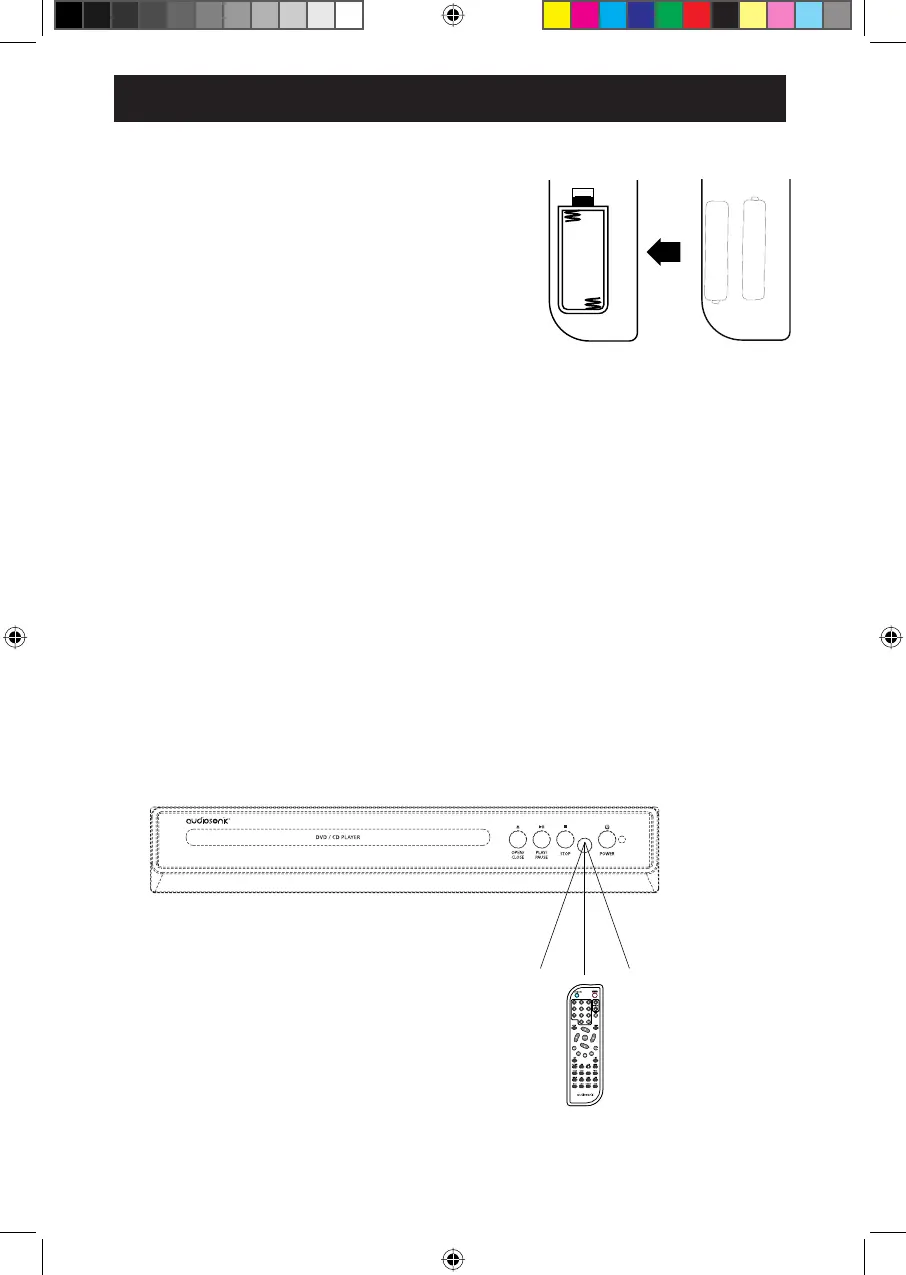
Remote Control Operation Range
Point the remote control to the DVD player no more than 5 meters/ 16 feet from the remote control
sensor and within 60° of the front of the DVD player. The operating distance may vary
depending on the brightness of the room.
30° 30°
WIDE
SURSHUW\
GDPDJHLQFOXGLQJ¿UH
AAA
AAA
3UHVVDQGOLIW WKHEDFNFRYHU XSWR RSHQWKH EDWWHU\
2.
Close the battery compartment cover.4.
Unscrew the screw on the battery door.
REMOTE CONTROL
8
3. Insert two "AAA" batteries (not included), following the
(+) and (-) markings in the battery compartment.


 To Next Page