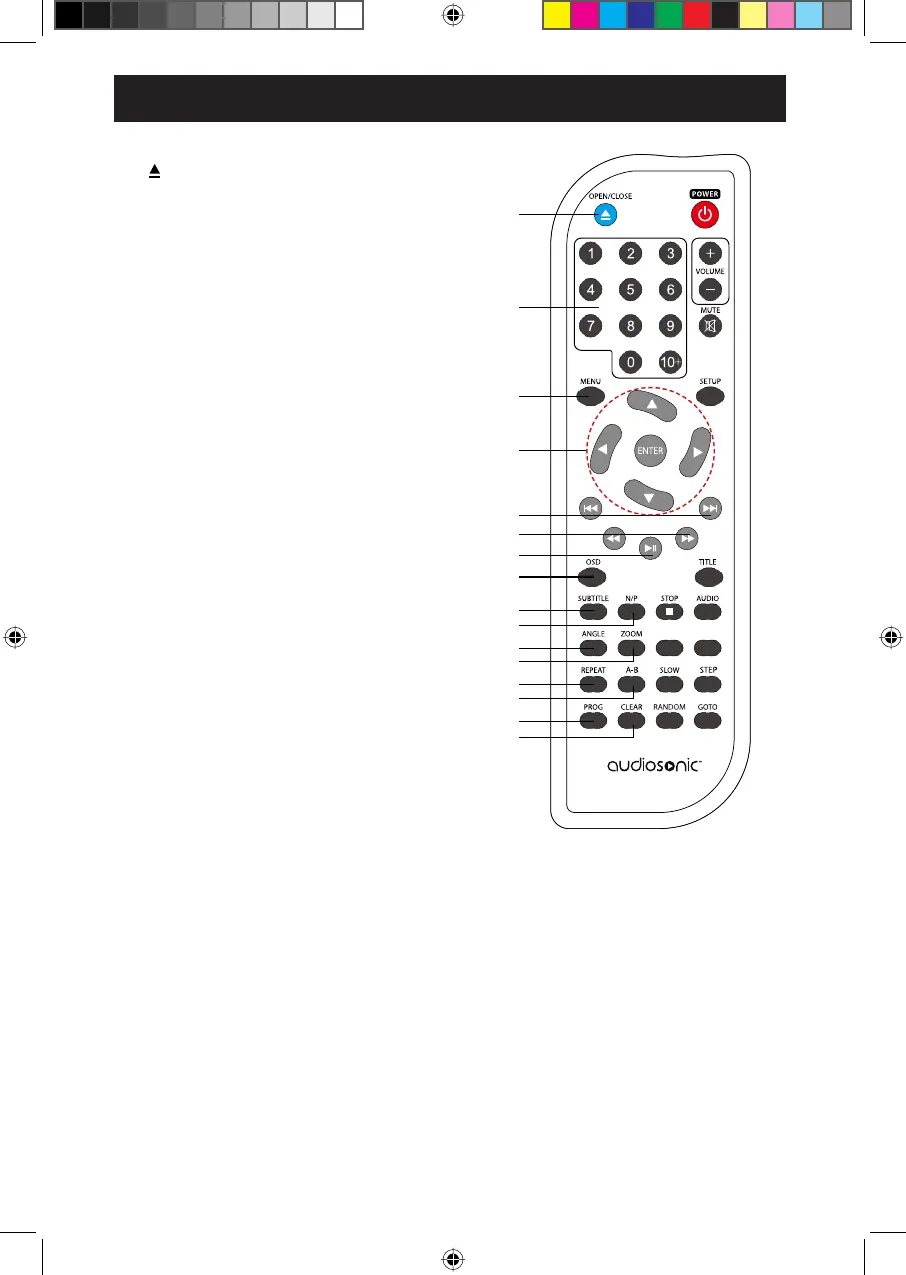
1. OPEN/CLOSE Button
Press to open and close the disc tray.
2. 0-9 Buttons
10+ Button
,IHQWHUGLJLWVWKDWDUHPRUHWKDQHJ
3. MENU Button
ŸźŻŹ%XWWRQV
3UHVVWRQDYLJDWHDQGPDNHVHOHFWLRQVRQ
RQVFUHHQPHQXV
ENTER Button
3UHVVWRFRQ¿UPWKHVHOHFWLRQRUFXUUHQWRSHUDWLRQ
5. PREV / NEXT Buttons
3UHVVWRVNLSWRWKHSUHYLRXVQH[WWLWOHFKDSWHU
WUDFN
6. F.BWD / F.FWD Button
Press to perform fast rewind / fast forward
SOD\EDFN
3/$<3$86(ŹOO%XWWRQ
3UHVVWRVWDUWRUSDXVHWKHSOD\EDFN
8. OSD Button
3UHVVWRGLVSOD\WKHFXUUHQWSOD\EDFNLQIRUPDWLRQ
9. SUBTITLE Button
Press repeatedly to switch between different
subtitle languages that are available in the disc.
10. N/P Button
Press to change the output signal to NTSC /
PAL / AUTO.
11. ANGLE Button
Press to switch between multiple camera angles
programmed on a DVD (if available).
13. REPEAT Button
Press to select different repeat modes.
14. A-B Repeat Button
3UHVVWRUHSHDWDVHFWLRQEHWZHHQSRLQW$
and B within a title/ chapter/
15. PROGRAM Button
Press to play the contents of the disc in a
SUHVHOHFWHGRUGHU
16. CLEAR Button
Press to erase input information.
1
2
3
4
5
6
7
8
9
10
11
12
13
14
15
16
ǿŻŻ
ŻŻ
ŻŻ
ǿŻŻ
track.
WIDE
,IHQWHUGLJLWVWKDWDUHOHVVWKDQLQFOXGHG
" ",
press "10+" button twice and press
"5" button to
enter.
3UHVVEXWWRQVFRPELQHG
Press to display the DVD main menu.
PBC
12. ZOOM Button
Press repeatedly to zoom in the image.
REMOTE CONTROL
6


 To Next Page