GB - 10
CONNECTIONS
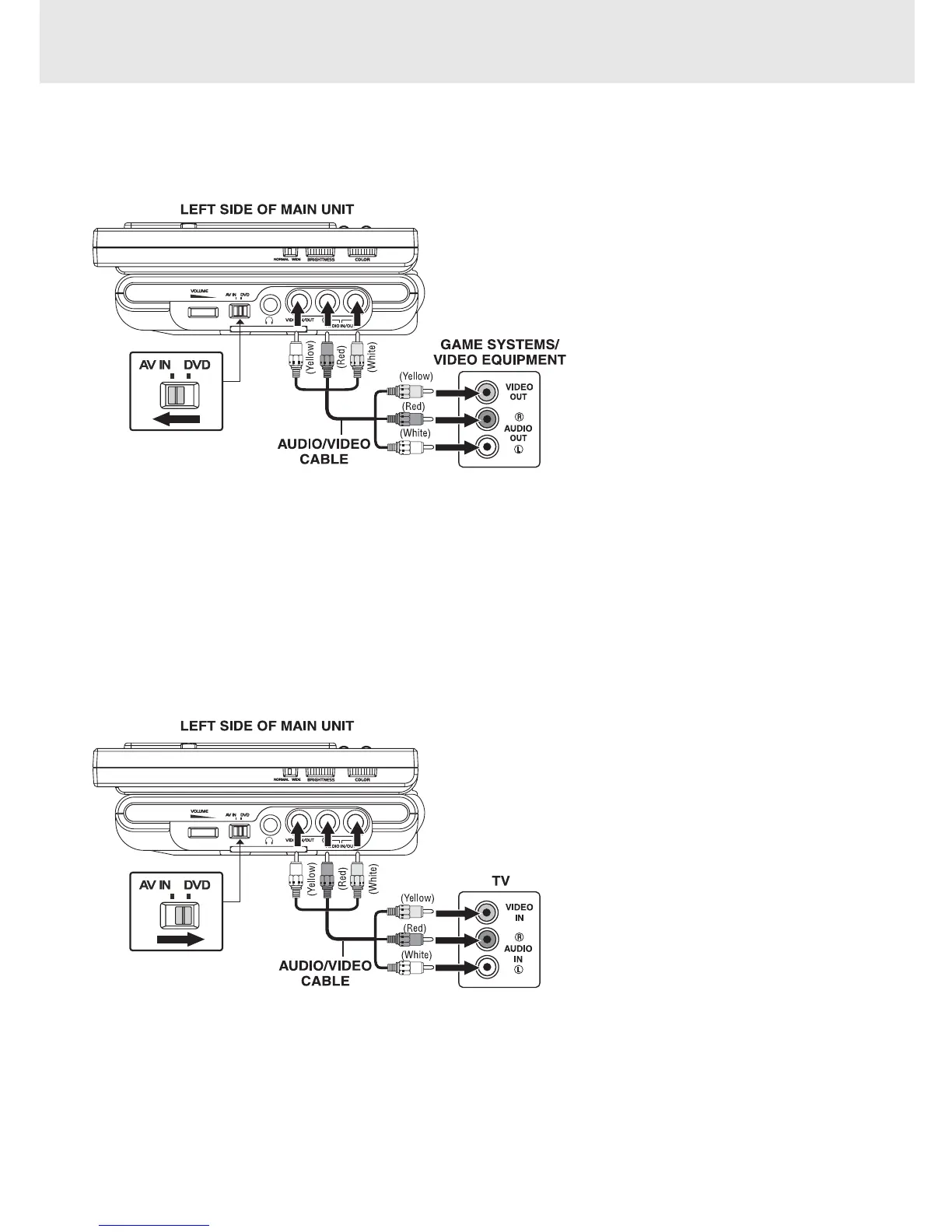
A. Connecting Game Systems/Video Equipment
You can connect game systems or other video equipment for playback through the monitors.
(continued on next page)
Using this Unit with Other Equipment
Watching Video Equipment
1. Turn on the unit; slide the AV IN / DVD
switch to "AV IN".
2. Turn on the video equipment and follow
the instructions provided with it to
playback.
NOTE:
If you have a mono VCR, the volume level
from the speakers will be low.
Watching a DVD on your TV
1. Turn on the unit; slide the AV IN / DVD switch to "DVD".
2. Turn on the TV and follow the instructions provided with
it to play the DVD.
NOTE: Make sure you use the correct Audio/Video cable.
B. Connecting the Unit to a TV
This DVD player can be used with a TV that has A/V inputs. If your TV does not have A/V inputs, you can purchase
an RF modulator (sold separately) to connect the DVD player.
(included)
(included)



 To Next Page