GB - 7
Unit
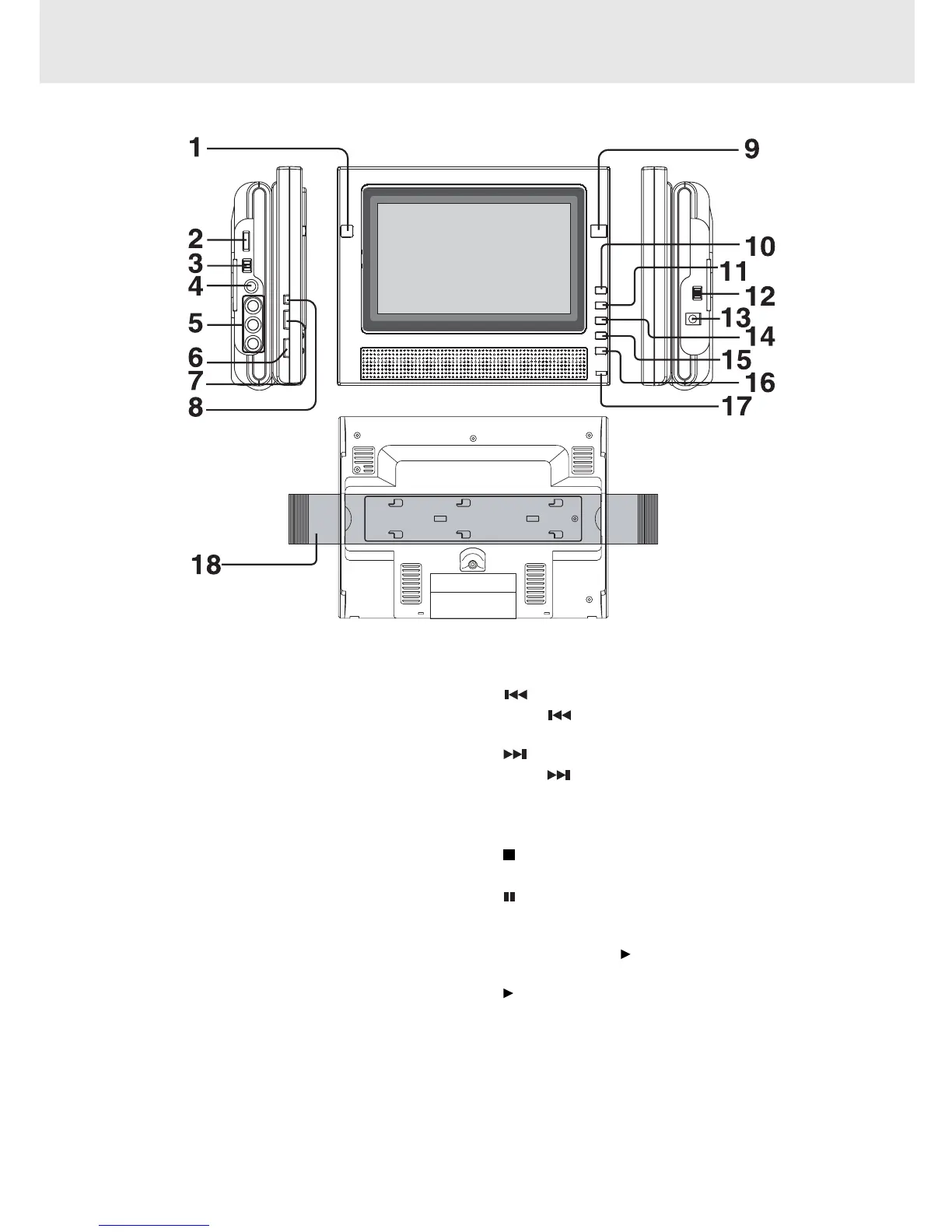
CONTROL REFERENCE GUIDE
1) OPEN Knob
Open the door.
2) VOLUME Control
Adjust the volume.
3) AV IN / DVD Switch
Select between the DVD player and an external
video source.
4) Headphones Jack
5) VIDEO & AUDIO IN / OUT Jacks
6) COLOR Button
Adjust for color intensity.
7) BRIGHTNESS Button
Adjust the relative lightness or darkness of the
color.
8) SCREEN Switch
WIDE: Wide screen
NORMAL: Pan screen
9) Remote Sensor
Receives the remote control unit signals.
10) PREV Button
Press
PREV button to go back to previous
chapters/tracks. Four speeds are available.
11) NEXT Button
Press NEXT button to advance to chapters /
tracks. Four speeds are available.
12) POWER ON / OFF Switch
13) DC IN (9-12V) Jack
14)
STOP Button
Stop playing a disc.
15)
PAUSE Button
Press to pause playback of disc. Each time you
press the PAUSE button the picture advances one
frame. Press the PLAY button to resume normal
playback.
16)
PLAY Button
Press to start or resume normal playback of a disc.
17) POWER ON Indicator
When the POWER ON/OFF is switched to the ON
position, the light will illuminate.
18) Strap



 To Next Page