8
Please ensure the following is ready: You have a broadband internet connection. A wireless broadband router is connected to
the internet successfully. The radio supports Wireless B, G and N connection (Wireless N router can also be used with the
setting on B or G). You know the Wired Equivalent Privacy (WEP) or Wi-Fi Protected Access (WPA) data encryption
code/password. You need to key in the correct code when the radio is connected to the wireless router for network
connection. If you do not know the code/password, please contact the person/technician who set up the router/network for
you. The radio can work via Wireless network connection (Wi-Fi connection).
• Remove internet radio from the package box.
• Plug in the power adapter and switch the Power on/off switch (on the rear cabinet) to ON.
Caution: Use only the adaptor supplied with the radio. Connecting a power supply with a different rating can cause
permanent damage to the radio and may be hazardous.
Internet connection can be setup via Wireless LAN (WiFi). Your Radio requires a broadband Internet connection.
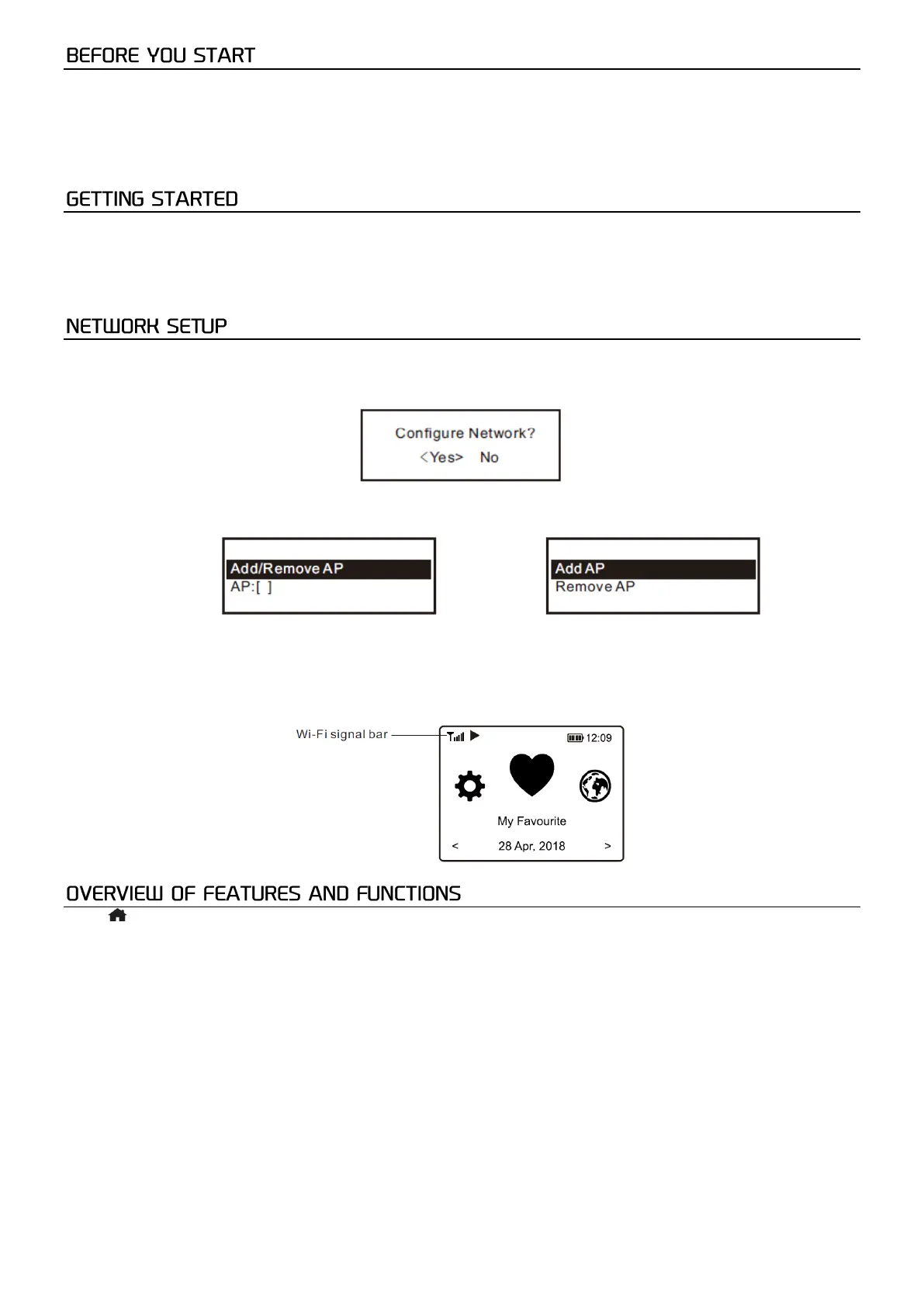
• If this is first time use, the Configure Network wizard will be displayed. Choose Yes to start configuring network.
Press the [◄] button to highlight Yes and press [Scroll/Select] to confirm.
• Select Add/Remove AP from the list, use the [Scroll/Select] knob to scroll and press it to confirm, then choose Add
AP (Scan):
• It will start scanning the Wi-Fi networks available. Scroll to your network and press [Scroll/Select] to confirm. If your
wifi network is password protected, it will ask you to enter the passphrase/password.
Note: The password is case sensitive. Please consult with the one who setup your network if you don't know the password.
• When the Wi-Fi connection is successful, “Association Complete” will be shown briefly. The WiFi signal bar will
appear on the top left corner of the display:
Press [ /EQ] to enter the home screen. Scroll by rotating the [Scroll/Select] knob or by pressing the [◄▲/ ►▼] buttons on
the remote:
My Favorite - Shows the list of favorite stations which have been assigned to the presets. There are up to 150 presets
available.
Internet Radio - Start exploring the worldwide radio stations and music here.
Media Centre - You can browse and stream music from your network via UPnP or DLNA compatible devices.
DAB+/DAB Radio - Pick up DAB+ and DAB radio signal if available in your local area (no internet connection required).
FM Radio - Receive ordinary FM radio stations in your local area (no internet connection required).
BT - BT playback, to play audio stream from another BT enabled device after pairing.
AUX-IN - Plays music from external media devices after connecting them to the AUX-IN jack.
CD Player - Play CDs.
USB - Play music from USB drive.
Micro SD - Plays music from Micro SD card.
Alarm - Alarm clock. Two alarm settings available.
Sleep Timer - Enable the timer to turn the radio in standby after the selected time elapsed.
Configuration - More options/settings available to personalize as you desire.


 To Next Page
 Loading...