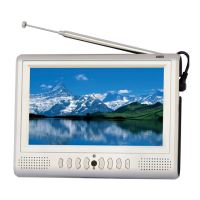
Thank you for buying our August TV. You may already be familiar with using
a similar product but please take time to read these instructions carefully. It is
designed to familiarise you with the product’s many features and to ensure
that you get the very best from your purchase.
To ensure your safety and the safety of others, please ensure you read the
Safety Instructions you use this product.
Please ensure the product and its accessories are disposed in compliance with
WEEE (Waste Electrical and Electronic Equipment) Directive and other
regulations. Please check with your local authority for disposal regulations.
If you need help, please contact our Customer Service:
Telephone: +44 (0) 845 250 0586
Email: service@augustint.com
Safety
Disposal
Customer Service:
before
User Manual
Quick Start Guide
DA701C
It is suggested that you use a roof top aerial when scanning for TV channels
for the first time, if any signal is detected, the channel information will be
saved on the TV, you may then switch back to the portable antenna supplied
and change your location to find the best place to receive the signal.
Connect the device to the mains power, turn the power switch on the side of
the TV to ON, a red standby light will show, press POWER on the remote or
TV to turn on the device.
The TV/AV button on the TV and MODE on the remote are for switching
between Digital Freeview TV & Media Player and Analogue TV modes.
When turning on the device for the first time, “Initial Install” will show,
follow the instructions to select OSD Language and Area, then press ENTER,
it will ask whether to install, select YES, the auto search will then start. Once
the search has finished, press CH+, CH- or EPG to select channels. Press
REV/RADIO to switch between Freeview TV and Radio channels.
If you have done the first time installation before, and would like to search
for Digital Freeview channels again, or if you have moved to a different
region and need to scan channels again, press TV/AV on the TV or MODE on
the remote to switch to Digital TV & Media Player mode, press MENU,
select “Digital TV” by pressing ENTER, select “Installation”, then select
“Auto Search”, press ENTER to start the search. Once the search has
finished, press CH+, CH- or EPG to select channels. Press REV/RADIO to
switch between Freeview TV and Radio channels.
To search for Analogue TV, press TV/AV on the TV or MODE on the remote
to switch to Analogue TV mode and you should see either “AUTO”, “PAL”
or “SECAM” at the top right corner of the screen. Press MENU repeatedly, it
gives you menu “PICTURE”, “VOLUME”, “OPTION', “SYSTEM”,
“PRESET”, and “CLOCK” respectively. To start the auto search, move to
“PRESET” menu and “AUTO SEARCH” is selected, press RIGHT to start
search for channels.
1.
2.
3.
4.
5.
6.


 To Next Page