-24-
Problems listed below do not necessarily signify a fault with the unit.
Please check this list before requesting repairs.
Problems
13. Troubleshooting
No picture and no sound
Check the connection with the AC adaptor/Car adaptor.
Use of an unauthorized power supply.
Power switch on the side of the TV is off.
TV is on standby as it was switched off by pressing the
POWER on remote.
Check the channel selection. Scan for channels again.
Always rescan for channels in new locations. Ensure
video settings are correct.
Check the sound volume. If you are using earphones,
test them on another item. Check that the cable is plugged
in. Sound System is not correctly set in Analogue TV mode.
Possible Causes and Solutions
Picture freezing, and/or
sound distorting
Signal too weak, please check the aerial. Try to use a
proper roof top aerial or an amplified aerial.
No signal
Signal too weak, please check the aerial. Try to use a
proper roof top aerial or an amplified aerial.
Please adjust Brightness and/or Contrast settings.
Dark Picture
Motors/Trains/High Voltage Lines and Neon Lights may
affect the signal.
Snowstorm
Achromatic/Flashing/No Colour
Please adjust the Colour Setting.
Color-Sys is not correctly set in Analogue TV mode.
No sound
No image
No user serviceable components are fitted inside this TV. Do not attempt
any repairs, as this will invalidate the warranty. Any repairs must be carried
out by either the manufacturer or their nominated service centre. Parts
inside this set are subject to high voltage.
-23-
12 Battery Charging.
This unit has a built-in rechargeable battery. Fully charge the battery
before using the device for the first time.
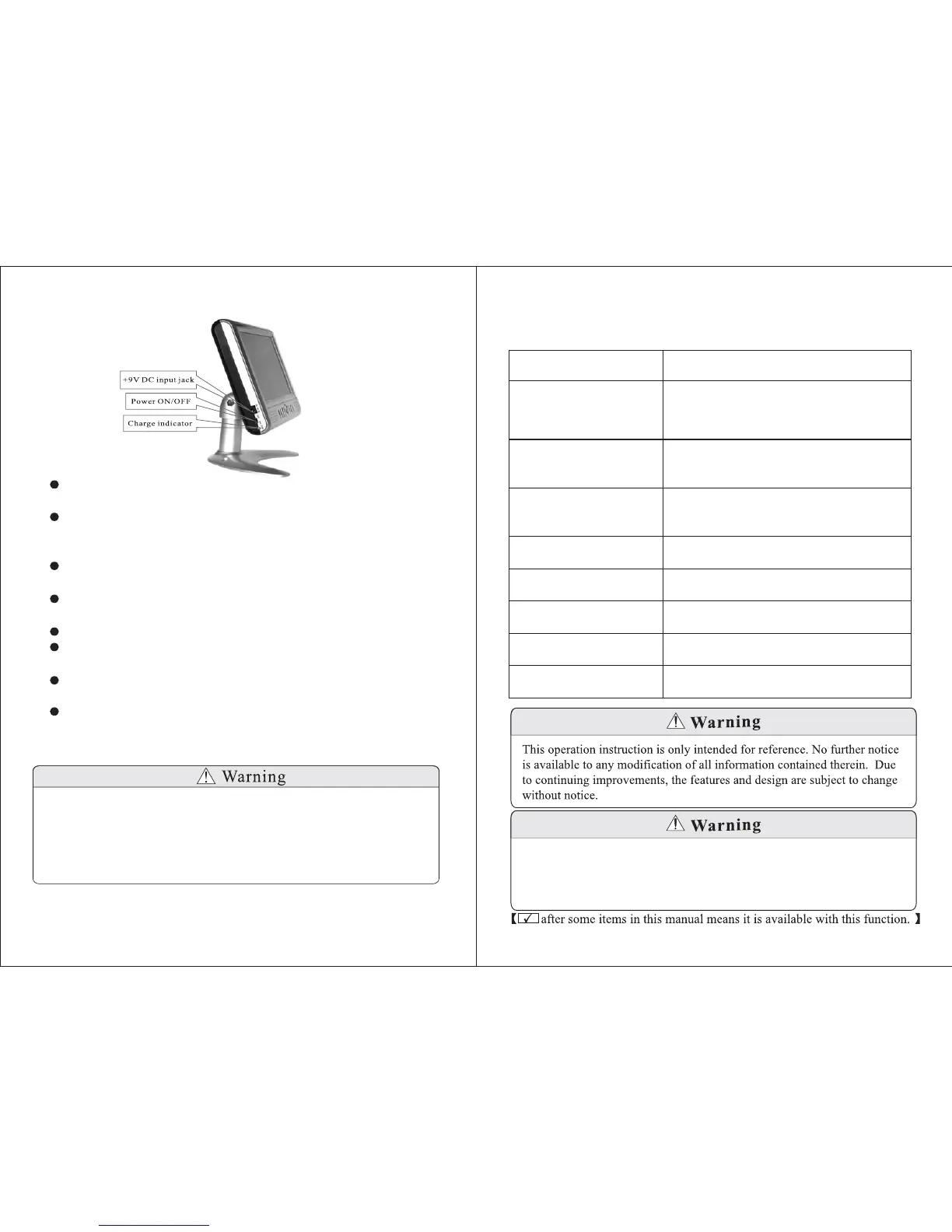
To run the unit off mains power and/or charge the battery, connect the
supplied AC adaptor to the socket marked 9V DC IN and switch
on the power at the wall.
To run the unit off a car cigarette lighter, connect the car adaptor to the
lighter socket and the socket marked
The charge indicator (marked CHG will turn red,indicating that
the battery is charging.
When the indicator turns green, the battery is full.
To run the unit from the battery,make sure any power adaptors are
disconnected.
""
"+ ".
"")
+
9V DC IN
Fully charge the battery when it will not be used for an extended
period of time.
Switching off the device while charging the battery can shorten the
charging time and extend the life of the battery.
1. Use only the supplied power adaptors with this device. Failure to do so
can cause damage to the device and risk personal injury.
2. Do not attempt to repair or replace the battery by yourself, as this will
invalidate the warranty. Any repairs must be carried by either the
manufacturer or their nominated service centre. Parts inside this device
are subject to high voltage.


 To Next Page