-3-
English
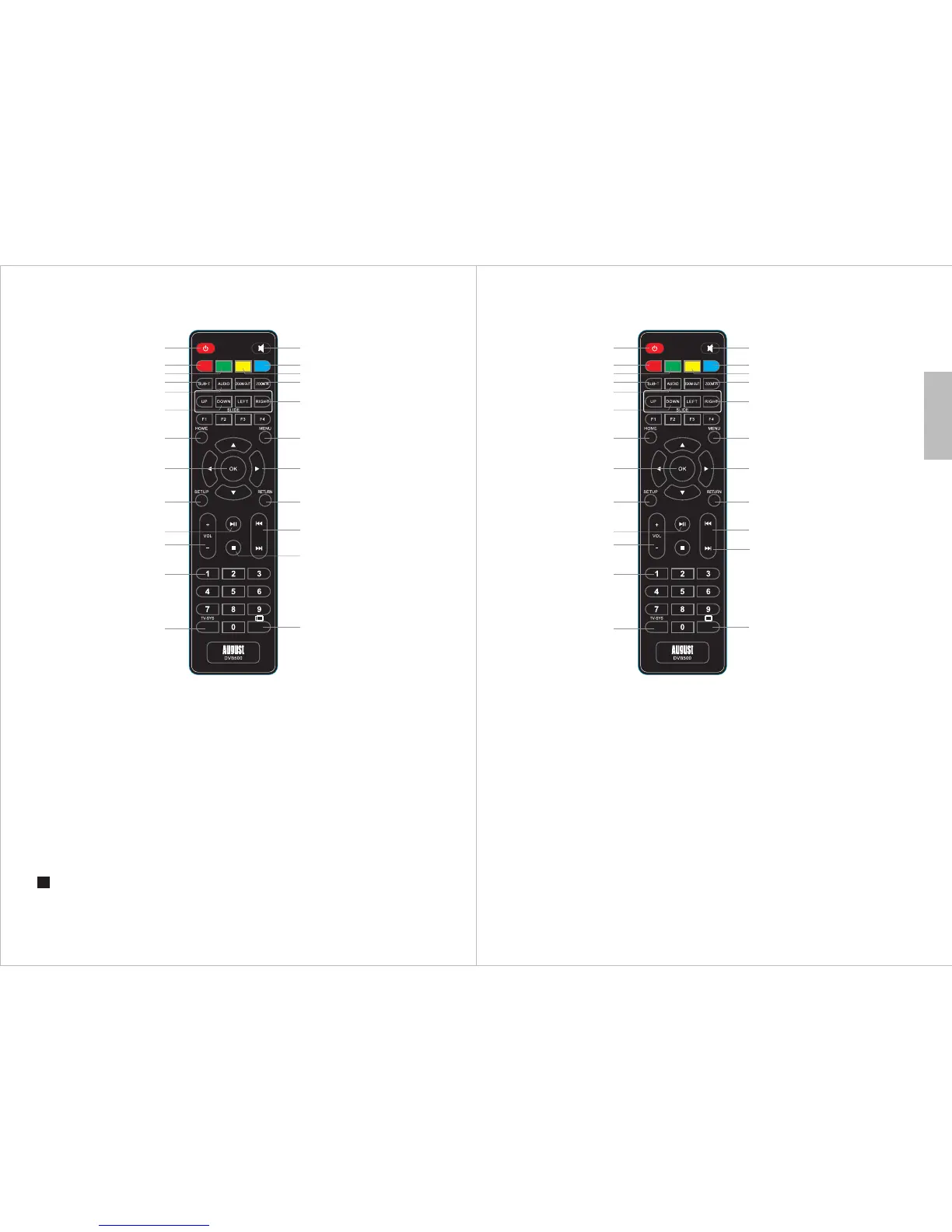
1 Power
2 - Red button
3 - Green button
4 - Subtitle
5 - Audio
6 - Scroll up and down
7 - Home
8 - Confirm
9 - Setup
10 - Play/Pause
11 - Volume up/down
12 - Numbers
-
Functionality depends on the application
-4-
1.4 Remote Control
1 14
2 15
4
17
18
7 19
3 16
6
8 20
9 21
11
22
10
23
12
13
24
5
1.4.1 General
13 TV/Sys
14 - Mute
15 - Blue button
16 - Yellow button
17 - Zoom in and Zoom out
18 - Slide left and Slide right
19 - Menu
20 - Directional Buttons
21 - Back One Level
22 - Next and Previous
23 - Stop
24 - Aspect Ratio / Long press to
activate Mouse function
-
1.4.2 TV Mode (Live TV)
1 Power
2 - Image Ratio
3 - Channel Information
4 - Subtitle Menu
5 - Audio Language Selection
6 - Channel List
7 - Home
8 - Channel List
9 - System settings
10 - Set or remove Favourite
channel Play/Pause when
using TimeShift
11 - Volume up/down
12 - Numbers
13 - Change HDMI Resolution
14 - Mute/unmute the sound
15 - Blue Button
-
16 - Yellow Button
17 - TV Settings
18 - Channel List
19 - TV Setting
20 - Up - Channel Up
Down - Channel Down
Left, Right - Channel information
21 - Return / Home page
22 - Not available in TV mode
23 - Audio Stereo/Left/Right
24 - Recall Last Channel
F1: EPG
F2: TTX
F3: Program Information
F4: Timed Record
1 14
2 15
4
17
18
7 19
3 16
6
8 20
9 21
11
22
10
23
12
13
24
5



 To Next Page