5ENGLISH
PaperShredderOperatingInstructions
• Warning • Installation • Operation • Maintenance • Troubleshooting
*ManualFeed:
• Shreds credit cards, small paper clips, staples
• One folded sheet of paper equates to 2 sheets of paper
• Heavier paper, humidity or electrical voltage other than the rated voltage may reduce shredding capacity
Sheet Capacity
Paper Shred Size
Paper Tray Size:
Paper Entry Width
Credit Card Capacity
Duty Cycle
Voltage
120 Sheets of 20 lb. letter size bond paper
5/32 in. x 15/32 in. pieces
(4.0 mm x 12 mm pieces)
Letter size- 8.5” x 11”
8.7 in / 220 mm
N/A
30 min. on / 45 min. off
120-V~60Hz / 3.0 A
10 Sheets of 20 lb. bond paper*
5/32 in. x 15/32 in. pieces
(4.0 mm x 12 mm pieces)
N/A
8.7 in / 220 mm
Only one per pass
10 min. on / 45 min. off
120-V~60Hz / 3.0 A
AutoFeedTray: ManualFeedSlot:
INSTALLATION
1. Make sure the basket door is securely closed shut. This shredder features a safety power cut off and
will not operate if door is open. Shredders with pull-out wastebaskets will also cut power upon bin
removal. The supplied wastebasket activates a safety switch, which allows the shredder to be operable.
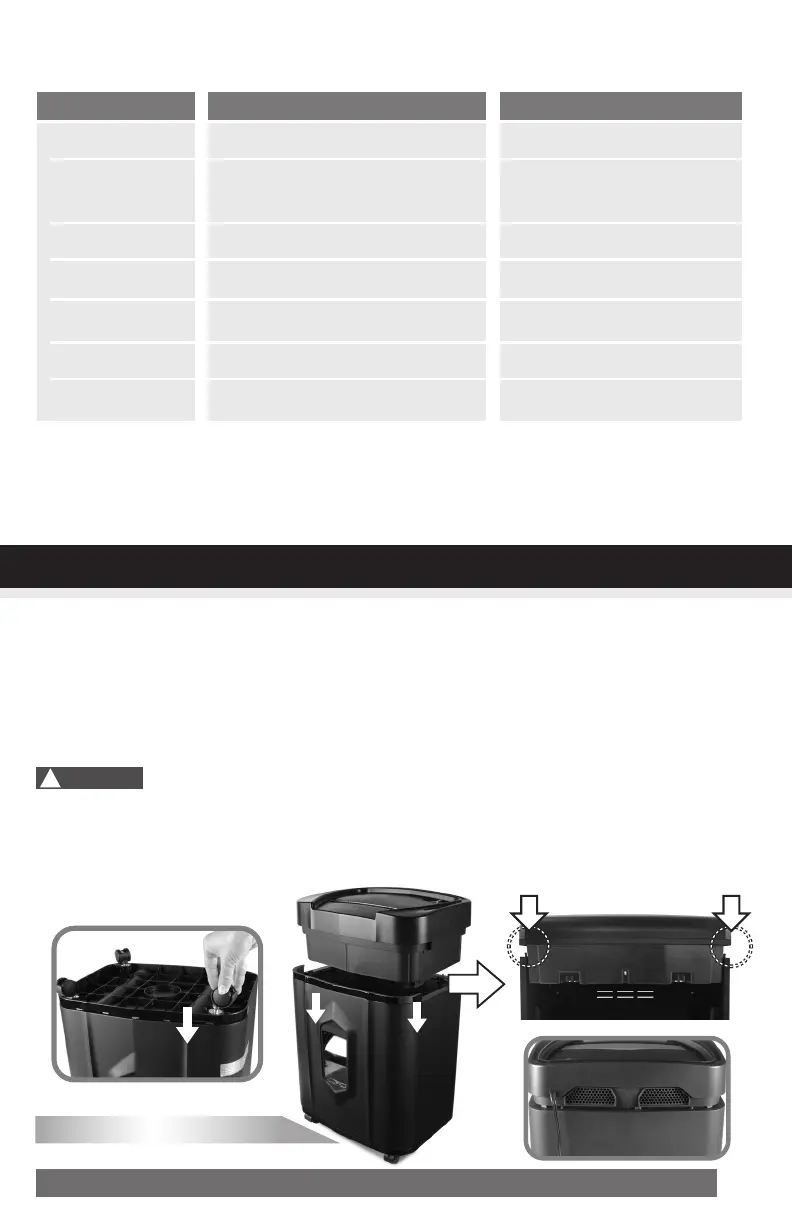
2. Attach all 4 caster wheels to the bottom of the wastebasket. (FIGURE 1)
3. A socket-outlet should be near the equipment and be easily accessible.
4. Connect the power cord to any standard 120 volt AC outlet.
Microcut shredders have very sharp exposed blades on the underside. Do not touch. Unplug the
shredder before clearing paper jams.
Use care when mounting the shredder on the wastebasket.
PUSH
DOWN
PUSH
DOWN
!
Caution:
CORRECT FIT
FIGURE1



 To Next Page