6 ENGLISH
NOTE:
•Always turn off and unplug the shredder when not in use.
•This shredder will shred staples and small paper clips. It is recommended that you remove paper
clips whenever possible to extend the lifespan of your shredder.
OPERATION
CONTINUED NEXT PAGE
Paper/CreditCardEntry:
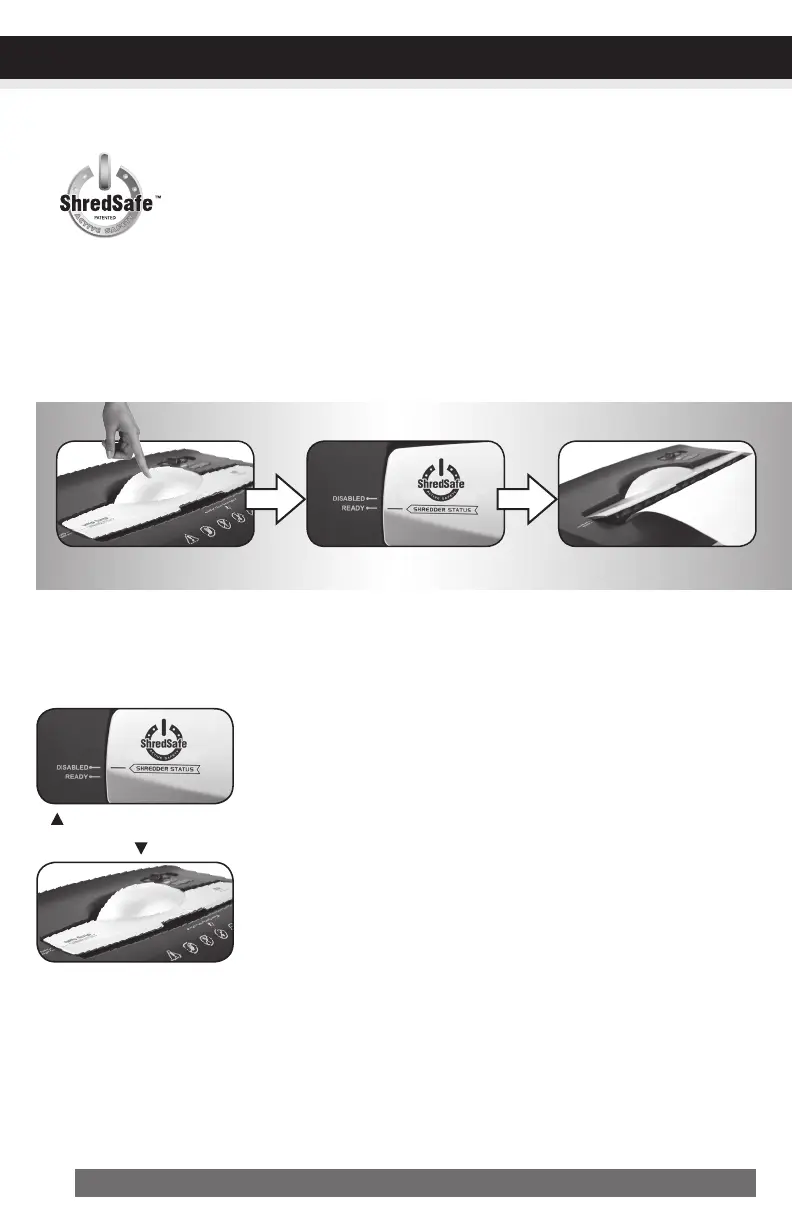
ShredSafe™ technology is an added safety feature incorporated in this particular
model. It is a new technology where the shredder is able to detect forced entry and
automatically cuts the power off, preventing further shredding.
To begin shredding, locate the control switch on the unit and select the “Auto” mode. The Green LED
light indicates the shredder is “On” and ready to use. Press the designated “PUSH OPEN” area on the
handle of the cover to open and expose the paper feed slot (FIGURE 3). Thecoverwillclickinto
apresetpositionwherethe“SHREDDERSTATUS”linemustalignwiththe“READY”
setting.
FIGURE3
READY:
TheshredderiscurrentlyonSTANDBYandreadytooperatewhenpaperisinserted.
With the feed slot now exposed, you can shred sheets of paper or 1 credit card per pass.
DISABLED:
The safety feature has been activated. All power to the SHREDDER
IS CURRENTLY SHUT OFF AND WILL NOT OPERATE until the cover
is returned to the “READY” setting. The cover has been opened
beyond the safe position (FIGURE 4).
AFTERUSE:
When shredding is completed, you can press the designated “PUSH
CLOSE” area on the cover to tilt shut the paper feed slot (FIGURE 5). It is
recommended to have the paper feed slot closed when shredder is not
in use to prevent any objects from accidentally getting into the feed slot.
FIGURE4
FIGURE5


 To Next Page