10
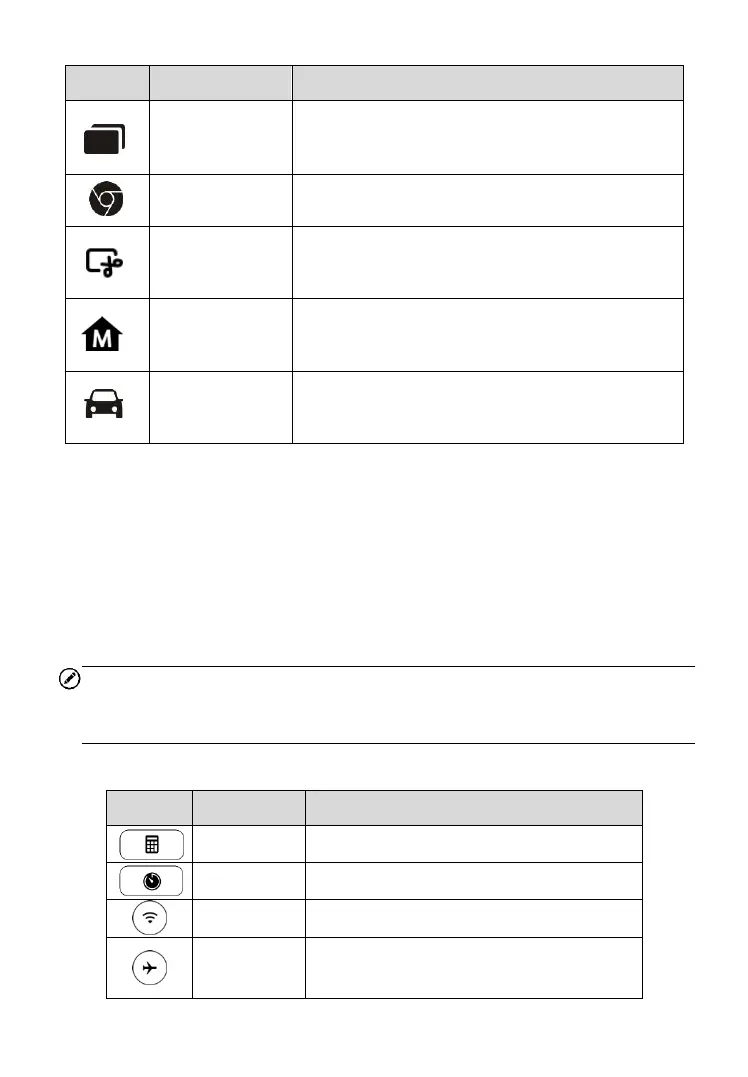
Displays a list of applications that are currently
working. To open an app, tap it. To remove an
app, swipe it to the top or bottom.
Launches the Android built-in browser.
Takes a screenshot when you want to save the
displayed information.
Returns to MaxiDAS Job Menu from other
Android applications.
Returns to the Diagnostic screen from other
operations.
System Status Icons
As the Display Tablet is working with the Android operating system, you may
refer to Android documents for more information.
By tapping the bottom right corner, a Shortcuts Panel will be displayed, on
which you are allowed to set various system settings of the tablet. Operations
of each button on the panel are described in the table below.
NOTE
The shortcuts buttons will be highlighted when enabled and dimmed when
disabled.
Table 3-3 Shortcuts Panel Buttons
Launches calculator when pressed.
Launches clock when pressed.
Enables/disables Wi-Fi when pressed.
Enables/disables Airplane Mode when
pressed.


 To Next Page