24
Auto Scan
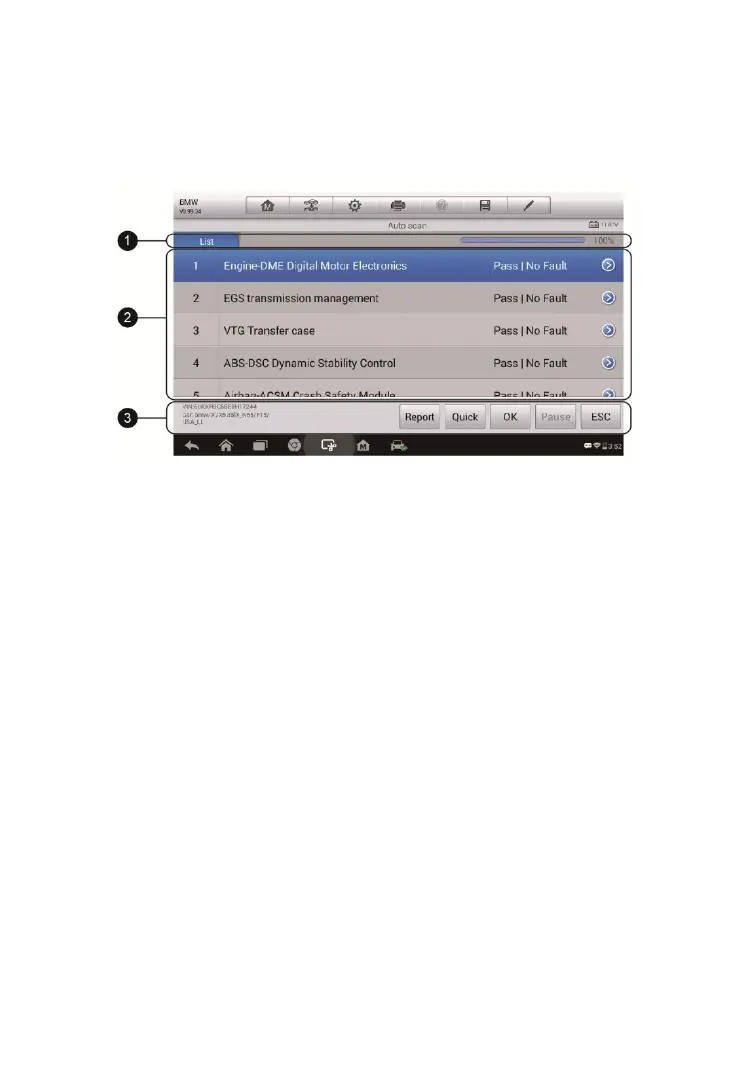
The Auto Scan function performs a comprehensive scanning over all the
ECUs in the vehicle’s systems in order to locate and retrieve DTCs. The
sample operation screen of Auto Scan displays as below:
1. Navigation Bar
2. Main Section
3. Functional Buttons
Navigation Bar
List Tab – displays the scanned data in list format.
Progress Bar – indicates the test progress.
Main Section
Column 1 – displays the sequence numbers.
Column 2 – displays the scanned systems.
Column 3 – displays the diagnostic marks indicating different conditions of
the test result:
-!-: Indicates that the scanned system may not support the code
reading function, or there is a communication error between the
Display Tablet and the control system.
-?-: Indicates that the vehicle control system has been detected, but
the Display Tablet cannot accurately locate it.
Fault(s) | #: Fault(s) indicates there is/are detected fault code(s)
Figure 4-10 Sample Auto Scan Operation Screen


 To Next Page