4
2. Ambient Light Sensor – detects ambient brightness.
3. Power LED – indicates battery level & charging or system status.
4. Microphone
The power LED displays green, yellow or red depending on power level and
operating state.
A. Green
Illuminates green when the Display Tablet is charging and the
battery level is above 90%.
Illuminates green when the Display Tablet is powered on and the
battery level is above 15%.
B. Yellow
Illuminates yellow when the Display Tablet is charging and the
battery level is below 90%.
C. Red
Illuminates red when the Display Tablet is powered on and the
battery level is below 15%.
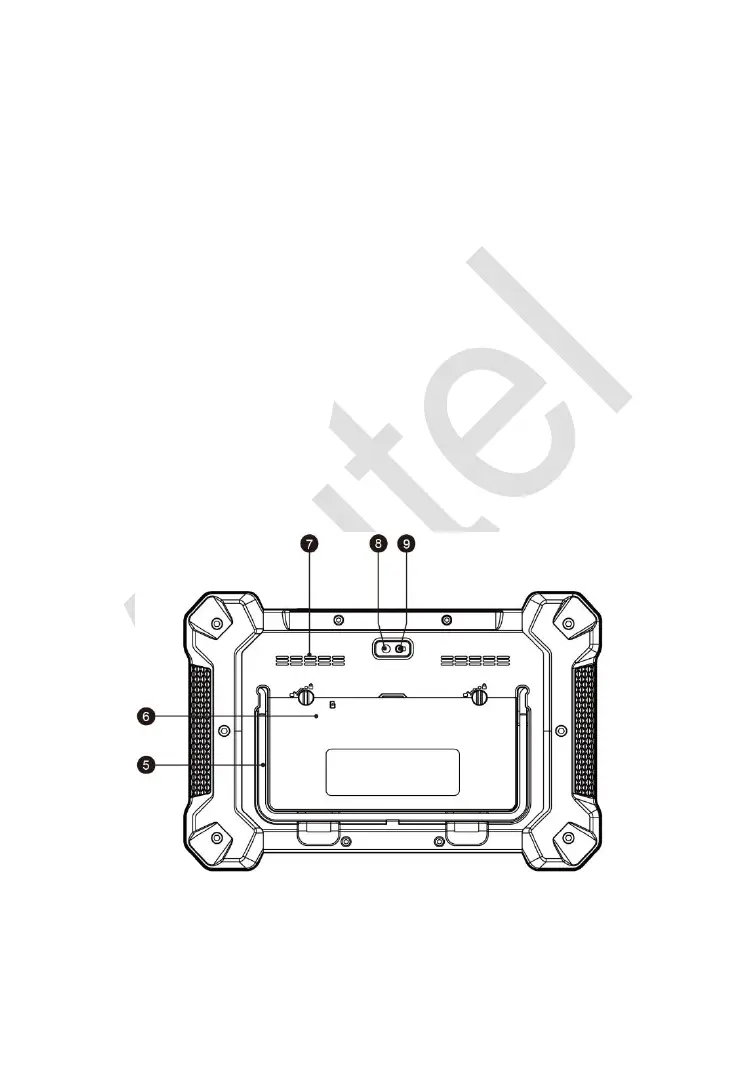
5. Collapsible Stand – extends from the back to allow hands-free viewing
of the Display Tablet.
6. Built-in Battery
Figure 2-2 Display Tablet Back View














 To Next Page