94
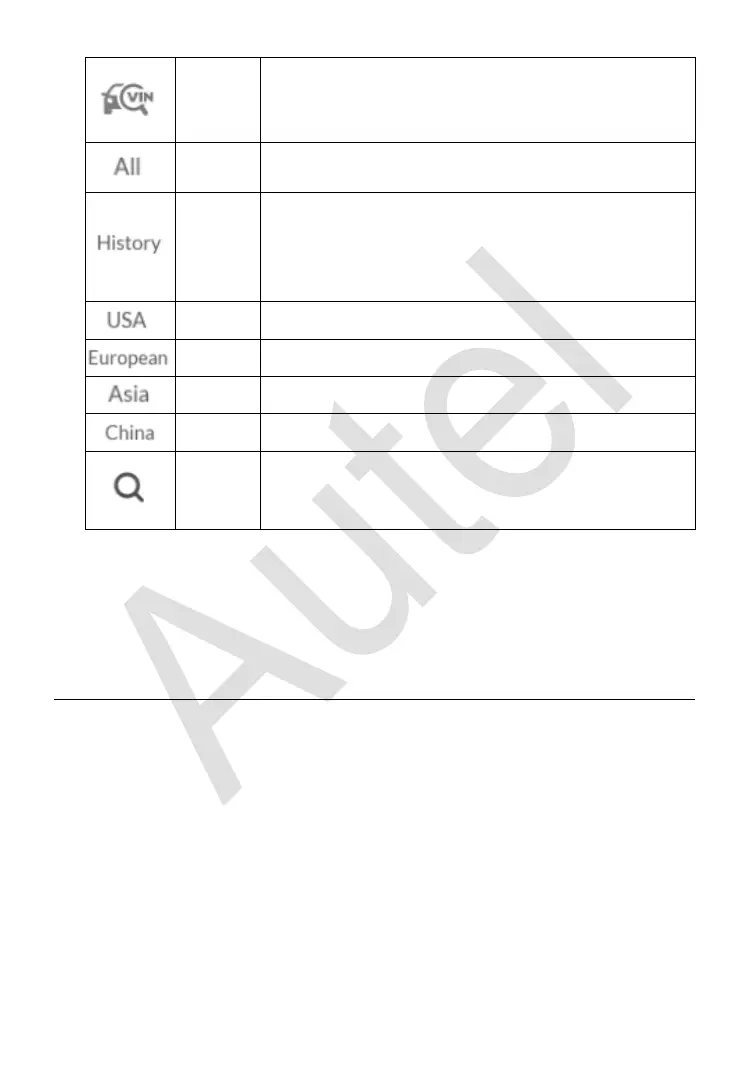
Displays a dropdown list; tap Auto Detect for auto
VIN detection; tap Manual Input to enter VIN
manually.
Displays all the vehicle makes in the vehicle menu.
Displays the stored test vehicle history records. This
option provides you direct access to the previously
tested vehicle recorded during previous test
sessions. See Vehicle History on page 177.
Displays the USA vehicle menu.
Displays the European vehicle menu.
Displays the Asian vehicle menu.
Displays the Chinese vehicle menu.
Displays the virtual keyboard to manually enter the
specific vehicle make required.
Manufacturer Buttons
To begin, select the manufacturer button of the test vehicle, followed by the
vehicle model and year.
Vehicle Identification
The MaxiIM diagnostic system supports four methods for Vehicle
Identification.
1. Auto VIN Scan
2. Manual VIN Input
3. Automatic Selection
4. Manual Selection
Auto VIN Scan and Manual VIN Input functions are applicable for IMMO,
Diagnostic and Service applications, Automatic Selection and Manual
Selection are applicable for Diagnostic and Service applications. In IMMO,














 To Next Page