EasyManua.ls Logo

AUTOHELM ST 50 plus - Page 37

AUTOHELM ST 50 plus
47 pages
Print Icon
To Next Page IconTo Next Page
To Previous Page IconTo Previous Page
Loading...
Once
Only
Entry
If
you do
not
exit'CODELOCK
SET'
within
10
seconds
the
display
will
change
to
CANCEL
CODE
.
You
now
have
the
option of cancelling
the
code,
by
pressing
TRACK
to
return
to
the
display,
or
exit
as
described
in
action
14
above
.
Your
Code
Number
For
future
reference, enter
your chosen
code
number
into
the
box
below
.
For
obvious
reasons,
please
store
this
handbook
in
a
safe
place
.
Operation
Once
ordy'CODE
Lock' entry
is
invisible
once
it
has been
set
.
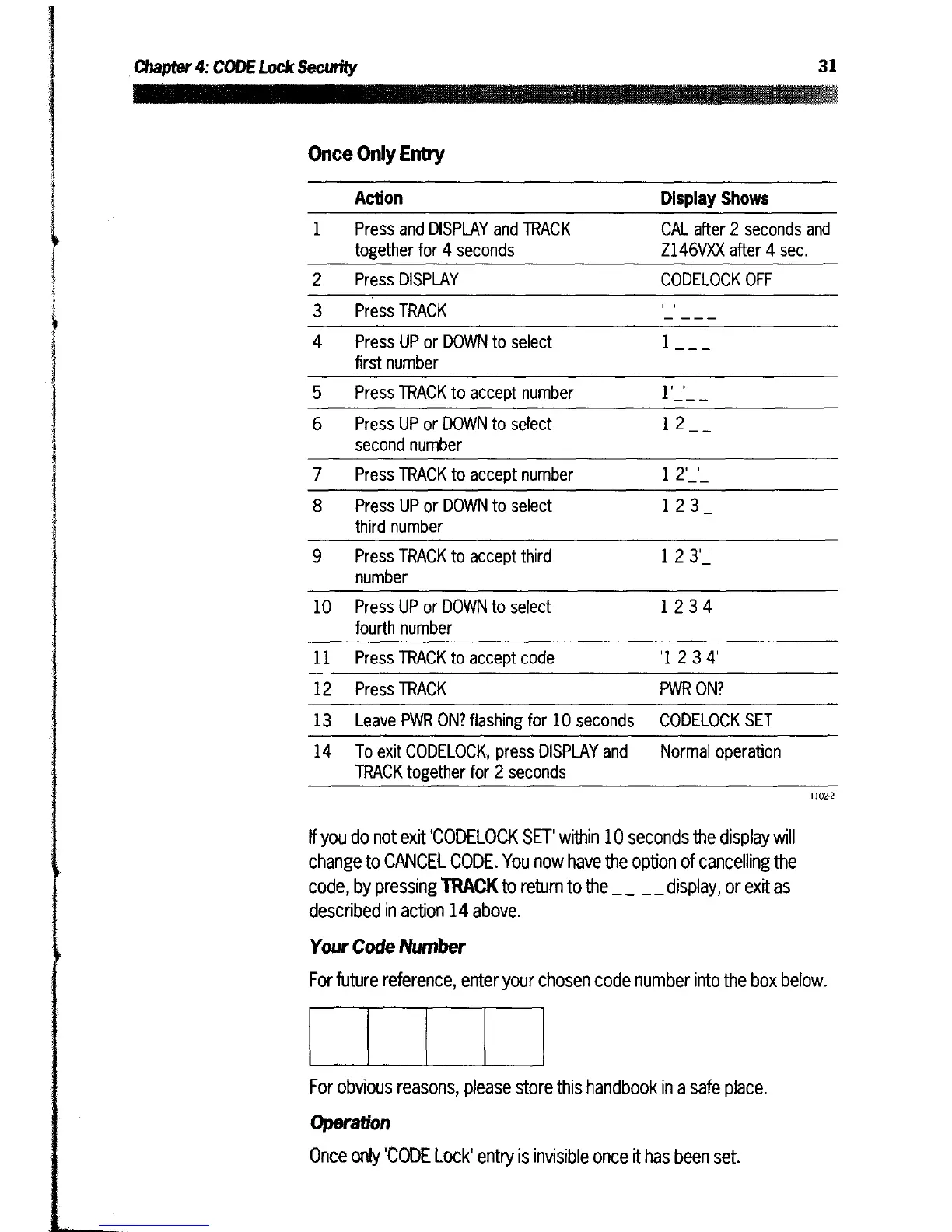
Action
Display
Shows
1
Press
and
DISPLAY
and
TRACK
together
for
4
seconds
CAL
after
2
seconds
and
Z146VXX
after
4
sec
.
2
Press
DISPLAY
CODELOCK
OFF
3
Press
TRACK
'_'___
4
Press
UP
or
DOWN
to
select
first
number
1_
__
5
Press
TRACK
to
accept
number
1'_'_
_
6
Press
UP
or
DOWN
to
select
second
number
1
2_
_
7
Press
TRACK
to
accept
number
12'_'_
8
Press
UP
or
DOWN
to
select
third
number
123_
9
Press
TRACK
to
accept
third
number
123'_'
10
Press
UP
or
DOWN
to
select
fourth
number
1234
11
Press
TRACK
to
accept
code
'1234'
12
Press
TRACK
PWR
ON?
13
Leave
PWR
ON?
flashing
for
10 seconds
CODELOCK
SET
14 To
exit
CODELOCK,
press
DISPLAY
and
TRACK
together
for 2
seconds
Normal
operation