Need help?
Do you have a question about the Automated Logic M220NX and is the answer not in the manual?
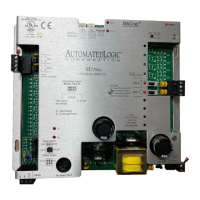
The M220nx is a versatile general-purpose control module designed for a wide range of HVAC applications, forming a key component of the M-Line system. This modular approach allows for the gradual construction of a complete HVAC control system. The M220nx integrates essential communication circuitry, non-volatile memory, and convenient removable screw terminals for input/output (I/O) connections.
The M220nx controller is equipped with two digital outputs and two universal inputs, making it suitable for various control tasks. It utilizes a 6.00g or later version of the M2M Module Driver, with detailed information available in the M2M Module Driver document on the Automated Logic website.
Before powering on the M220nx, its CMnet address must be set using two rotary switches: one for the tens digit and one for the ones digit. For instance, an address of three would require setting the tens switch to zero and the ones switch to three. It's crucial to ensure the module's power is off before adjusting the address, as the M220nx only reads the address upon power-up. After changing the address, memory must be transferred to the module.
The M220nx operates within a voltage range of 21.6VAC to 26.4VAC. If the voltage at the power input terminals falls outside this range, the module may not function correctly. To ensure proper operation, first turn off the module's power and the 24VAC power source. Connect the power wires to the Gnd and 24VAC terminals, then apply power to the transformer and verify that 24VAC is present at the input terminals. After setting the module's address, turn on the power switch. Upon power-up, the Run and Power LEDs should illuminate, the Run LED will begin blinking, and the Error LED will turn off. If the module fails to respond, technical support should be contacted.
The M220nx is a Class 2 device, meaning it operates at less than 30VAC and a maximum of 100VA. When mounting the module in a control panel alongside non-Class 2 devices (e.g., 120VAC) or wiring, appropriate isolation measures must be taken. Multiple modules can be powered from the same transformer, provided polarity is consistently maintained.
The M220nx supports CMnet, a peer-to-peer network utilizing an EIA-485 standard with a token-passing scheme for access control. CMnet can be configured as a legacy CMnet at 9600 bps or 38.4 kbps, or as an ARCNET CMnet at 156 kbps. The ARCNET CMnet configuration offers BACnet compatibility and improved performance over a legacy CMnet. All modules on a CMnet must operate at the same communication speed. The 156 kbps CMnet uses ARC156, a unique implementation of the ARCNET protocol.
For ARC156 CMnet communication, an A3ARC156 wire from Magnum Cable Corporation is recommended. When the Comm Select jumper is set to ARC156, the M220nx communicates on an ARCNET CMnet at 156 kbps, regardless of the Baud Select jumper setting.
For 9600 or 38.4K bps legacy CMnet communication, a dedicated 22AWG to 18AWG twisted pair wire (EIA-485) is used. With the Comm Select jumper set to CMnet, the module communicates at the baud rate specified by the Baud Select jumper. The jumper below the Comm Select jumper must always be set to CMnet.
To connect the M220nx to the CMnet, first turn off the module's power. Set the CMnet mode using the Comm Select jumper and, for legacy CMnet, set the Baud Select jumper. Verify CMnet wiring for shorts and grounds. Connect the CMnet communication wires to the module's CMnet terminals, ensuring consistent polarity throughout the network. Finally, turn on the M220nx's power switch.
A workstation or portable computer can be connected directly to the M220nx module via an APT and the module's Access port. This connection is useful for troubleshooting or transferring memory. On an ARC156 CMnet, colors can be received through the Access port if a gateway module is present on the CMnet, though alarms cannot be received this way. The Access Port's baud rate is determined by the Baud Select jumper. To connect, link the computer's serial port to the APT's EIA-232 port, set the APT's Mode Select switch (TTL for ARC156 CMnet, 485 for legacy CMnet), and connect the APT's Access Port to the module's Access Port. In SuperVision, define the appropriate connection type.
The M220nx module features two universal inputs capable of accepting thermistor (Precon type 2, 10kohm at 77°F), 0-5VDC, 0-20mA, and dry contact signals. Input voltages for thermistors should range between 0.489V and 3.825V. The 0-5VDC source impedance should not exceed 10kohms, and the M220nx's input impedance is approximately 1Mohm. For 0-20mA inputs, the "A" input resistance is 250 Ohms, and the "B" terminal provides 18-24VDC to power the transducer, with a total current capacity of 40mA for both "B" terminals. If the voltage from the "B" terminal to Gnd is less than 18VDC, an external power supply is needed. Dry contacts use a 5VDC wetting voltage to detect contact position, resulting in a 0.5mA maximum sense current when closed. The M220nx can accumulate up to ten input pulses per second.
Before wiring inputs or outputs, ensure the M220nx's power is off. Connect input wiring to the screw terminals. Set the configuration jumper for each input to match the signal type, gripping the jumper by the sides only. In SuperVision, enter the channel number, offset, and gain for each input on the Function Block's Parameter page. To verify operation, have each sensor create a known value and compare it to the status reported in SuperVision.
The M220nx module has two digital outputs, each a normally open dry contact rated at 3A maximum for 24 Volts AC/DC. Ensure the M220nx's power is off before wiring. Connect output wiring to the screw terminals. It's important not to power pilot relays from the same transformer that powers the M220nx. To verify output operation, lock the output to a known condition in SuperVision and confirm the equipment operates as specified. Each digital output can be set to Manual or Auto mode using the HOA switches. The status of these HOA switches can be monitored in SuperVision by assigning them digital inputs (channel numbers 81 and 82), where "off" indicates Auto mode and "on" indicates Manual mode.
Tables are provided to show valid channel numbers for each point on the M220nx. These numbers, along with offset and gain, should be entered in Eikon before the Function Block is created, or on the FB's Parameter page in SuperVision. If offset and gain are not provided, SuperVision's Point Configuration or Point Help feature can be used to determine these values.
The M220nx module can store up to 14 Function Blocks (FBs) and the M2M module driver. For memory transfer issues, contact Technical Support. To transfer memory, log into SuperVision on a workstation connected to the CMnet, or connect directly via the Access Port. Navigate to the module driver and check the module status report in SuperVision to confirm the module type and number match. In SuperVision v3.0, use Tools-Troubleshooting-Module Status; in v2.6b, press Esc, type mo, module address,15, and Enter. Then, transfer memory (Tools-Troubleshooting-Transfer Memory to Module in v3.0, or Download Memory for This Module in v2.6b). After transfer, recheck the module status report to ensure all intended FBs are listed.
If communication with a module is lost, a manual format can be performed as a last resort to restore communication. Formatting erases all memory, requiring a subsequent memory transfer. To format, turn off the module's power and ensure address switches are not set to '0,0'. Press and hold the Format button, then turn the module's power on while still holding the button. Continue holding until the Error LED flashes three times in sync with the Run LED. Release the button and then transfer memory to the module.
The M220nx module has several LED indicators to display function status, aiding in troubleshooting. These include:
The M220nx module is protected by internal solid-state Polyswitches on the incoming power and CMnet. These Polyswitches are not replaceable and will automatically reset if the fault condition returns to normal.
The module's production date can be found in the module status report in SuperVision. Additionally, a sticker on the back of the module shows the date. The first three characters on the sticker indicate the module type, and the next three characters show the year, month, and week of manufacture (month digit in hexadecimal).
 General
| Series | M-Series |
|---|---|
| Communication Protocol | BACnet MS/TP |
| BACnet Standard | BACnet Advanced Application Controller (B-AAC) |
| Relative Humidity | 10% to 90% non-condensing |
| Number of Universal Inputs | 8 |
| Number of Binary Outputs | 4 |
| Number of Analog Outputs | 2 |
| Inputs | Universal Inputs |
| Outputs | Binary and Analog Outputs |
| Power Supply | 24 VAC/VDC |
| Operating Temperature | 0°C to 50°C |

 To Next Page