Revised 8/14/02 • U141v+ 11 © 2002 Automated Logic Corporation
LEDs
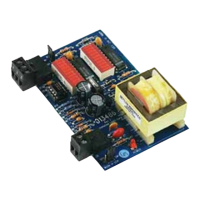
The U141v+ modules have diagnostic LEDs to
assist troubleshooting.
Power - On when the module is on.
Rx - On when the module receives data.
Tx
-
On when the module transmits data.
DO1 - On when digital output 1 is active.
CW - On when actuator motor turns
clockwise.
CCW - On when actuator motor turns
counterclockwise.
Production Date
To determine when a module was
manufactured, check the module status
report for the module in WebCTRL or
SuperVision. Refer to the appropriate user’s
guide for more information about the module
status report.
A sticker on the back of the module also
shows the date the module was
manufactured. The first three characters on
the sticker indicate the type of module. The
next two characters show the year and month
of manufacture. (The month digit is in
hexadecimal.)
Table 4. Analog Outputs
Point Signal Type
Channel
Number Range Offset Gain
AO 1 Analog 41 0 to 10VDC 0.00 0.0625
Table 5. Run LED
Status Meaning
2 times per second Normal operation.
5 times per second Transferring firmware.
Once every 2 seconds Auto-detecting baud rate.
Table 6. Error LED
Status Meaning
2 times per second Firmware error. Transfer
memory to the module to
correct.
Solid on Hardware failure.
Table 7. CW LED
Status Meaning
Solid on Motor is turning clockwise.
Blinking Actuator motor hit end-of-
travel.
Table 8. CCW LED
Status Meaning
Solid on Motor is turning counter-
clockwise.
Blinking Actuator motor hit end-of-
travel.



 To Next Page