Light Status Battery
Solid OK
Flashing Replace
No light Replace
3.0 CODING A REMOTE CONTROL
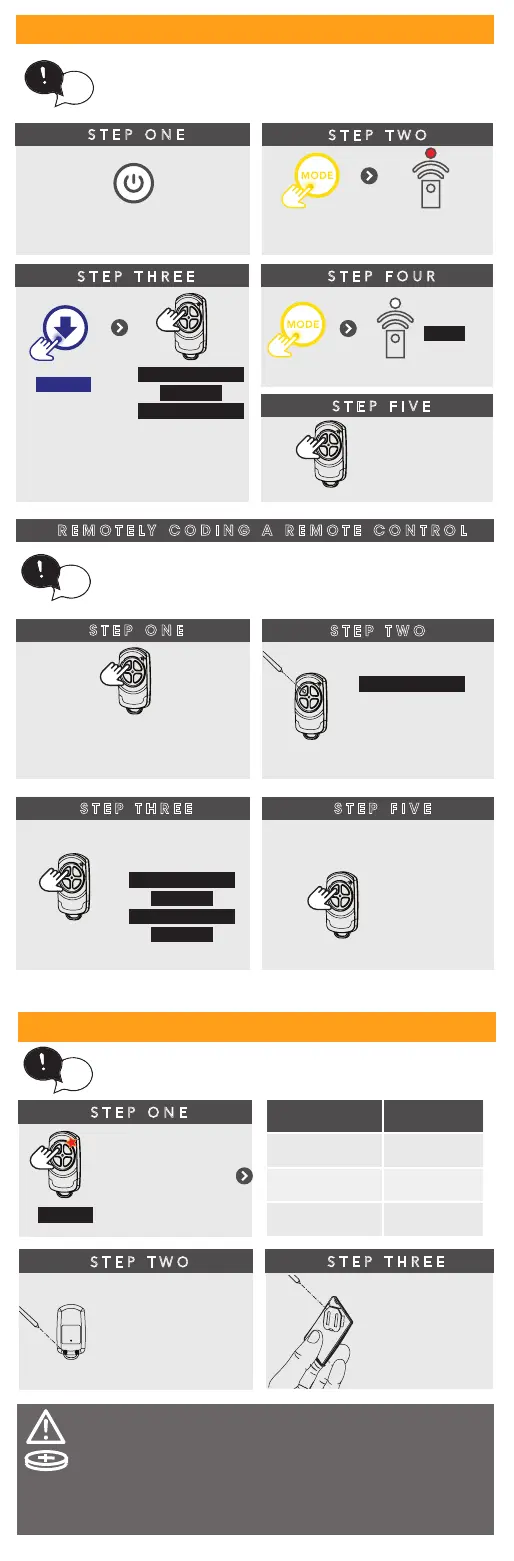
STEP ONE
The opener can only be operated from remote
controllers that have been programmed into its
memory. Up to 64 remotes can be programmed.
Battery Type: 1 x CR2032.
WARNING!: The battery is hazardous and must
be kept out of reach of children. The battery can
cause severe of fatal injuries within 2 hours or less
if swallowed or placed inside any part of the body.
If you suspect the battery has be swallowed or
placed inside any part of the body, SEEK
IMMEDIATE medical attention.
STEP TWO
STEP THREE
Switch power on and
remove controls cover
till remote
LED lit
Press
repeatedly
HOLD
Opener flashes
& beeps
HOLD for 3 sec
HOLD for 3 sec
RELEASE
Release both
buttons
STEP FOUR
OFF
STEP FIVE
Press to test
tip
Then replace controls cover
STEP ONE
4.0 CHANGING A BATTERY
HOLD
Check Light
Status Table
STEP TWO
tip
Use screwdriver
to remove scews
and open
STEP THREE
Use non-metallic
object to push
out.
STEP ONE
STEP TWO
Take a pre-coded
remote and press the
button to duplicate
REMOTELY CODING A REMOTE CONTROL
Remotely coding works when you have a
pre-coded remote control and are in range of the
opener.
tip
Use a pen,
HOLD for 2 sec
the middle button
through the
coding hole
STEP THREE
Opener ashes & beeps
HOLD for 3 sec
HOLD for 3 sec
RELEASE
Take new
remote
RELEASE
STEP FIVE
Press to test
Opener stops ashing &
beeping





 To Next Page