EasyManua.ls Logo

Automatic Technology GDO-2 SecuraLife - User Manual

Automatic Technology GDO-2 SecuraLife
20 pages
Print Icon
To Next Page IconTo Next Page
Loading...
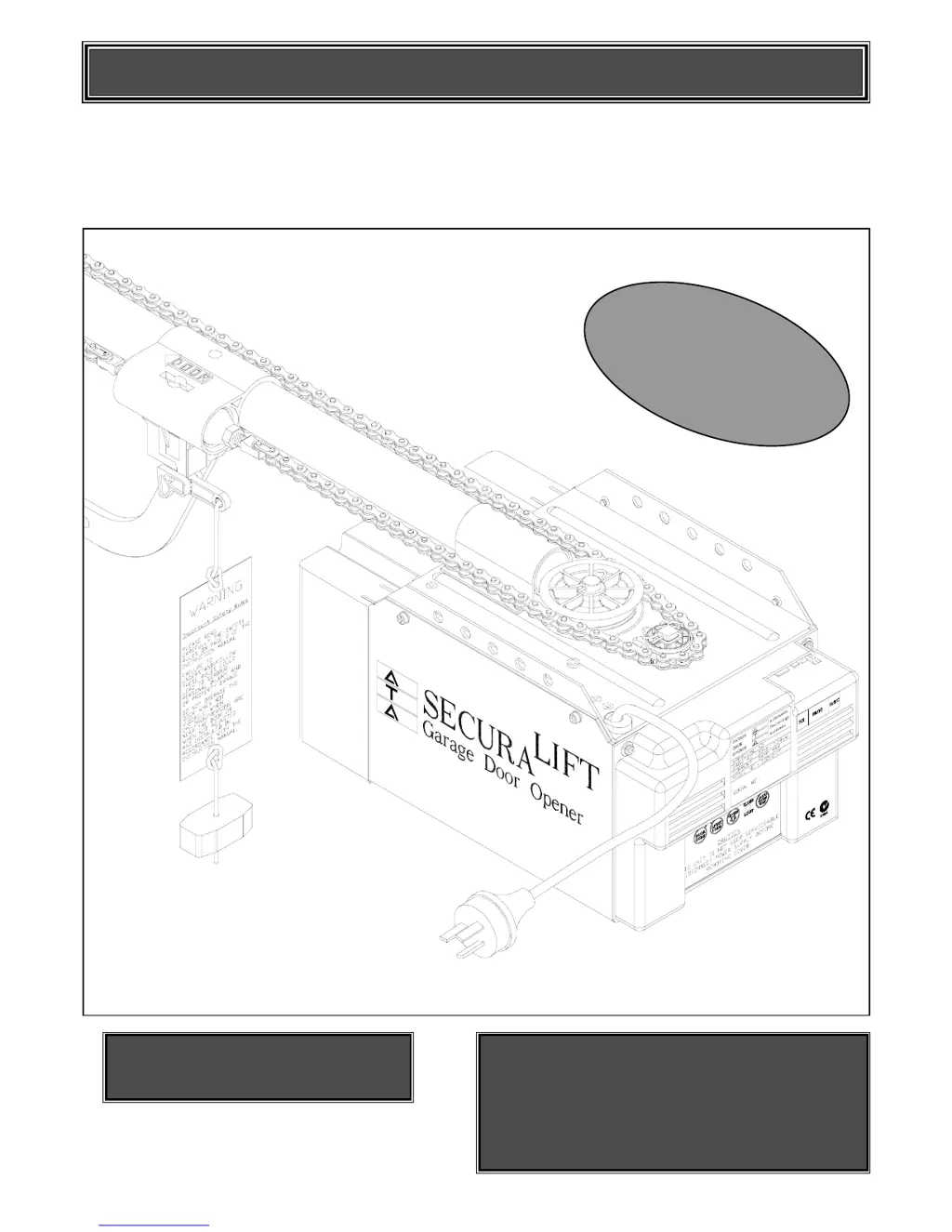
AUTOMATIC TECHNOLOGY AUSTRALIA PTY LTD
GDO-2 SecuraLift
®
GARAGE DOOR OPENER
OWNERS COPY
Warning: It is vital for the safety of persons to
follow all instructions. Failure to comply with the
installation instructions and the safety warnings
may result in serious personal injury and/or
property and remote control opener damage.
Please save these instructions for future reference.
Installation Instructions
FFeeaattuurriinngg
SecuraCode
®
Code Hopping
Technology
FFeeaattuurriinngg
SecuraCode
®
Code Hopping
Technology

Questions and Answers

  • J
    Jill SosaAug 13, 2025
    Why Automatic Technology GDO-2 SecuraLife Garage Door Opener auto close not working?
    • V
      vpayneAug 14, 2025
      Several factors can prevent the auto-close function from working on your Automatic Technology Garage Door Opener. These include: * A faulty PE beam or wiring: Repair or replace as needed. * Misaligned PE beam: Re-align the optics. * Obstruction of the PE beam: Clear any obstructions. * Door obstructed during closing: Remove the obstruction. * Auto-close time not set: Consult Step 22 on page 16 for instructions.
  • W
    Wendy PattersonAug 17, 2025
    What to do if Automatic Technology GDO-2 SecuraLife Garage Door Opener will not close fully?
    • S
      suttonmicheleAug 17, 2025
      If your Automatic Technology Garage Door Opener isn't closing completely, the door limit positions likely need to be reset. To do this, follow the instructions in Step 15.2 on Page 12.
  • D
    djohnsonAug 21, 2025
    What to do if Automatic Technology GDO-2 SecuraLife will not open fully?
    • D
      dwallaceAug 21, 2025
      If your Automatic Technology Garage Door Opener isn't opening completely, the door limit positions likely need to be reset. To do this, follow the instructions in Step 15.2 on Page 12.
  • C
    castilloelizabethAug 26, 2025
    Why Automatic Technology GDO-2 SecuraLife courtesy light not working?
    • L
      Luke SmithAug 26, 2025
      If the courtesy light on your Automatic Technology Garage Door Opener isn't working, the globe has likely blown. Replace it with an Edison Type 240V 60W globe.
  • E
    Evan RodriguezAug 29, 2025
    Why Automatic Technology Garage Door Opener starts closing but reverses to open position?
    • M
      Mark BrownAug 29, 2025
      Your Automatic Technology Garage Door Opener might reverse due to a few reasons. Adverse weather conditions, like wind or cold, can cause the door to stiffen. In this case, increase the force margin setting. Also, check for any obstructions in the doorway and remove them.
  • P
    phyllis13Sep 1, 2025
    What to do if Automatic Technology GDO-2 SecuraLife will not operate?
    • J
      Jerry ColonSep 1, 2025
      If your Automatic Technology Garage Door Opener isn't working, start by checking if the mains power is switched on. Ensure that the door path is free from any obstructions. Verify that the door isn't locked or the motor isn't jammed; if so, unlock the door or remove the jam. If the door tracks or hardware are damaged, a qualified technician will need to service or repair it.
  • R
    Richard SheaSep 5, 2025
    How to fix Automatic Technology GDO-2 SecuraLife that operates from the button but not the transmitter?
    • A
      Alexander CrawfordSep 5, 2025
      If your Automatic Technology Garage Door Opener works with the button but not the transmitter, there are two likely causes. First, the transmitter code may not be stored in the opener's memory. Refer to Step 17 on page 14 to code the transmitter. Second, the transmitter battery might be flat. Replace it with an A23 Alkaline 12V battery.
  • S
    stephaniedelacruzSep 9, 2025
    Why does the Automatic Technology GDO-2 SecuraLife Garage Door Opener globe keeps blowing?
    • A
      Abigail MorganSep 9, 2025
      If the globe in your Automatic Technology Garage Door Opener keeps blowing, it's likely due to an incorrect globe type. Ensure you are using a rough service or construction globe. Replace it with an Edison Type 240V 60W rough service/construction globe.

Summary

GDO-2 SecuraLift Garage Door Opener

Installation Instructions

Step-by-step guide for setting up the automatic garage door opener system.

Initial Safety Warnings

Critical safety advice for the installation and initial use of the opener.

Important Safety Instructions

Product Features Overview

Hopping Code Security

Advanced security system generating billions of unique codes for secure access.

Intelligent Safety Obstruction System (ISS)

Automatically reverses door upon detecting an obstacle during closing.

Operating Controls Explained

Tube and Pipe Assembly

Mounting Opener for Track Type Door

Mounting Opener for Spring Loaded Door

Mounting Door Bracket and Arms

Setting Travel Limit Positions

Setting Safety Obstruction Force

Testing Safety Obstruction Force

Procedures for testing the door's reaction to obstructions.

Coding Transmitters

Programming Transmitter for Courtesy Light

P.E. Beam and Auto Close Setup

Trouble Shooting Guide

Automatic Technology GDO-2 SecuraLife Specifications

General IconGeneral
ModelGDO-2 SecuraLife
CategoryGarage Door Opener
ManufacturerAutomatic Technology
Motor TypeDC
Battery BackupYes
Warranty7 Year Motor / 2 Year Electronics
Remote Controls2 x Remote Controls
SecurityRolling Code

Related product manuals