J-32
CX Series
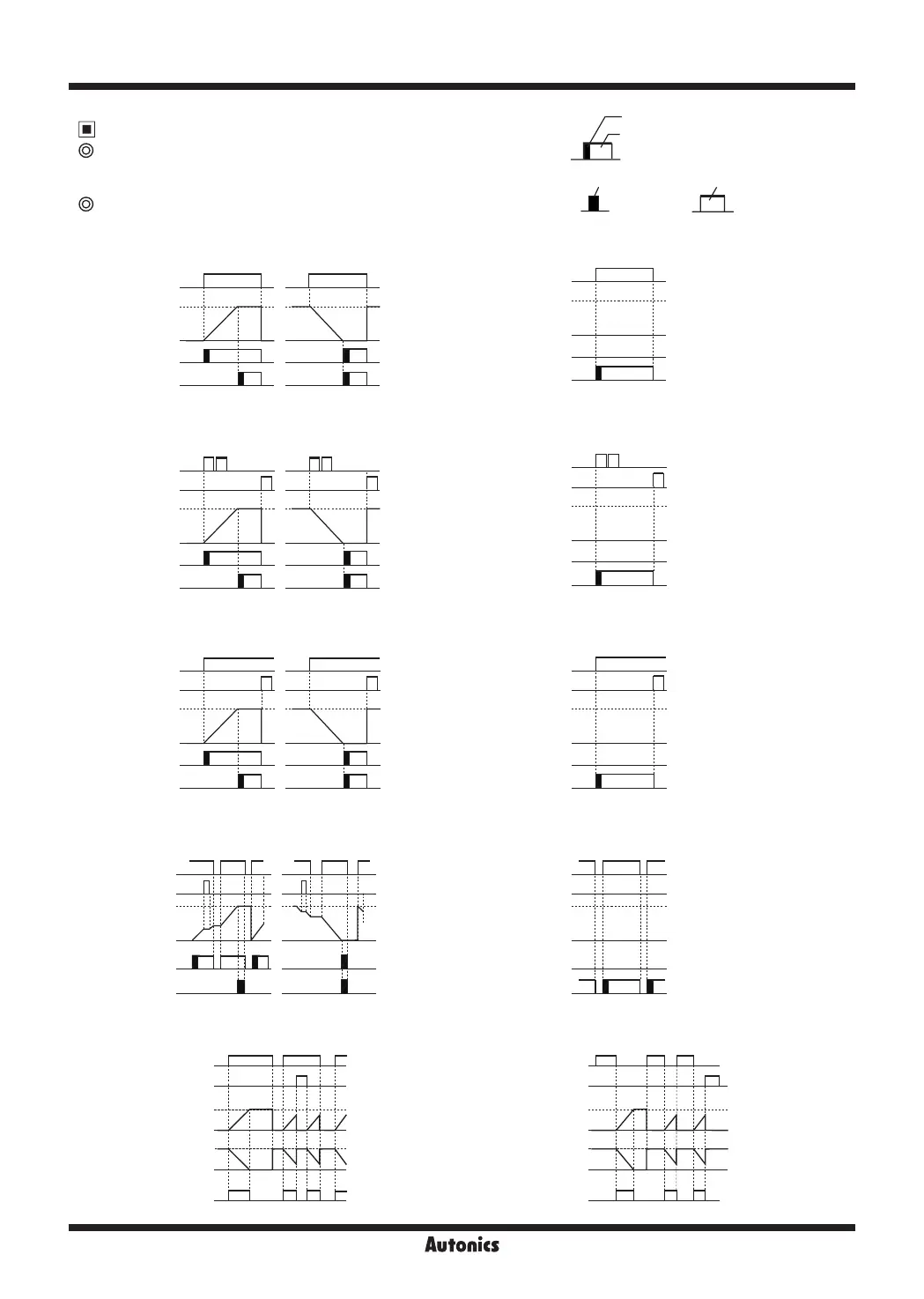
Timer '0' Time Setting
Available output operation mode to set '0' time setting
OND
,
ONd1
,
ONd2
,
ONd3
,
NFD
,
NFd1
Operation according to output mode (at 0 time setting)
1) OND (Signal ON Delay) mode [
OND
]
● Set '0' for setting time1 . ● Set '0' for setting time2 .
One-shot output (0.01 to 99.99 sec)
Retained output
One-shot output
Retained output
2) OND.1 (Signal ON Delay 1) mode [
ONd1
]
3) OND.2 (Power ON Delay 2) mode [
ONd2
]
4) OND.3 (Power ON Delay 3) mode [
ONd3
]
5) NFD (ON-OFF Delay) mode [
NFD
]
● Set '0' for setting time1 .
● Set '0' for setting time1 .
● Set '0' for setting time1 .
● Set '0' for Off_Delay setting time.
● Set '0' for setting time2 .
● Set '0' for setting time2 .
● Set '0' for setting time2 .
● Set '0' for On_Delay setting time.
INA (START)
Setting time 1
0
OUT 1
OUT 2
Up mode
INA (START)
Setting time 2
0
OUT 1
OUT 2
Down mode
INA (START)
RESET
Setting time 1
0
OUT 1
OUT 2
Up mode
INA (START)
RESET
Setting time 2
0
OUT 1
OUT 2
Down mode
Up mode
POWER
RESET
Setting time 2
0
OUT 1
OUT 2
Down mode
Up mode
POWER
RESET
Setting time 1
0
OUT 1
OUT 2
Up mode
POWER
RESET
Setting time 2
0
OUT1
OUT2
Down mode
Up mode
POWER
RESET
Setting time 1
0
OUT1
OUT2
INA (START)
UP
DISPLAY
DOWN
RESET
On_Delay
On_Delay
0
0
OUT 2
(OUT)
INA (START)
UP
DISPLAY
DOWN
RESET
Off_Delay
Off_Delay
0
0
OUT 2
(OUT)


 To Next Page
 Loading...