Need help?
Do you have a question about the Autonics MT4Y Series and is the answer not in the manual?
Covers critical warnings for preventing serious injury, death, fire, or explosion during operation.
Highlights cautions to prevent injury, product damage, fire, or electric shock.
Provides general advice for safe operation, preventing accidents and ensuring proper use.
Details input/output options, input limits, display range, frequency measurement, power, and dimensions.
Guide for selecting the appropriate model based on input type and output options.
Guidance on using appropriate wires and terminals for safe and correct wiring.
Diagrams illustrating input and output terminal connections for various signal types.
Lists the items that are included with the product package.
References for user manuals and the DAQMaster device management software.
Provides physical dimensions and panel cut-out details for installation planning.
Detailed technical specifications covering input, accuracy, display, and measurement methods.
Environmental operating conditions, safety ratings, and insulation details.
Specifications for the RS485 communication interface, including protocol and speed.
Describes the step-by-step procedure for setting operating modes and parameters.
Details configuration parameters for Group 0, 1, and 2, covering various functions.
Specifies input and display ranges for DC voltage and DC current measurement models.
Specifies input and display ranges for AC voltage and AC current measurement models.
Configuration for output high/low-limit setting values and max/min peak value monitoring.
Details on measuring and displaying input signal frequency for AC inputs.
Function to correct the gradient of high/low-limit scale values for accurate display.
Mechanism to display specific high/low-limit values based on measured input.
Sets the DC 4-20 mA transmission output based on the display value.
Describes three methods for adjusting the display value to zero by force.
Methods for correcting display errors and limiting output during startup.
Functions for adjusting display fluctuations and monitoring max/min peak values.
This document describes the Autonics 4-Digit Multi Panel Meter, MT4Y Series, a versatile device designed for precise measurement and display of various electrical parameters.
The MT4Y Series Multi Panel Meter is capable of measuring and displaying a wide range of electrical inputs, including DC voltage, DC current, AC voltage, and AC current. It features a 4-digit LED display for clear readability of measured values. The device offers multiple output options, such as relay outputs, NPN/PNP open collector outputs, and communication outputs like RS485 and transmission (DC 4-20 mA), allowing for integration into various control systems. It also supports BCD dynamic output for specialized applications.
The meter incorporates several advanced functions to enhance its utility. It can perform frequency display for AC inputs, providing a comprehensive view of electrical system performance. The device includes a high/low limit scale correction function, which allows users to adjust the display value based on specific input ranges and desired output scales. This is particularly useful for linearizing sensor outputs or scaling measurements to engineering units. Zero adjustment and error correction features are also available to ensure accuracy and compensate for potential offsets or measurement errors.
The MT4Y Series supports various operation modes, including normal display, peak/min value display, and different output control modes (HI, GO, LO, SET). These modes enable the meter to adapt to diverse application requirements, from simple monitoring to complex control tasks. The device can be configured to trigger outputs based on preset high and low limits, providing alarm or control signals when measured values exceed or fall below specified thresholds.
Communication capabilities, such as RS485, allow the meter to be integrated into larger supervisory control and data acquisition (SCADA) systems. This enables remote monitoring, data logging, and parameter adjustment, enhancing system flexibility and control. The transmission output (DC 4-20 mA) provides an analog signal proportional to the measured value, which can be used to interface with PLCs, data recorders, or other analog input devices.
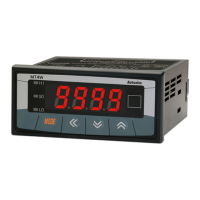
The MT4Y Series is designed for user-friendly operation and configuration. The front panel features a 4-digit LED display and intuitive control buttons (MODE, UP, DOWN, L/D) for easy navigation through menus and parameter settings. The display can show values ranging from -1999 to 9999, with a high-frequency display function for rapid updates.
Input selection is flexible, accommodating various voltage and current ranges. For DC current measurements exceeding 5A, the use of a shunt is recommended, requiring the selection of a DV (DC voltage) type input. For AC voltage and current, frequency display is an available option, though it may affect output availability depending on the model.
Output configurations are highly customizable. Users can select from various preset output types (relay, NPN/PNP open collector) and sub-output types (transmission, RS485, BCD dynamic, low speed serial). The relay outputs can be configured for different operation modes (HI, GO, LO, SET) and hysteresis settings to prevent chattering. The transmission output (DC 4-20 mA) can be scaled to correspond to specific input ranges, providing a proportional analog signal.
The device supports various communication protocols, including Modbus RTU for RS485, facilitating integration into industrial networks. Communication parameters such as baud rate, data bit, stop bit, and parity can be configured to match the network requirements.
The MT4Y Series includes features like startup compensation time, which allows for a delay before outputs become active after power-up, preventing false triggers during system initialization. The display cycle function helps manage display updates, especially in applications where rapid changes might cause instability. Max/Min peak value monitoring allows users to track the highest and lowest measured values over time, providing valuable insights into system performance and potential overloads.
The device is designed for panel mounting, with specified panel cut-out dimensions for easy installation. Brackets are provided for secure mounting. Wiring connections are clearly labeled, and specific terminal types are recommended for reliable operation.
The MT4Y Series is built for durability and long-term reliability in industrial environments. However, proper installation and wiring are crucial for optimal performance and safety. Users should always refer to the instruction manual for detailed wiring diagrams and safety precautions.
In case of measurement errors or unexpected behavior, the device provides troubleshooting guidance. Common issues such as measurement input exceeding the display range, wiring errors, or power supply problems are addressed with recommended actions like checking connections, verifying input values, and resetting the device.
The device includes a reset function that allows users to restore all parameters to their default factory settings. This can be useful for troubleshooting or reconfiguring the device for a new application. The reset procedure involves pressing specific front panel buttons in a sequence.
For ongoing maintenance, it is important to ensure that the operating environment adheres to the specified conditions, including temperature, humidity, and vibration limits. Regular inspection of wiring and connections can help prevent loose contacts or damage that could affect performance.
The DAQMaster software, available for download from the Autonics website, provides a comprehensive tool for device management. This software allows for parameter setting, monitoring, and data management, simplifying configuration and enabling advanced diagnostics. This can be particularly useful for remote maintenance and system optimization.
Overall, the MT4Y Series Multi Panel Meter is a robust and versatile device designed for accurate measurement and control in a wide range of industrial applications, with features that support ease of use, flexible configuration, and reliable operation.
 General
| Model | MT4Y Series |
|---|---|
| Category | Measuring Instruments |
| Type | Digital Panel Meter |
| Display Type | 7-Segment LED |
| Display Digits | 4 digits |
| Communication | RS-485 (Optional) |
| Mounting | Panel Mount |
| Input Type | Voltage, Current |
| Control Output | Relay |
| Power Supply | 100-240VAC, 12-24VDC |
| Resolution | 0.1℃/℉ (Thermocouple, RTD) |
| Operating Temperature | -10 to 50 °C |
| Ambient Humidity | 35 to 85% RH (non-condensing) |
| Protection Structure | IP65 |

 To Next Page