10
Introduction
to the
parameter
setting
Display
Confirm
Long press for pressure zeroing
Description
Press to switch the pressure units, long
press to switch the temperature units
●
Main button function.
●
Unit description.
【 】
【 】
【 】
Display
°C, °F
bar, kg/cm²,
psi, KPa, MPa
hPa, micron,
mbar, Torr, mToor
Vacuum degree unit setting
Temperature unit setting
Pressure unit setting
Description
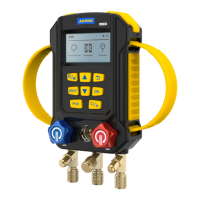
Blue Red
Valve
precautions
Start up valve: Turn the valve handle to the left.
Shut down valve: Turn the valve handle to the right.
Blue represents low pressure.
Red represents high pressure.
Turn the control valve tight by hand. Do not tighten the control
valve with any tool, as this will damage the thread.
●
●
●
●
WARNING


 To Next Page