Autostacker™ Parking Lift 15 P/N 5900248 — Rev. B — May 2021
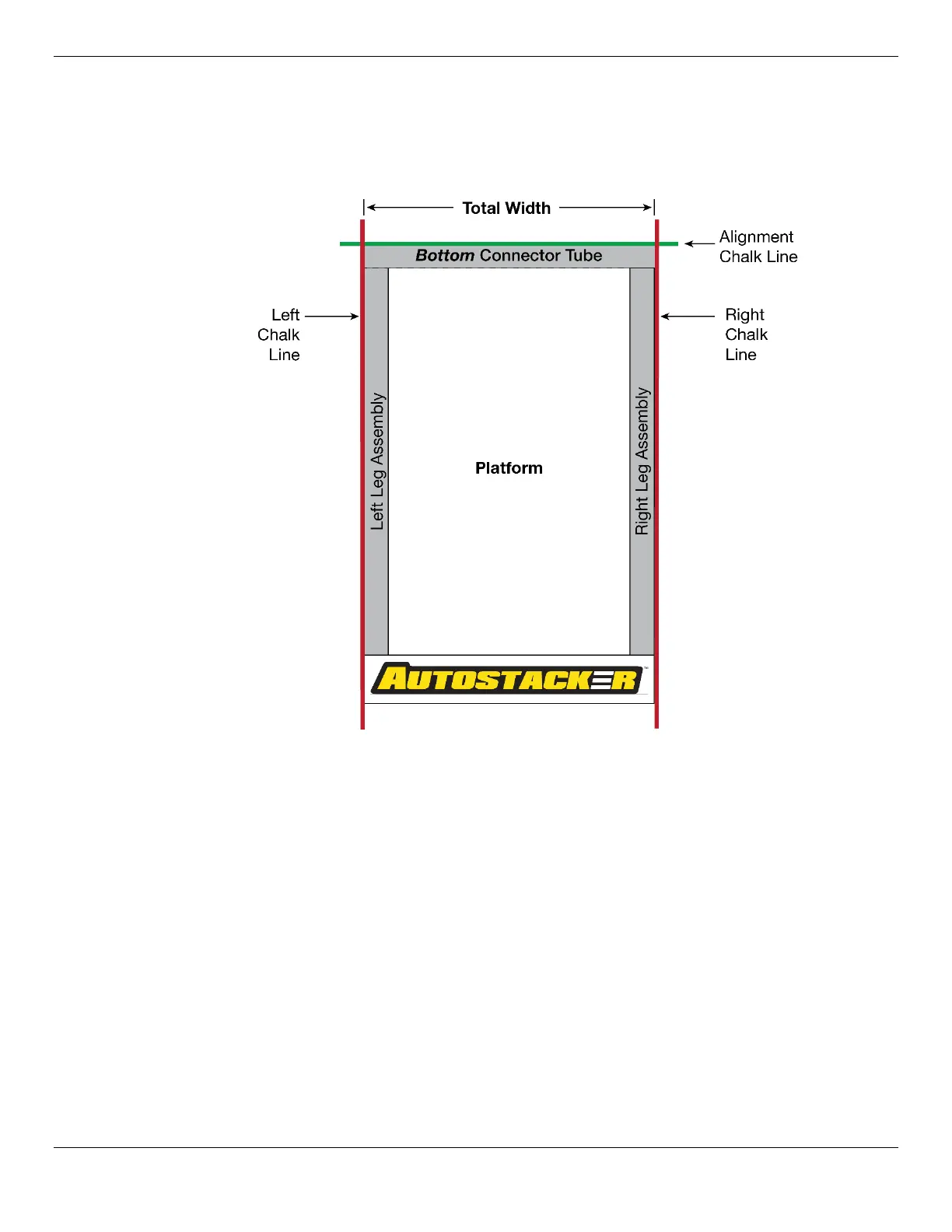
Create Chalk Lines Guides
Using Chalk Line Guides makes it easy to position the Autostacker components for installation.
Note: The front of the Autostacker is the end
opposite
the Drive-Up Ramp. The Tire Trough is at
the front of the Autostacker and the Drive-Up Ramp is at the back.
To add Chalk Line Guides:
1. Create an Alignment Chalk Line where you want the front of the Autostacker.
Make the Alignment Chalk Line
longer
than the Total Width setting for the Autostacker.
2. Create two perpendicular Chalk Lines at 90° angles to the Alignment Chalk Line.
Make the distance between the Left and Right Chalk Line the distance of the
setting
for the Autostacker, found in
Specifications.
For a
Multi-Lift
setup, see Multi-Autostacker on Page 49 modified specifications. If you plan
to position the Control Stand at the
Rear
of the Lift, use the Total Width (A); do
not
use the A1
figure.



 To Next Page