1
2
4
5
3
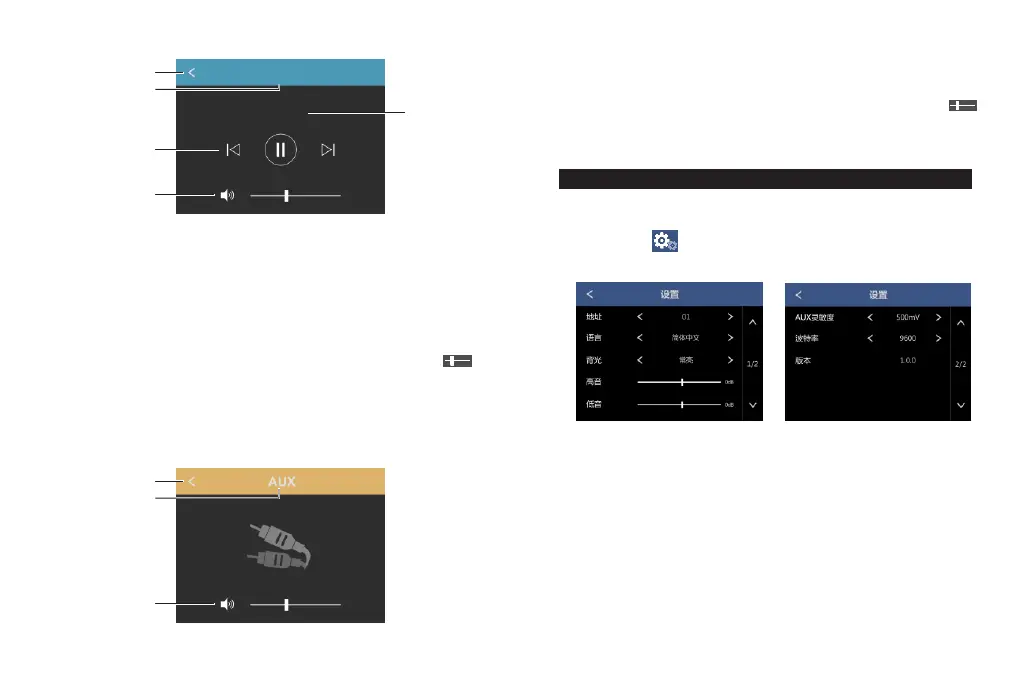
1. Return button. Press it to return to homepage.
2. Displays the current mode.
3. Displays the Bluetooth connection status
4. Information of the song being played.
5. Playing control button: the previous song, play / pause, the next song.
6. Volume button. Press it and it will go mute; slide the bar “ “
and it will adjust the volume
Pic. 6
5. AUX play
Twice click "AUX" icon to use AUX play mode。
- 7 -
1
2
3
Set the system
Twice click“ ” icon to enter system setting interface.。
- 8 -
1. Return button. Press it to return to homepage.
2. Displays the current mode.
3. Volume button. Press it and it will go mute; slide the bar “ ”,
and it will adjust the volume
Setting
There are following information in the setting interface:
1. Address
2. Language:, switchable system language
3. Backlight:you can set when to stand by the system without
operation for a certain period of time
4. Treble/bass adjustment setting
5. AUX sensitivity:, you can set the AUX sensitivity level
6. Baud rate setting
7. System information display: It displays system version No, device
Bluetooth name and connection password
Bluetooth
Connected


 To Next Page