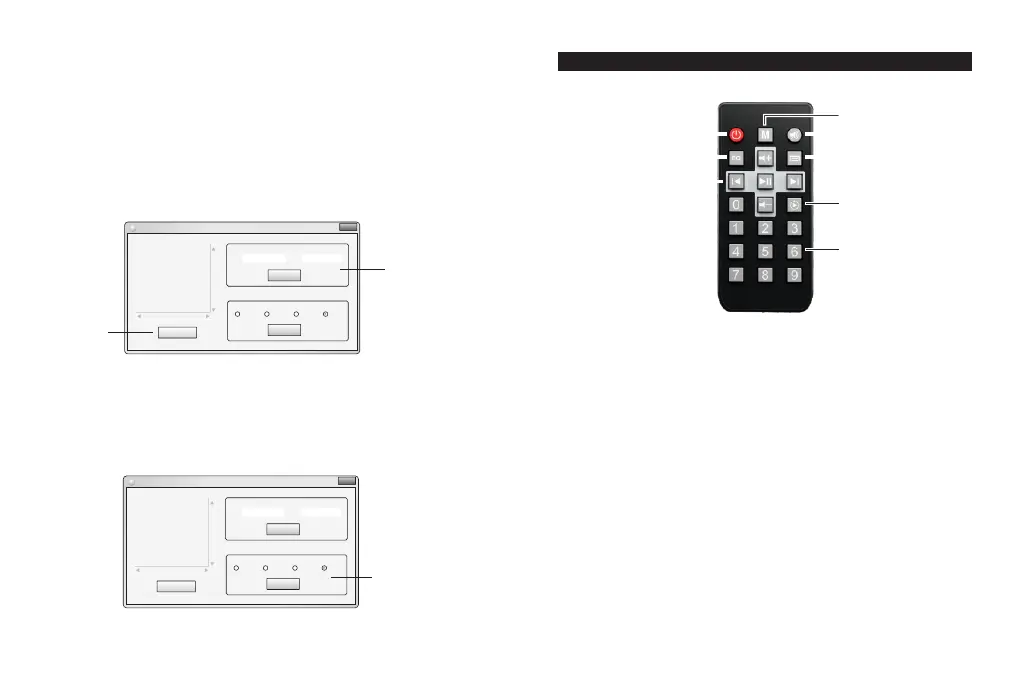
Remote description
1
2
3
5
7
8
4
6
- 10 -
Bluetooth and volume configuration
Prepare a computer first and connect it to the device through the USB
cable. Turn on the DM837 configuration software in the computer.
1. Modify the password and set the Bluetooth name
① Click the "Find DM837" button on the left side of the homepage
of the software,and then device’s information will show up in the top.
t
② Fill the name and password tha 's to be changed below “Bluetooth”.
Click “Configure” and it will be finished (Password can be empty).
Software homepage
XXX
Find DM 837
Conf igure
Conf igure
DM8 37 C onfig ur ation
Blue toothBlue toothBlue tooth
Maxi mum volum e li mitMaxi mum volum e li mitMaxi mum volum e li mit
Nam e Pwd
25% 50% 75% 100%
Fin ding DM8 37. ..
Rea d I D OK, as f ollow :
Vend orID :0xA 5A
Pro duct ID :0x 201
Vers ionNu mber: 0x100
XXX
Find DM 837
Conf igure
Conf igure
DM8 37 C onfig ur ation
Blue toothBlue toothBlue tooth
Maxi mum volum e li mitMaxi mum volum e li mitMaxi mum volum e li mit
Nam e Pwd
25% 50% 75% 100%
Fin ding DM8 37. ..
Rea d I D OK, as f ol low :
Vend orID :0xA 5A5
Pro duct ID :0x 201
Vers ionNu mber: 0x100
Con figur ing blu etoot h
nam e=DM 837, pwd =12 3456
Sen d da ta ok!
DM 837
123 6456
①
②
Volume limit setting area
- 9 -
2. Maximum volume limit for the device
Here you can limit the total output volume of the device, you can set the
total volume of "25%" "50%”
Click “Configure” and it will be finished
Homepage of the software
1. Standby switch
2. Mode selection. Click the button to cycle through the mode: FM,
USB, SD, Bluetooth, AUX.
3. Mute
4. Sound mode selection.
5. Menu (not available).
6. Play controlling area. Can play / pause, the previous song, the
next song, the volumecontrol.
7. Play mode selection. Click the button to cycle through the
display: single cycle, the order of play
8. Numeric keypad: In the USB/SD card mode, the number keys
directly select the track to play .In the FM radio mode, the
number keys directly enters the FM frequency .
* The input range is 0870 ~ 1080. If the input frequency is out of
range, it will not respond. For example: 0875 input means 87.5MHz


 To Next Page