9
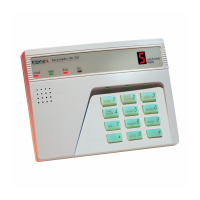
11. AV-2004/48 HOLD-DOWN FUNCTIONS (AV-701, AV-702 SERIES)
To access the hold-down functions hold down the key for approximately 2 seconds.
Holds down functions are confirmed by a prolonged beep.
Hold-Down Functions:
Key 2
SHUNT DISPLAY
Displays shunted zone(s).
Key 3
STATUS DISPLAY
Displays troubled or malfunctioning zone(s).
Key 4
DELAY DELETE (INSTANT PROTECTION)
Holding-down key 4 cancels Entry Delays in zones selected as ‘Delayed’ zones. All
zones become Instant.
‘d’ is displayed in confirmation. Instant Protection becomes effective only if System
is armed within 20 seconds following hold-down of key 4.
Key 5
DOOR CHIME
Enable Chime mode. Door Chime operates on Chime-programmed zones.
Hold-down key 5 enables and disables the function; chime mode is not affected by
Arm/Disarm.
Chime mode is confirmed by ‘c’ display on keypad.
Key 6
DIALER TEST & FOLLOW-ME PROGRAMMING
Test is performed in ‘Disarmed’ mode.
Displays Programmed Follow
Me Telephone Numbers Without
Dialing
Follow Me telephone number
programming
Hold-down [6] then hold-
down
[6] again
Programmed Telephone number
Verification (Display and Dial 4
telephone numbers)
Hold-down [6] then hold-
down
[7]
To display the programmed telephone numbers without dialing hold down key 6; within a few
seconds, ‘c’ will appear on the display, followed by the (programmed) ‘Follow Me’ telephone
number.
When programming telephone numbers that requiring an inter-digit delay (‘Pause’) during dialing,
Hold-Down key [0], a momentary ‘P’ will be displayed (Delay duration is 3 seconds).
The ‘Follow-Me’ number will be displayed, or displayed and dialed, followed by display-and-dial
of up to three additional telephone numbers.



 To Next Page