6
www.AvantcoRefrigeration.com
User Manual
Refrigerated Bakery Display Cases
Digital Temperature Controller
Your new refrigerator is already factory set to run at optimum temperatures for food safety and
should require no adjustments.
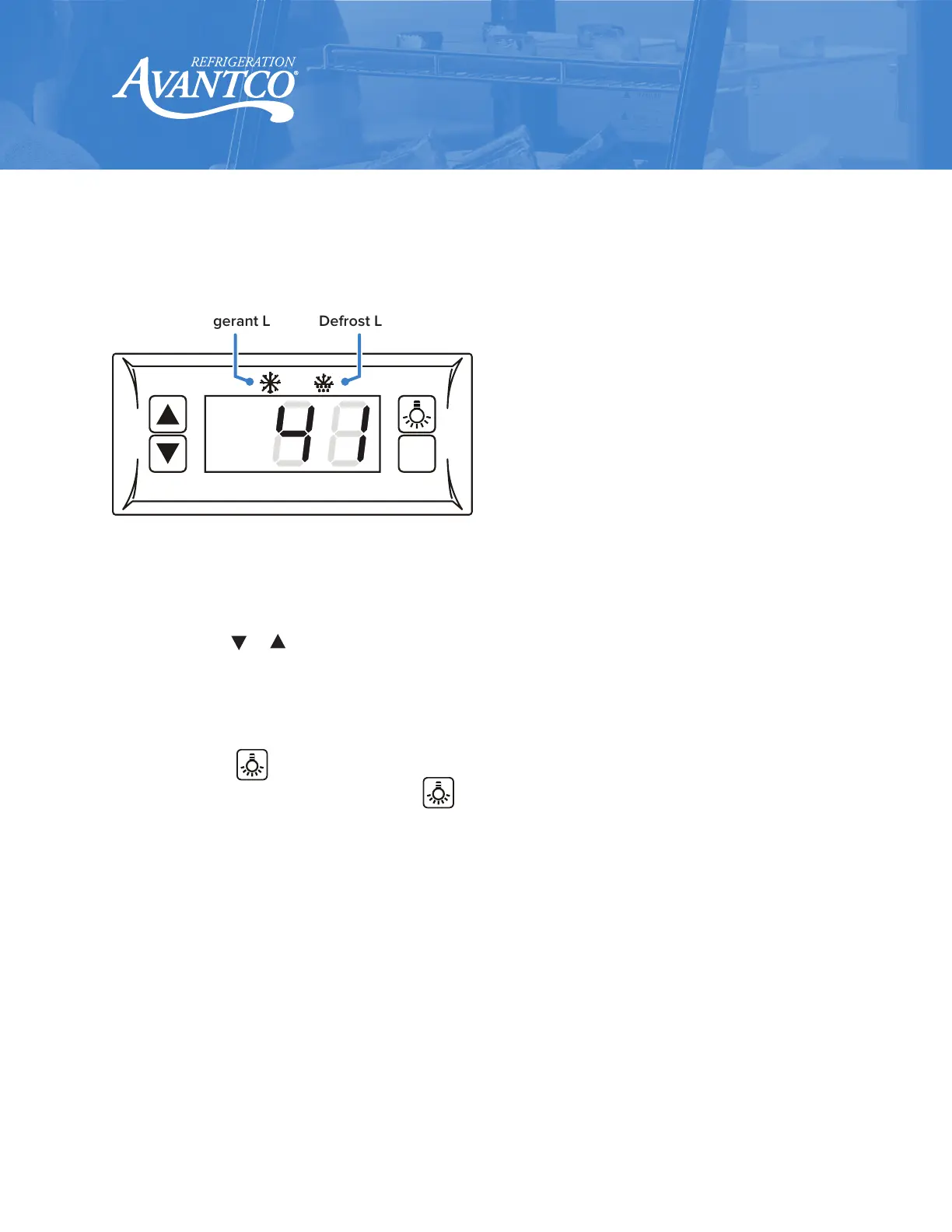
Refrigerant LED Defrost LED
SET
Front Panel Information
Set Temperature.
• Press "SET" button, the set temperature is displayed.
• Press or to modify the displayed value.
• Press "SET" to exit the adjustment and display the unit's current temperature.
1.
If no more buttons are pressed within 10 seconds, the unit’s current temperature will
be displayed.
2.
Lights: Press button to turn lights ‘on’ or ‘o’.
• Manual start/stop defrost: Press button and hold for 6 seconds to defrost or
stop defrost.
3.
Refrigerant LED: When the compressor is running, the LED is on; when the refrigerator
temperature is constant, the LED is o; during the delay start, the LED flashes.
4.
Defrost LED: during the defrost cycle, the LED is on; when it stops defrosting, the LED is o;
during the delayed display of defrost, the LED flashes.


 To Next Page