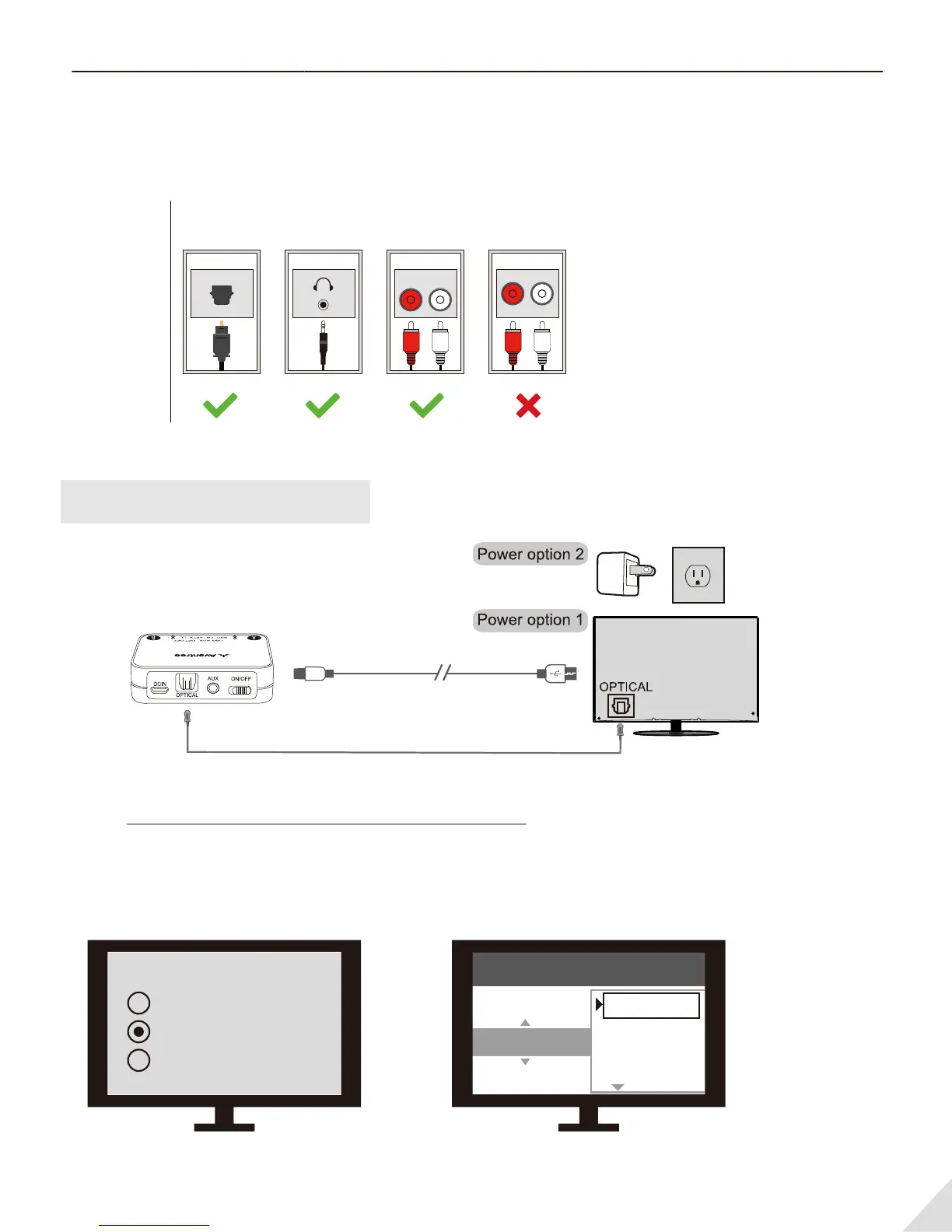
Use with your TV
Check your TV output options before the set up
TVs with OPTICAL audio out
After pairing the Audikast to your Bluetooth headphones and connecting cables, you should be able
to hear sound from your headphones; if not,
Ensure your TV speaker is set to “External Speaker”.
Ensure TV audio format is set to “PCM” or “Dolby/DTS” is OFF(This is IMPORTANT)
Note: Setting menu may be dierent depending on dierent TV brands and model.
3
Optical
OUT
RCA jacks
labeled
"AUDIO OUT"
LR
AUX/3.5mm
Other RCA
jacks (usually
audio IN)
Natively
Supported?
Jack
Options
Optical audio cable
Micro USB power cable
Speakers
Internal speakers
External speakers
Headset
Settings
Audio Format
PCM
Dolby Digital
DTS
DTS Neo 2:5



 To Next Page