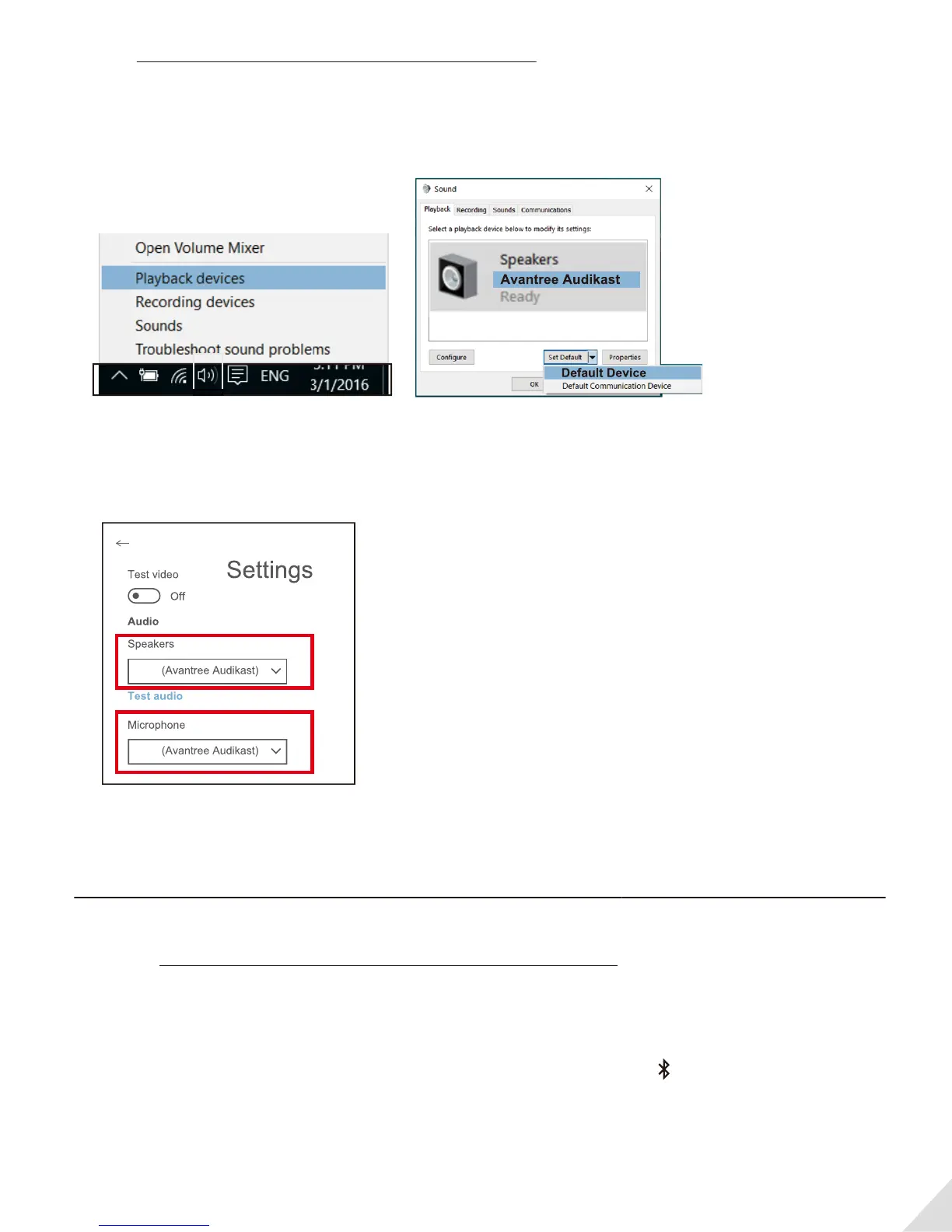
After
pairing the Audikast to your Bluetooth headphones and connecting cables, you should be able
to hear sound from your headphones; if not,
• Set as default "Playback device" on PC/laptop - Right-click the speaker icon in the bottom-right of
the taskbar and select “Playback devices”.
• Set the “Avantree Audikast” as the “Default Device”.
For Skype audio settings, please select “Avantree Audikast” for both Speakers and Microphone.
Add a 2nd pair of Bluetooth headphone
Step 1: Pair and connect the Audikast to 1st Bluetooth headphone.
Step 2: Enter the Audikast into PAIRING MODE manually - press and hold B for 2 seconds, close to B
ash BLUE and RED alternately.
Step 3: Place your 2nd set of headphone into Bluetooth PAIRING MODE (please refer to your 2nd
headphones’ user manual).
Step 4: Keep the devices close to each other and wait. Once connected, close to B on the transmit
ter will turn SOLID BLUE.
6



 To Next Page