User Manual
ENSEMBLE
9
Setup
The transmitter must be connected to a power source in order to function.
Connect it to a nearby wall outlet via the provided USB adapter and power
cable.
Once the transmitter is connected to its power source, you can connect it to
your TV’s audio ports. You can choose one of 3 dierent ways to do this:
Connecting the Transmitter to Your TV
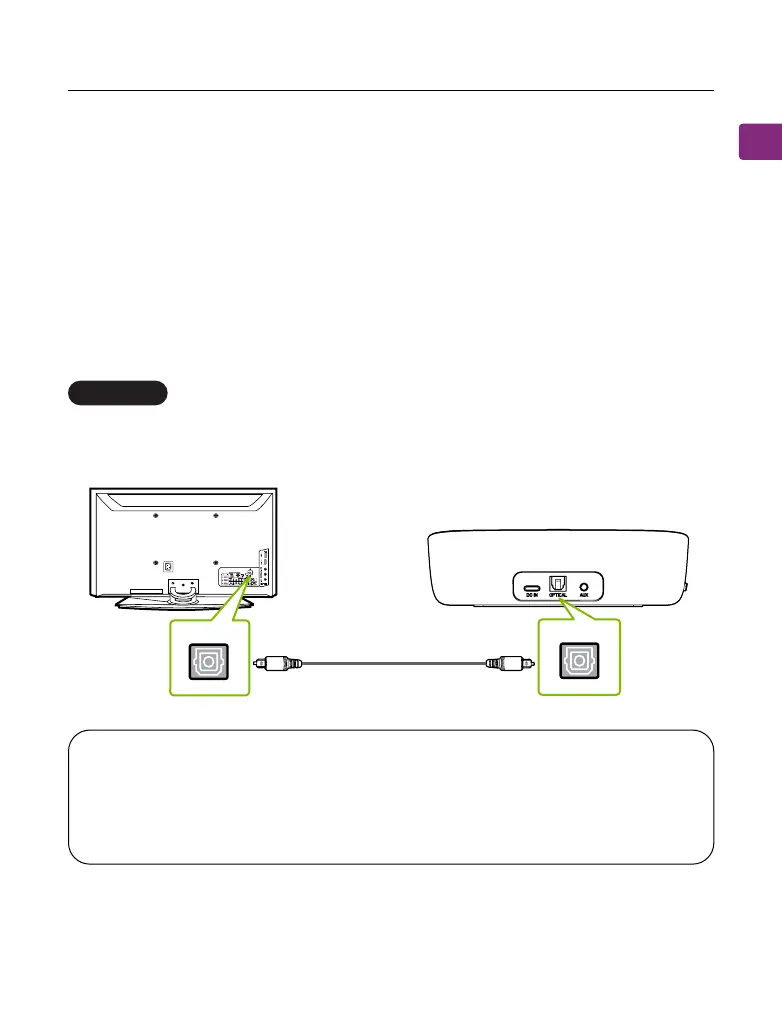
Optical port (recommended)
Plug the provided optical audio cable into the TV’s DIGITAL AUDIO OUT
(OPTICAL) port, then plug the other end into the transmitter’s optical port.
OPTION 1
OPTICAL
OPT/OUT
TV
NOTE: Most TVs support audio output through only one digital output
port at a time, so if your TV’s HDMI ARC port is in use, the optical port
may be disabled. You can either unplug the HDMI ARC or try connecting
the transmitter via RCA / AUX.



 To Next Page