User Manual Quartet
9
STEP 2
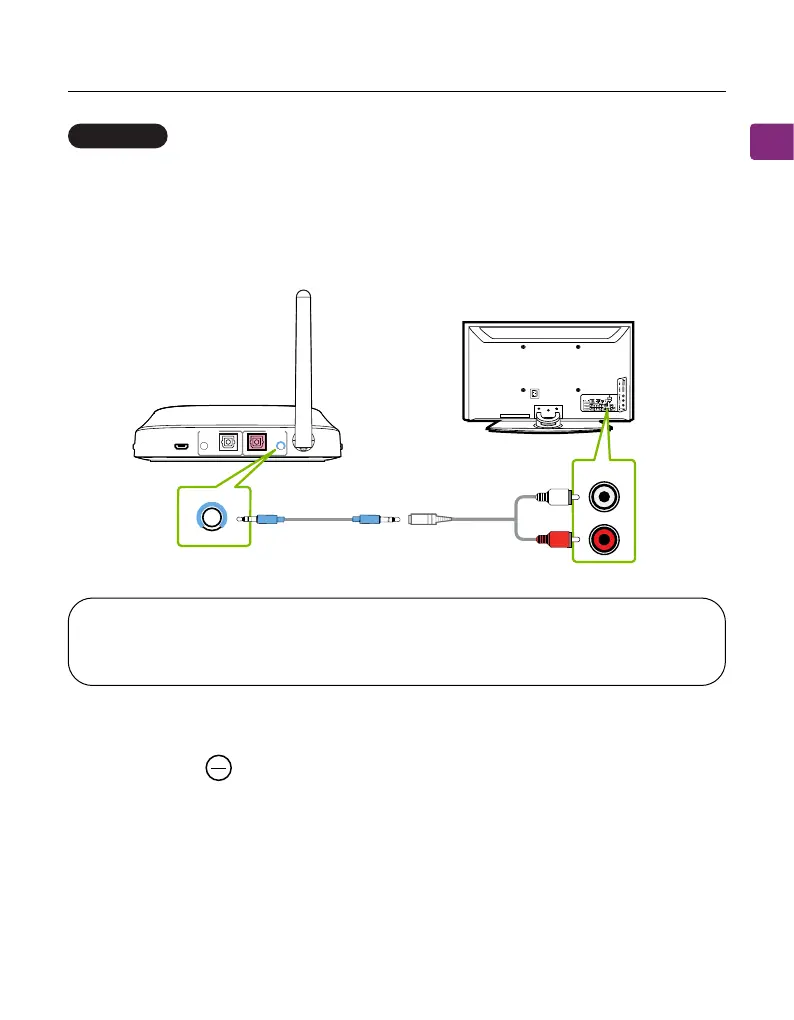
Check the transmitter’s audio signal indicators and ensure that “AUX” is lit up. If
it isn’t, press the button.
NOTE : Double check to ensure that optical / RCA cables are plugged into
the TV’s audio OUT ports and not the AUDIO IN / COMPONENT IN ports.
STEP 1
Connect the provided RCA adapter to the AUX 3.5mm audio cable. Plug the red
& white RCA connectors into the TV’s “AUDIO OUTAUDIO OUT” ports, then plug the other
end into the transmitter’s AUX 3.5mm port in the “INPUT FROM TV” section.
RCA port
OPTION 3
AUX
OPT
DC IN AUX AUX
OPTICALOPTICAL
RX Output
To Speaker
TX Input
From TV
AUDIOOUT
TV
AUX



 To Next Page