6
Introduction
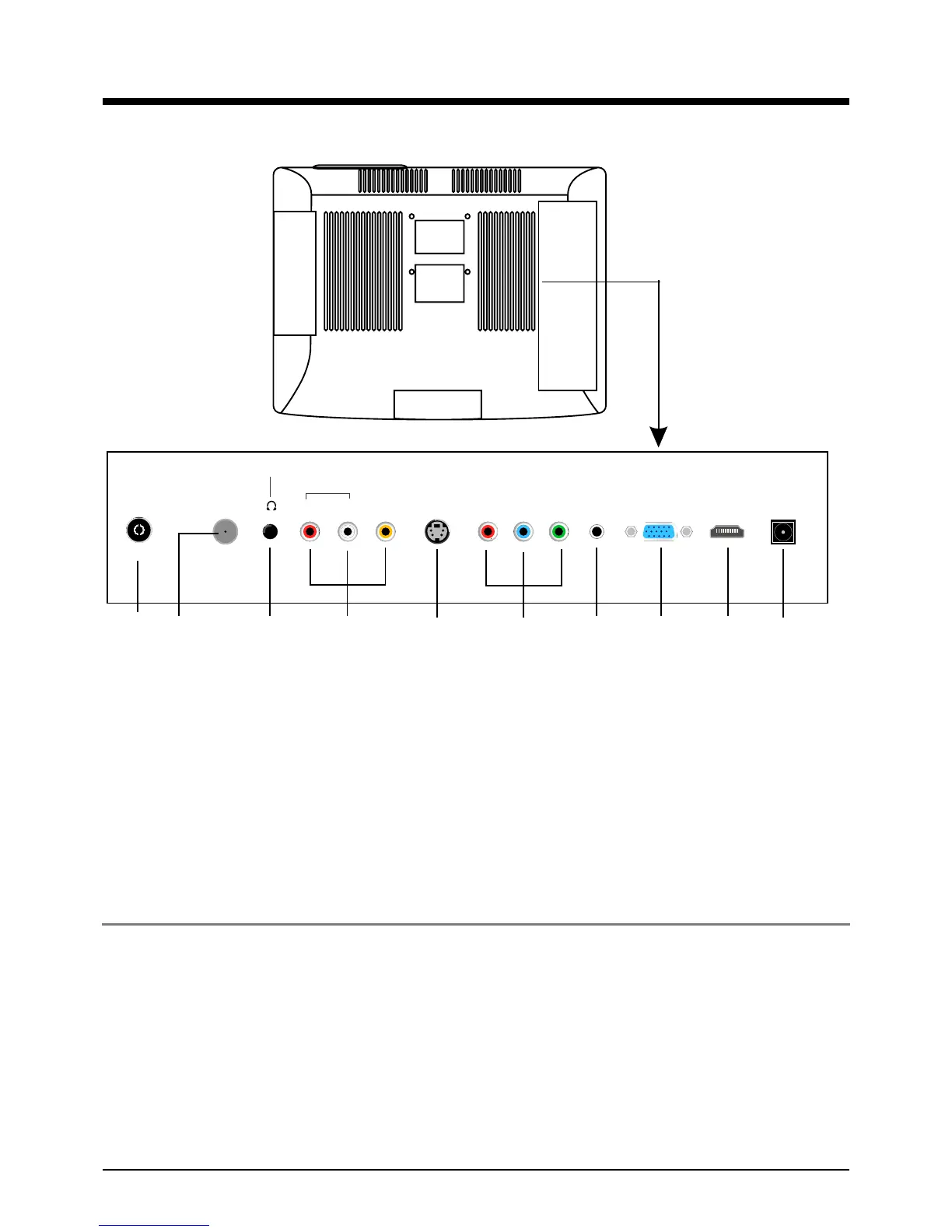
2. Rear View
Wall Mounting
The TV is provided with mounting holes for a VESA approved wall mounting bracket(NOT SUPPLIED).
Remove the Two Posi screws holding the base to the base bracket and lift the base away (do not
remove the base mounting bracket). Mount the VESA bracket with 200x200 VESA Standard using
4 x M4 x10 Iso metric threaded screws (not supplied). Do not use screws longer than 10 mm,
damage will occur to the internal parts. Fit the wall bracket securely following the manufacturers
instructions.
1.
RF1(for USA): Connect antenna or cable 75 Ohm coaxial to receive TV signal.
2.
RF2(for Europe): Connect antenna or cable 75 Ohm coaxial to receive TV signal.
3. Headphone: Connect to a headphone.
4. VIDEO: Connect it to video output terminal of DVD.
L/R in: Connect them to the audio output terminal of DVD(shared with YPbPr and S-Video)
5. S-VIDEO: Connect it to S-video output terminal of DVD.
6. YPbPr: Connect them to the YPbPr video output terminal of DVD.
7. PC IN: Connect it to the audio output terminal of PC.
8. VGA: For PC display.Connect it to the D-Sub 15 pins analog output connector of the PC.
9. HDMI: Connect it to the HDMI of DVD or other equipment.
10.POWER: Connect to power adaptor.
RF1 R L VIDEO S-VIDEO Pr Pb Y PC-IN VGA HDMI POWER
Headphone out
Audio in
RF2
12 3 4 5 6 7 8 9 10



 To Next Page