RF1 R L VIDEO S-VIDEO Pr Pb Y PC-IN VGA HDMI POWER
Headphone out
Audio in
RF2
9
Connection
Connection
Antenna(RF) Connection
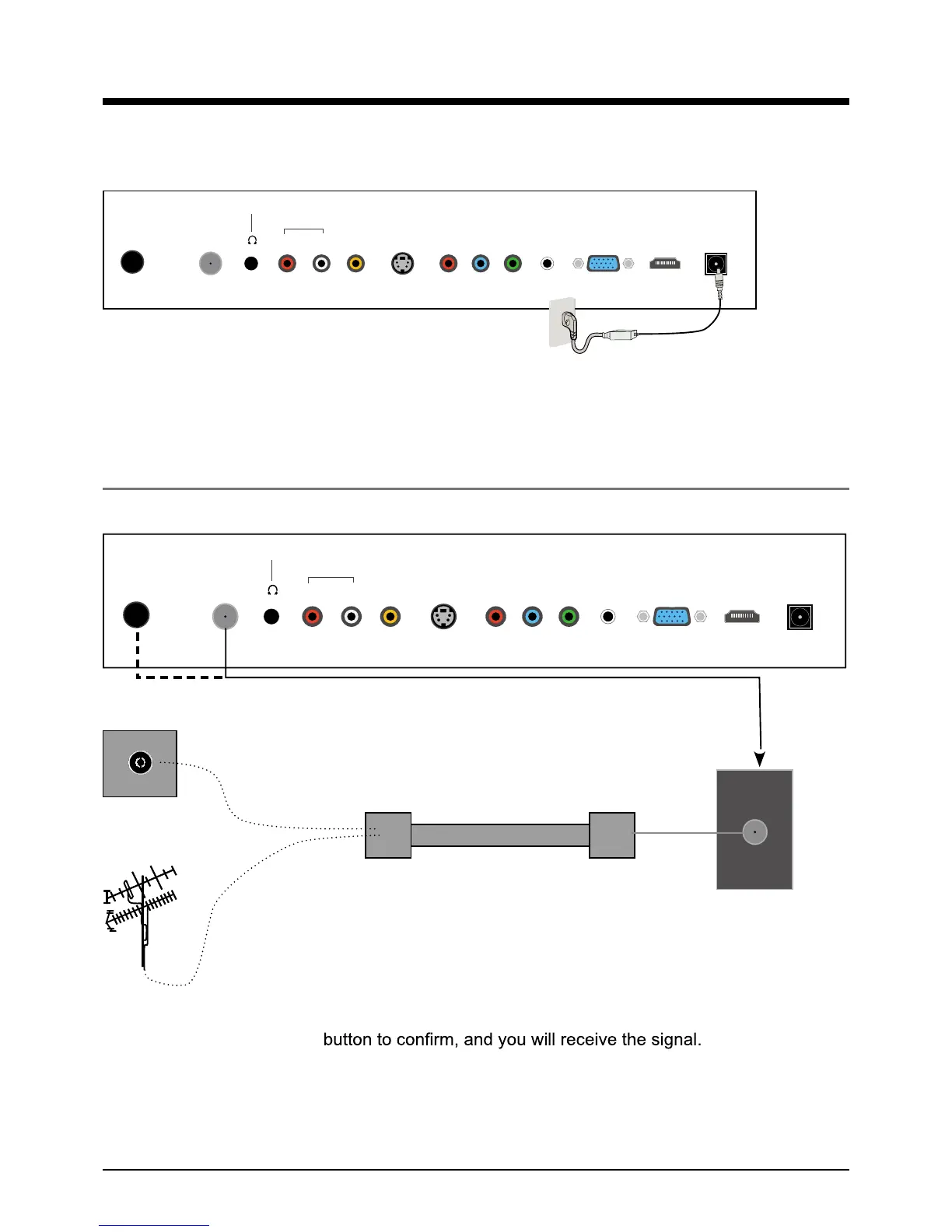
Power Cord Connection
Coaxial (Round) Antenna Cable
Press SOURCE button on the remote control to display the input source menu, press
ġ
Ģ
button
to select TV, then press OK
Note: RF1(for USA): $QDORJ'LJLWDOȍATSC/NTSC Signal.
RF2(for Europe): $QDORJPAL/SECAM Signal.
- Connect to the power supply correctly as shown with the Mains cable and Mains adaptor.
- When you connect the power, the TV set comes into standby mode and the LED indicator (Page
5) lights Blue.
- You could bring the TV out of standby mode by press the POWER ro)5egap(tesVTnonottub
remote control(page 7), and the LED indicator lights off.
Wall jack with F-Connector
RF1: $QDORJ'LJLWDOȍATSC/NTSC Signal
RF2: Analog-PAL/SECAM Signal
External Antenna
RF
RF1 R L VIDEO S-VIDEO Pr Pb Y PC-IN VGA HDMI POWER
Headphone out
Audio in
RF2



 To Next Page