10
User instructions
ll
Bluetooth status table
‘BT’ state Reason
‘BT’ solid (no flash) • Connected
‘BT’ flash • Auto re-connecting with last
paired device.
•
Pairing mode
Controlling a paired device
Once connected you can either use the controls on the
audio device to begin playback, skip tracks etc.Or you can
use the control buttons on the sound bar & remote.
1: The PLAY/PAUSE button (3 or 21) when pressed wi
begin playback of the selected track on the audio devic
Press again to pause pla
yback.
2: To skip to the next track press the SKIP
button (4
or 31).
3: To skip to the previous track press the SKIP
button (4 or 24).
4: Any further operations must be done from the audio
device.
NOTE: the volume output is effected by the
volume level on the audio source EG: Phone or
laptop, so make sure that is set to about 70-80% (
not too loud to avoid distortion).
Bluetooth notes
• The operation range of bluetooth is approximately 10
meters (30 Feet). Any obstacles in the path between
devices may reduce this range.
• Only o
ne Bluetooth device can be paired at a time.
• Not all Bluetooth devices are compatible.
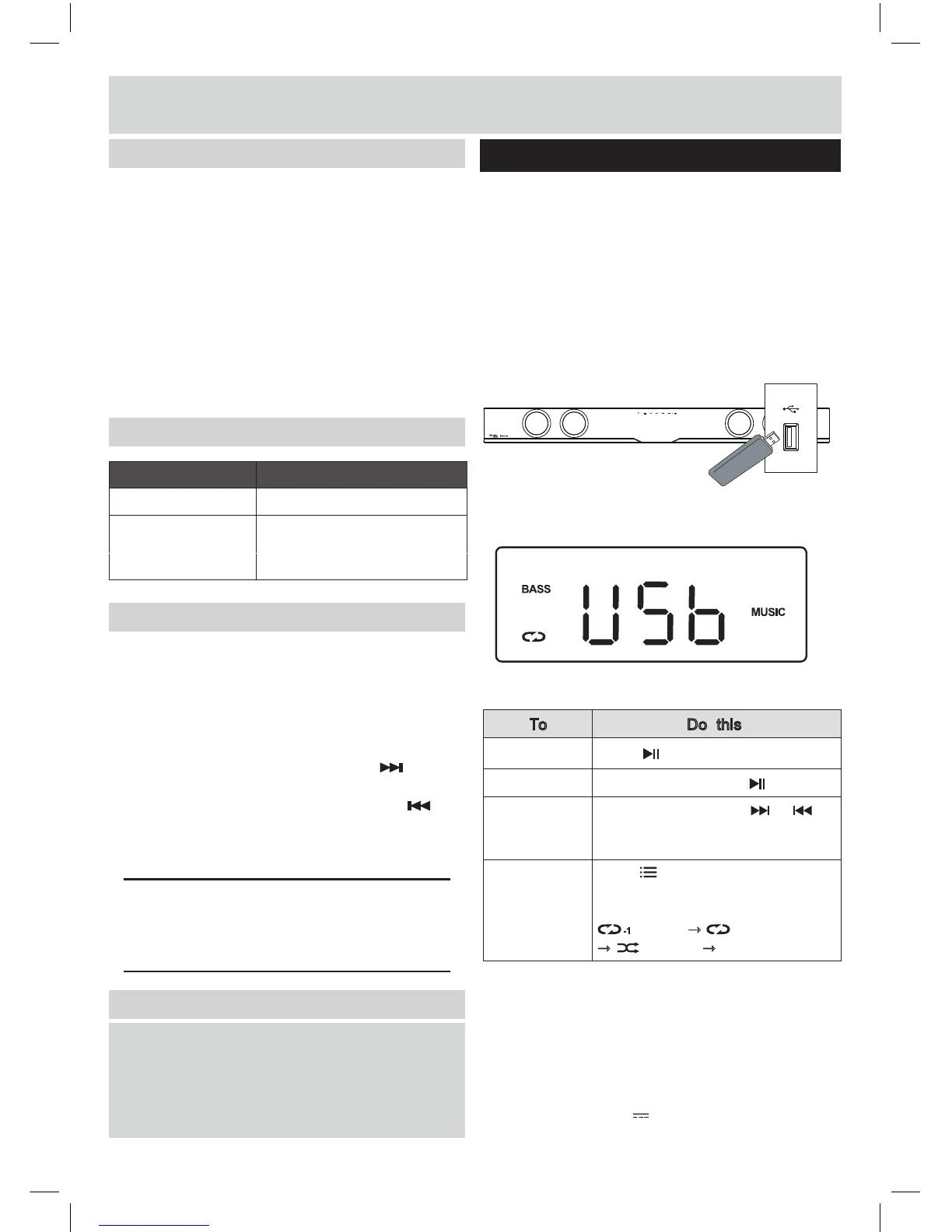
Play aduio from USB storage devices
2. Press SOURCE button (2 Unit or 22 Remote)
repeatedly until USB text appears on display.
3. Select a file you want to play.
1. Connect a USB storage device to the sound bar.
Playback
Pause
Skip to the next/
previous file
Play repeatedly
or randomly
D
(4 or 24, 31) to go to the next file or
uring playback, press or
Press (Option) (26 on remote)
repeatedly, the display will be
changed in the following order :
(repeat)
→
(repeat all)
→
(random)
→
(normal).
Press (3 Unit or 21 Remote).
During playback, press .
To Do this
Note:
Enjoy audio on a USB storage device, such as an
MP3 player and USB flash memory, etc.
What you need
● A USB storage device that is formatted for FAT
file systems, and complies with the Mass Storage
Class.
● An MP3 or WMA file on a USB storage
device
to step back to the previous file.
• This product may not be compatible with certain types of
USB storage device.
• If you use a USB extension cable, USB HUB, or USB
multi-reader, the USB storage device may not be recognized.
• Digital camera PTP protocols are not supported.
• Do not remove the USB storage device while it is being read.
• DRM-protected music files (MP3, WMA) are not supported.
• Support a USB port: 5V , 1A.
-1
4: Select and enable pairing for the ‘AS6000BW’
device. If prompted for a password enter ‘0000’.
5: If pairing is successful the sound bar will beep and
the ‘BT’ text will stop flashing.
6: If the connected device goes out of range, the
sound bar will attempt to connect for 2 minutes.
When the device comes into range the sound bar
will reconnect again automatically.
7: To remove the paired device using only the sound bar,
press and hold the OPTION button (26) on the remote
control. The ‘BT’ text will begin flashing again.
Pairing a Bluetooth device


 To Next Page