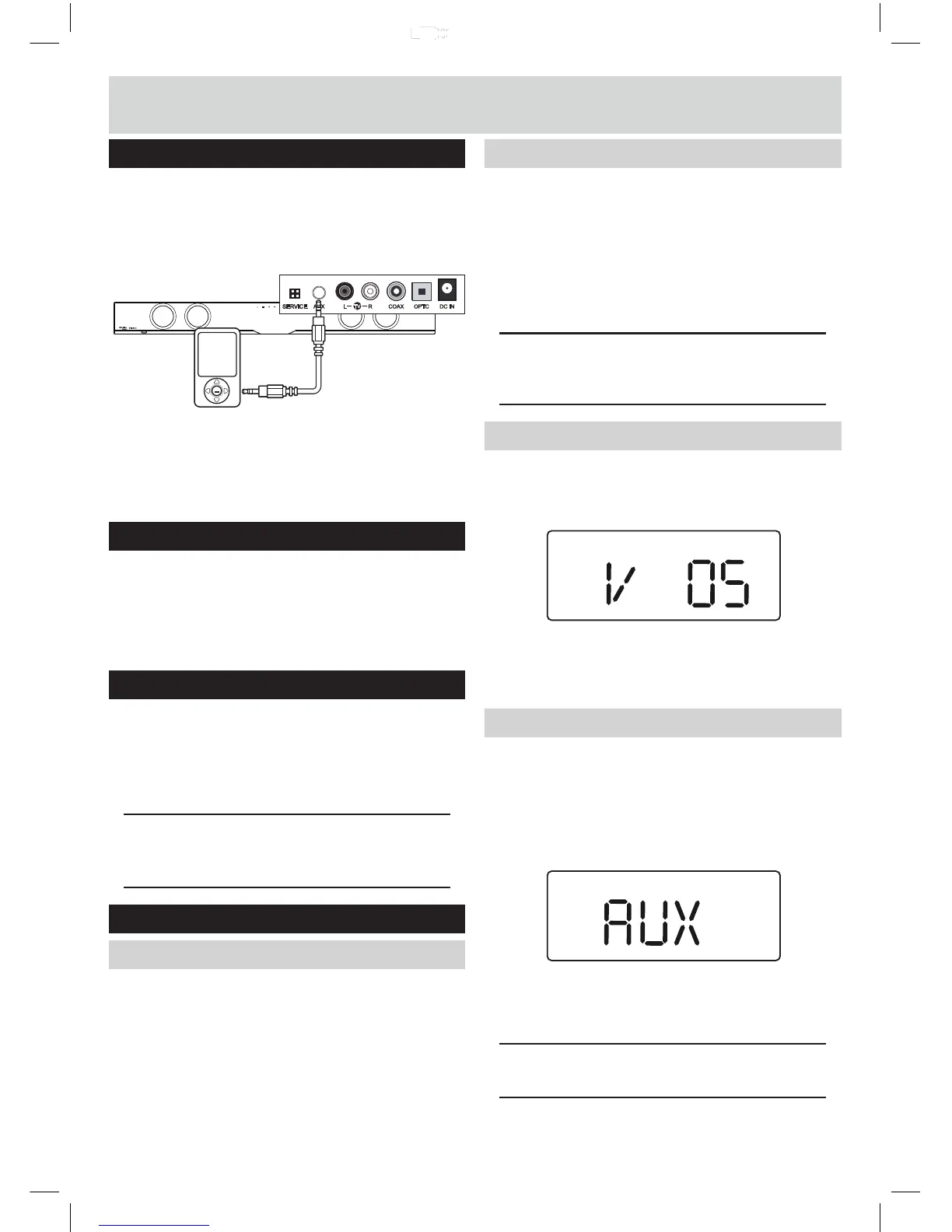
1: Connect one end of the 3.5mm audio cable to the
headphone output of your MP3 player.
2: Connect the other end to the AUX input (3.5mm
socket) on the back of the Sound bar (9).
Mains connection
Connecting mains power
1:
2:
Connect the AC power adaptor of the sound bar and
subwoofer between the DC IN socket and the power
supply outlet.
Switch the power outlet ON.
Standby mode
Standby mode
1: Press the STANDBY button (1 Unit & 23 Remote) to
wake the unit f
rom STANDBY mode.
2: To enter STANDBY mode press either STANDBY
buttons (1 Unit & 23 Remote).
NOTE: As part of the power saving mode the unit
will enter STANDBY mode automatically after 20
minutes (approx) of no audio output.
General operation
Switching inputs
Follow the below steps to switch inputs between : TV,
Auxilliary, Coaxial, Bluetooth,Optical or USB.
1: Ensure the Sound bar is powered ON. If not press the
STANDBY button (1) or remote (23).
2: Press the SOURCE button
(2, 22) repeatedly until you
reach the required input mode.
Switching inputs (cont)
TV input:
.......................... . . . . . . . .
TV
Auxilliary input:
................... . . . . . . . .
AUX
Coaxial input:
..................... . . . . . . . .
COAX
Bluetooth input:
.................. . . . . . . . .
BT
Optical input:
..................... . . . . . . . .
OPTC
USB input:
HDMI input:
..................... . . . . . .
. .
..................... . . . . . .
.
USB
HDMI
NOTE: When switching inputs there will be a 5
second pause after selecting BT while the unit
scans for paired devices.
Adjusting the volume level
1: To increase the volume level press the VOLUME +
button (5 Unit or 25 Remote) repeatedly or press and
hold for fast adjustment.
BASS
2: To decrease the volume level press the VOLUME -
button (5 Unit or 25 Remote) repeatedly or press
and hold for fast adjustment.
Sound effect presets
1: During playback pressing the SOUND EQ button on
the remote control (32) repeatedly cycles through the
available sound modes.
Choose between : STANDARD (STD), MOVIE, MUSIC
or NEWS.
MUSIC
NEWS
MOVIE
2: As you select a sound mode the corresponding name
appears on the display to indicate that sound mode
is active.
NOTE: The STANDARD sound mode when selected
does not show an icon on the display.
User instructions
AUX OPTC DC INCOAXRL
TV
AUXAUX
SERVICE


 To Next Page