7
TV connections
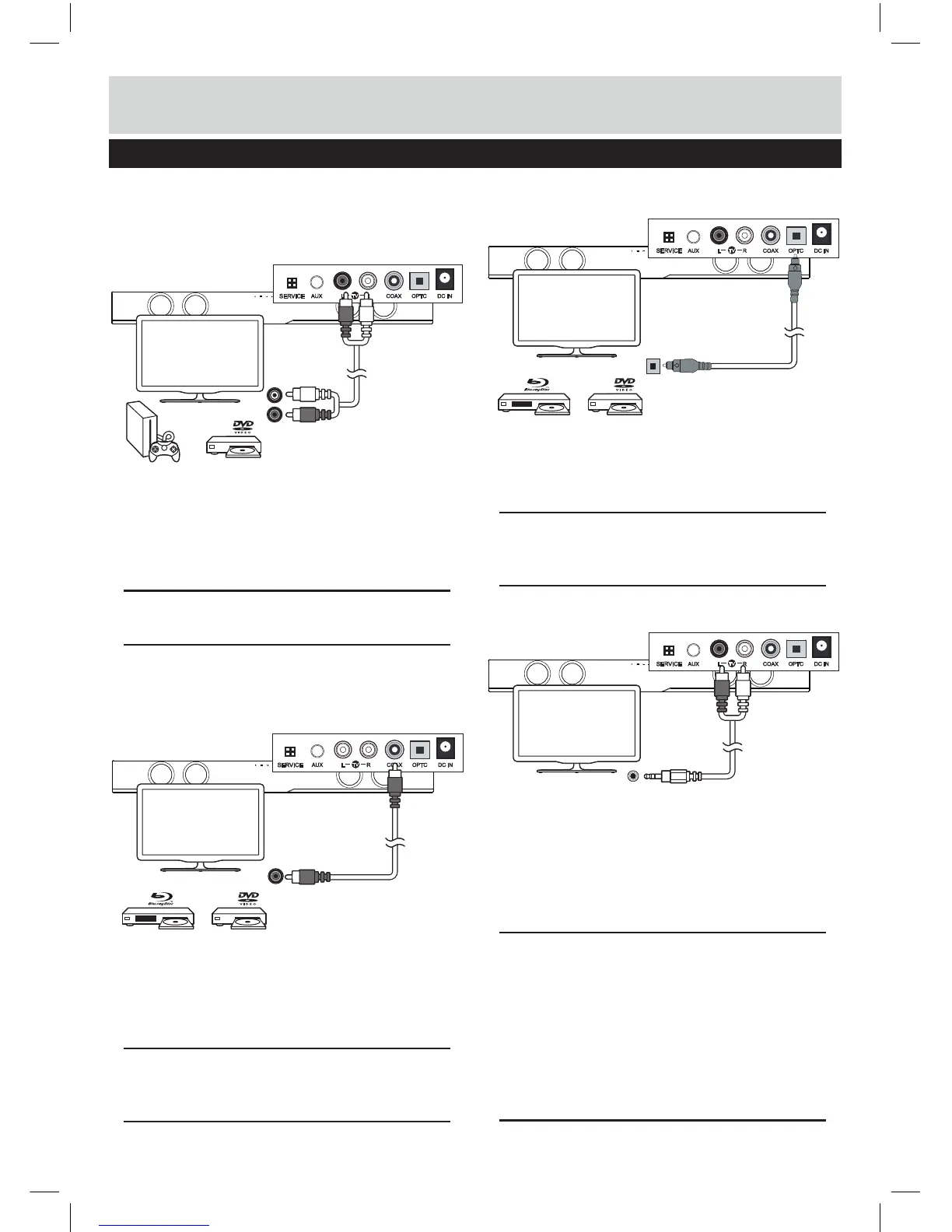
3) Connecting a TV, DVD or GAMES CONSOLE
using the RCA - RCA audio cable.
1: Connect one end of the RCA cable to the TV,
DVD or CONSOLE audio output RCA sockets.
2: Connect the other end to the TV inputs on the back of
the Sound bar (10).
NOTE: Take care to match the RED plug to the RED
socket and the WHITE plug to the WHITE socket.
4) DIGITAL connection to a TV, DVD or Blu-ray player
using the COAXIAL cable.
1: Connect one end of the RCA COAX cableto the
TV, DVD or Blu-ray COAXIAL audio output RCA
socket.
2: Connect the other end to the COAX input on the back
of the Sound bar (11).
NOTE: You may need to a
ctivate PCM (Downmix)
on your source device EG:- TV, DVD or Blu-ray
player.
5) DIGITAL connection to a TV, DVD or Blu-ray
player using the OPTICAL cable.
1: Connect one end of the OPTICAL cable to the TV,
DVD or Blu-ray OPTICAL audio output socket.
2: Connect the other end to the OPTC input on the side
of the Sound bar (12).
NOTE: You may need to activate PCM (Downmix)
on your source device EG:- TV, DVD or Blu-ray
player.
6) Connection to a TV using the RCA - 3.5mm audio
cable.
1: Connect the 3.5mm (small) end of the cable to the
TV headphone 3.5mm audio output socket.
2: Connect the other RED & WHITE ends to the TV
inputs on the side of the Sound bar (10), taking care to
match the RED
plug to the RED socket and the
WHITE plug to the WHITE socket.
NOTE: In some cases the Sound bar volume
output is effected by the volume level on the TV.
In this case adjust the TV volume to increase the
audio output from the sound bar.
NOTE: If no sound can be heard from the sound
bar using this connection, you may need to check
your TV settings to enable the headphone socket
output.
User instructions
AUX OPTC DC INCOAXRL
TV
AUX OPTC DC INCOAXRL
TV
AUX OPTC DC INCOAXRL
TV
AUX OPTC DC INCOAXRL
TV
SERVICE
SERVICE
SERVICE
SERVICE


 To Next Page