4
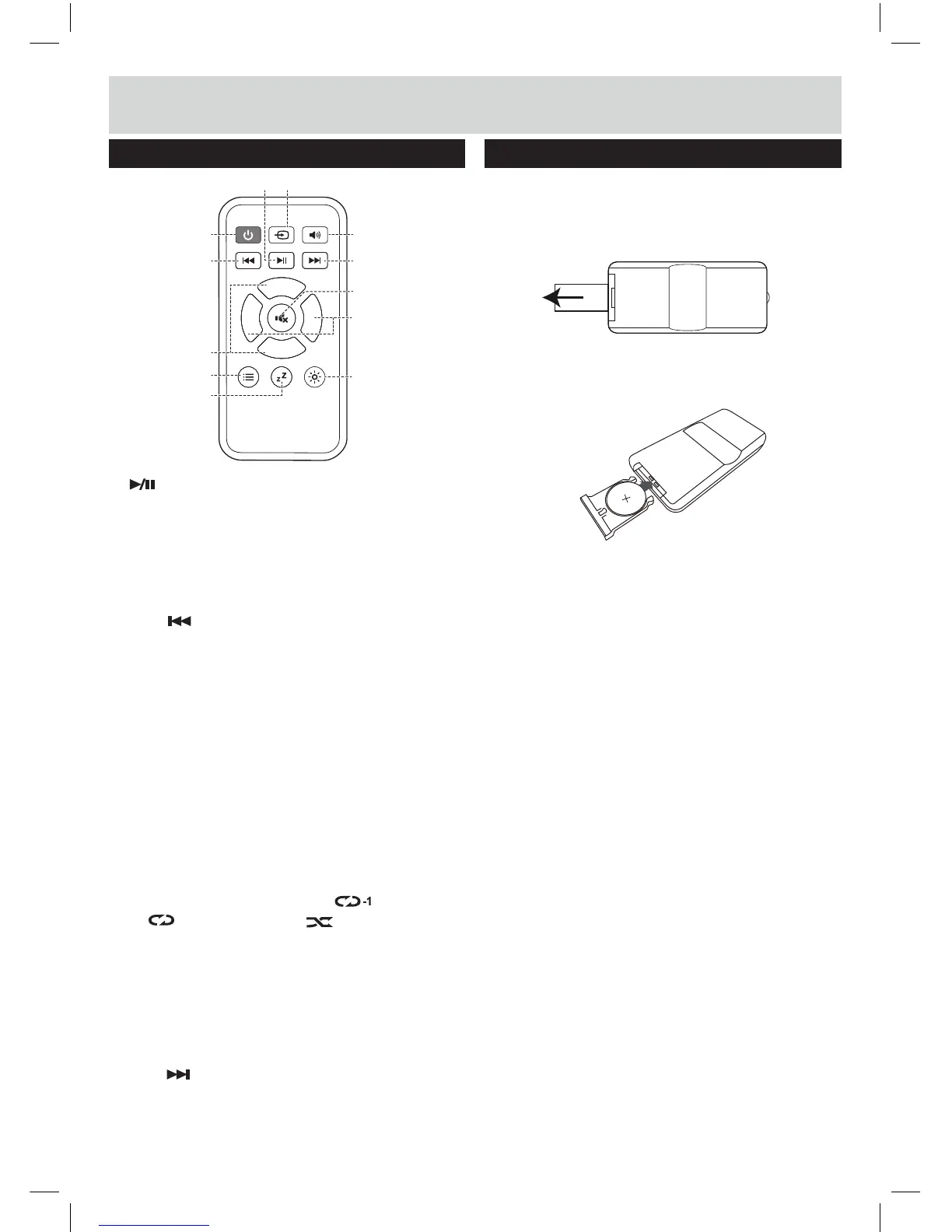
Overview of remote
21
PLAY/PAUSE: START, PAUSE or RESUME
22 SOURCE: Select an audio source from TV, AUX,
COAX, BT, OPTICAL, USB or HDMI
inputs.
23 STANDBY: Switch on the Sound bar or USB and
switch to STANDBY mode.
24 SKIP : Skip to previous track for USB and
25 VOLUME - / +: Increase or decrease the volume
output.
26 OPTION:
27
SLEEP:
Activates the sleep timer function.
28 DIM:
Press this button to adjust the display
brightn
ess.
29 BASS
- / +: Increase or decrease the bass output.
30 MUTE
: Press to mute the sound output.
31 SKIP
: Skip to next track for USB and
32 SOUN
D EQ MODES: Press repeatedly to assign
differe
nt sound EQ modes: STANDARD, MOVIE,
MUSI
C or NEWS.
Remote battery usage
Using the remote for the first time
Before use, pull the tab out from the bottom of the
remote control . This allows the terminals contact with
the pre-installed battery.
Installing batteries in the remote
1: Push open the battery compartment on the bottom of
the remote control using a fingernail.
2: Insert a CR2025 battery into the space taking care to
match the + & - polarity symbols correctly .
3: Replace the battery compartment .
Disposal of batteries
Dispose of used batteries with regard to the recycling
regulations in your area. Do NOT short circuit batteries
or throw them into water, the general rubbish or in a fire.
Weak batteries can leak and damage the remote control.
Replace them in good time!
Functions and controls
VOL +
B +
VOL
-
B
-
23
22
21
24
32
25
26
27
29
28
31
30
USB and Bluetooth playback.
● In subwoofer pairing mode, after pressing ID
SET button on subwoofer when 1st use,
press
and hold for 3 seconds on TV or AUX
mode to pair the wireless subwoofer with
main soundbar unit.
● In Bluetooth mode, press and hold for 3
seconds to "unpair" a connected Bluetooth
device.
● In USB mode, press repeatedly to cycle
through the repeat modes: (REPEAT),
(REPEAT ALL) or (RANDOM PLAY).
Bluetooth playback.
Bluetooth playback.


 To Next Page