5
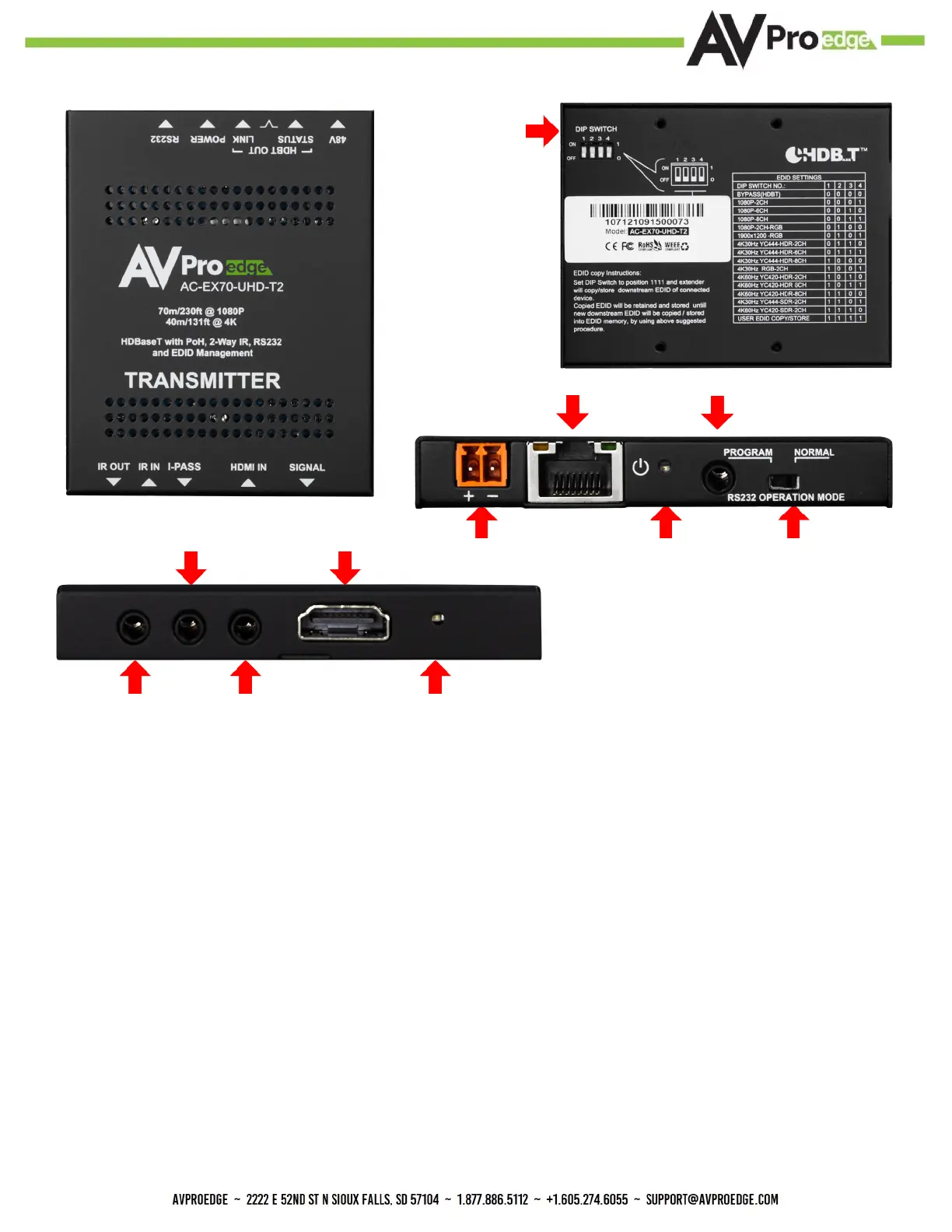
Transmitter Overview
Indicator Troubleshooting Lights - Transmitter
POWER - On the back by power HDBaseT RJ45 port: (Red) This is an indicator
that the power is connected. There are only two states for light:
·Light Is On = Power supply is connected and functioning.
·Light Is O = Power supply is not connected or there is no power present. In order to have
power, check the power supply, USP, Outlet, etc.
STATUS - On front by HDMI Port: (Blue) This indicator shows that the HDMI
source is connected. The states are:
·Light Is On (Solid) = Sync w/ HDMI source is correct and solid.
·Light Is Flashing = The light ashes during the sync process. If it is ashing continuously, a
picture may not be present.
HDBaseT
RS-232
48V Power
RS-232 Operation
Mode Switch
IR OUT I-PASS HDMI Signal
Indicator LED
HDMI InputIR IN
Power LED
EDID DIP
Switches
see page 12


 To Next Page