5
1. CAMERA NETWORK CONFIGURATIONS
Please follow the instructions below to finish camera installation and network configurations.
You may configure the network connection of this network camera with your laptop / computer, or with your iPhone®
or iPad® based on your network environment.
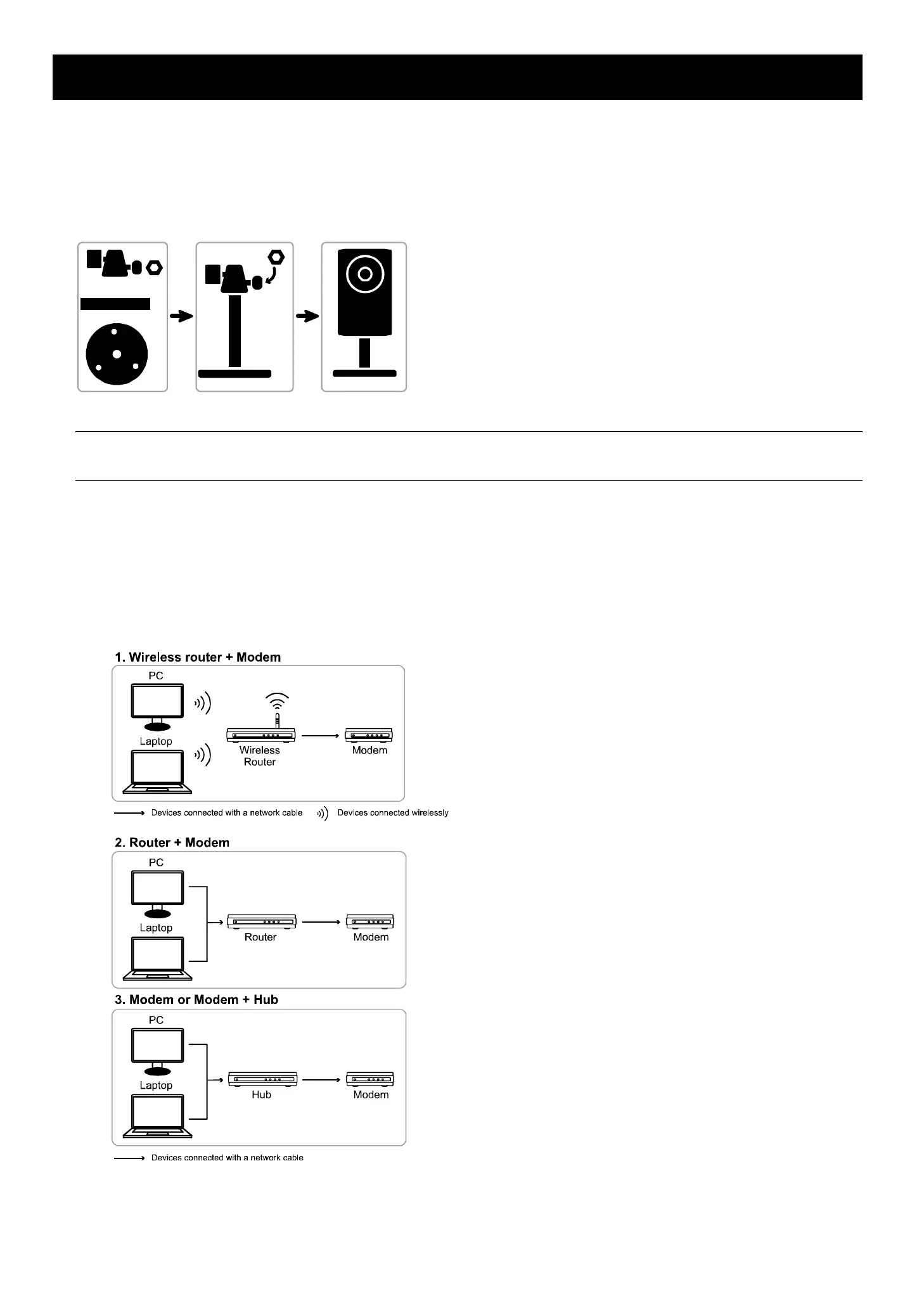
1.1 Assemble & Install Camera
Step1: Fasten the base of the bracket (the round one) to where the camera is installed.
Note: The distance between your camera and the location you want to monitor should be 3 ~ 4 meters,
for the built-in human detection function to work properly.
Step2: Assemble the bracket and the camera, and adjust the viewing angle of the camera.
Step3: Connect the supplied power adapter to the camera’s power jack (DC 5V / 2A) on the rear panel and the power
outlet.
Step4: Continue to proceed network configurations as instructed in the following sections.
1.2 Understand How Your Laptop / Computer Connect to Internet
Then, connect your network camera directly to your wireless router / router / hub / modem with a network cable,
and power it on.



 To Next Page