SMART HOME (CONT.)
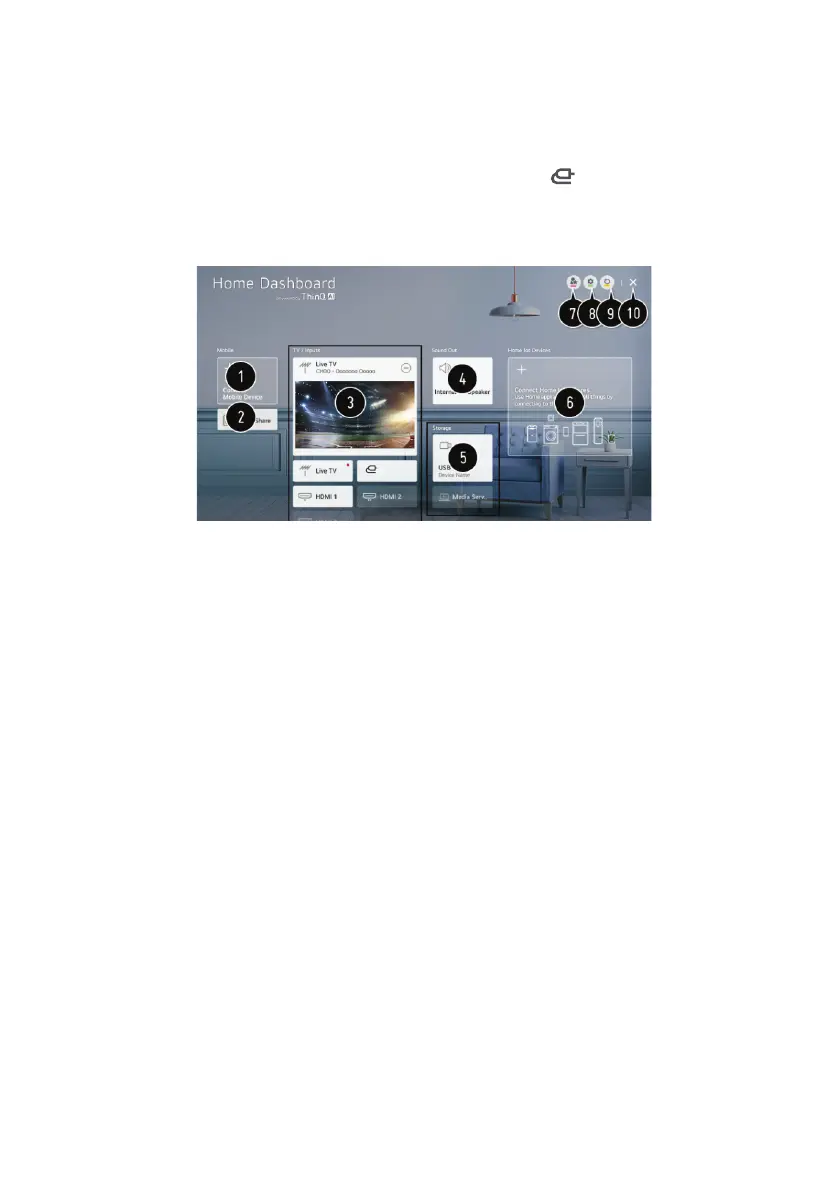
Home Dashboard
You can select or control a device connected to the TV. Press the ( ) button on the remote
control and select Home Dashboard.
You can perform the operations you want according to the prompt information on the TV
screen.
1. Check and select the smart device connected with the LG ThinQ app.
2. Play sound from a smart device connected via Bluetooth.
3. Check and select the external device connected through the external input port or network.
4. The currently selected output speaker is displayed, and you can navigate to the output
speaker settings screen.
5. View and select the connected storage device.
6. Check and control the device connected via the Home IoT.
7. Easily control your device by presetting the desired operations.
8. Sign In : You can log in/out to and from the LG ThinQ account you created on mobile.
Edit: You can edit the name of the device connected to Inputs or Home IoT Devices or
configure the related settings.
9. Refreshes the device list.
10. Exit the Home Dashboard.
AV
17



 To Next Page