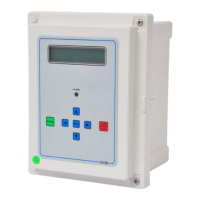
S – 150 Controller User Manual
MKTF – 429-A 17 08/16
SYSTEM OPERATION
General Operation
The unit has two modes of operation, a standby mode and an operating mode. In the standby mode, the
unit is effectively off. All outputs are turned off and the display shows STANDBY. In the operating mode,
the unit operates automatically. All inputs are monitored and the outputs are controlled accordingly.
Pressing the Power key will toggle the unit from standby to operate, or from operate to standby. If power
is removed from the unit, when power is reapplied, the unit will restart in the mode it was in when power
was removed.
Display
The display is a 2 line x 20–character backlit liquid crystal display. System operating status and sensor
readings are shown on this display. Setpoint information is also shown on this display.
Operating Status Messages
The operating status of the unit is shown on the top line of the display. The following list describes the
items shown for the operating status.
STANDBY: The unit is in the standby mode.
DELAY 99: The unit is in the RO start delay. The number is the seconds remaining before the
RO pump starts.
OPERATING: The RO unit is operating.
TANK FULL: The unit is shut down due to a tank full condition.
TANK FULL 99: The unit is shut down due to a tank full condition. If the number is blinking, the tank
full high switch has cleared, but the tank full low switch is still active. If the number
is on steady, both tank level switches have cleared and the delay is counting down.
PRETREAT: The unit is shut down due to a pretreat lockout condition.
PRESS FAULT: The unit is shut down due to a pressure fault condition.
MEMB FLUSH 99: Membrane flush is active. The number is the minutes remaining in the flush
cycle.
TDS / Conductivity
The TDS / Conductivity is shown on the top line after the unit operating status. When the unit is offline
because of a shutdown condition, the reading is replaced with ‘––––’ If the reading is over range, the
reading is shown as ‘^^^^’.


 To Next Page