S – 150 Controller User Manual
MKTF – 429-A 7 08/16
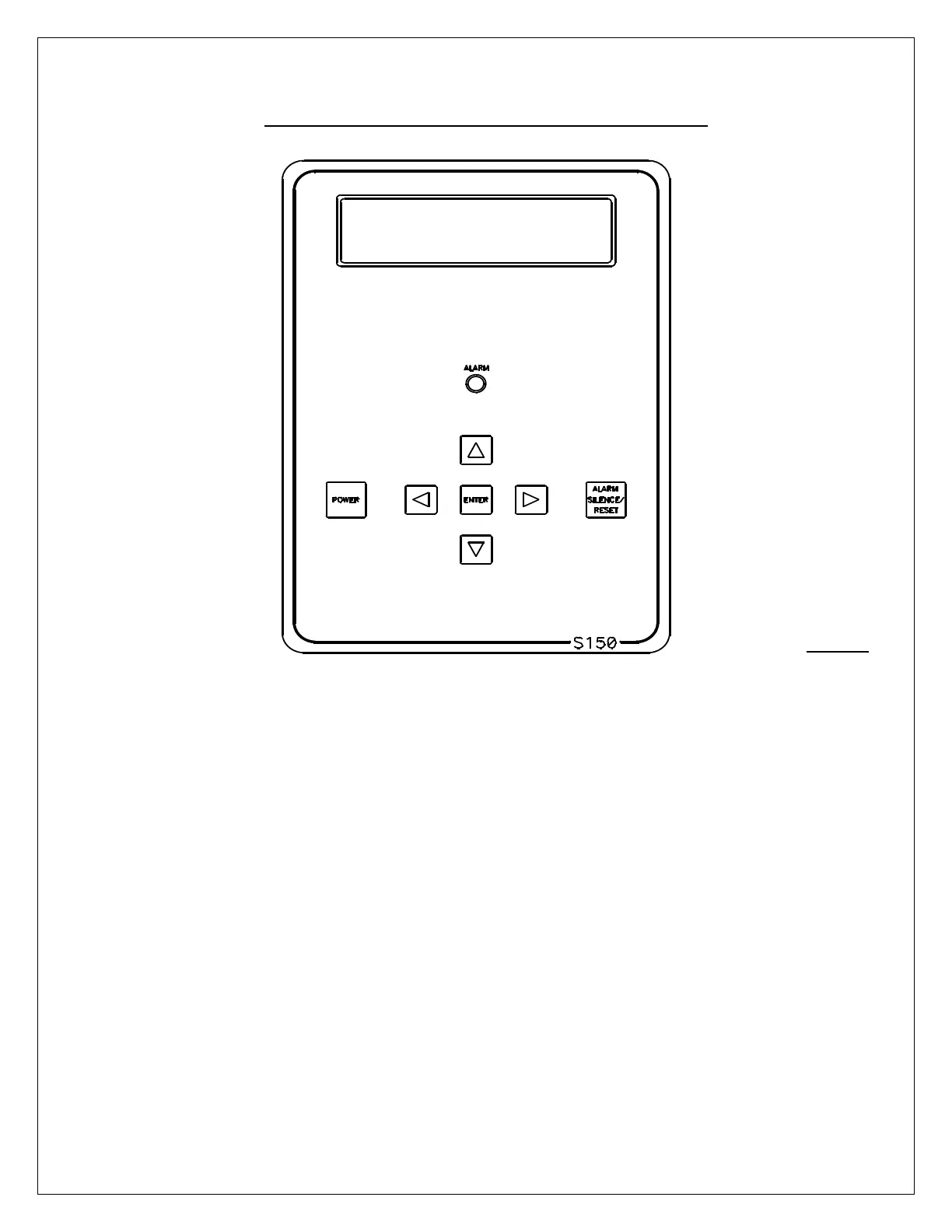
FRONT PANEL CONTROLS AND INDICATORS
DISPLAY: Shows status of system.
ALARM LAMP: Flashes when fault causes the RO system to shut down.
On steady when a Setpoint is exceeded that does not
cause the RO system to shut down.
POWER KEY: Places controller in operating or standby mode.
LEFT ARROW KEY: Scrolls through Setpoints starting with first Setpoint.
RIGHT ARROW KEY: Scrolls through Setpoints starting with last Setpoint.
UP ARROW KEY: Increases value of Setpoint.
DOWN ARROW KEY: Decreases value of Setpoint
ENTER KEY: Confirms entry of new Setpoint value
ALARM SILENCE/RESET KEY: Push once for alarm silence and twice to reset system
after a shutdown has occurred.


 To Next Page