- 17 -
This Summary Screen shows the overall print quality of the barcode as
measured by the ISO/ANSI standards (the overall grade can be expressed
either as a number (ISO) – or as a letter (ANSI) – this can be altered as
required through the “Set-Up” icon (see below)
Information is also given on the bar-gain (ink spread), the overall
magnification of the barcode, validation of the check digit, structure,
and light margins (Quiet zones).
Ideally these will all show in green (pass) – any that have an amber or red
warning light beside them should be investigated.
NOTE: Be aware that just because a barcode receives a “pass” grade for
print quality does not necessarily mean that it is “fit for purpose” – after
all the wrong barcode number on a product may be printed perfectly but
that would not make it acceptable – Things like the size of the barcode
(magnification) and the location of the barcode are important if the
barcode is going to be “fit for purpose”.
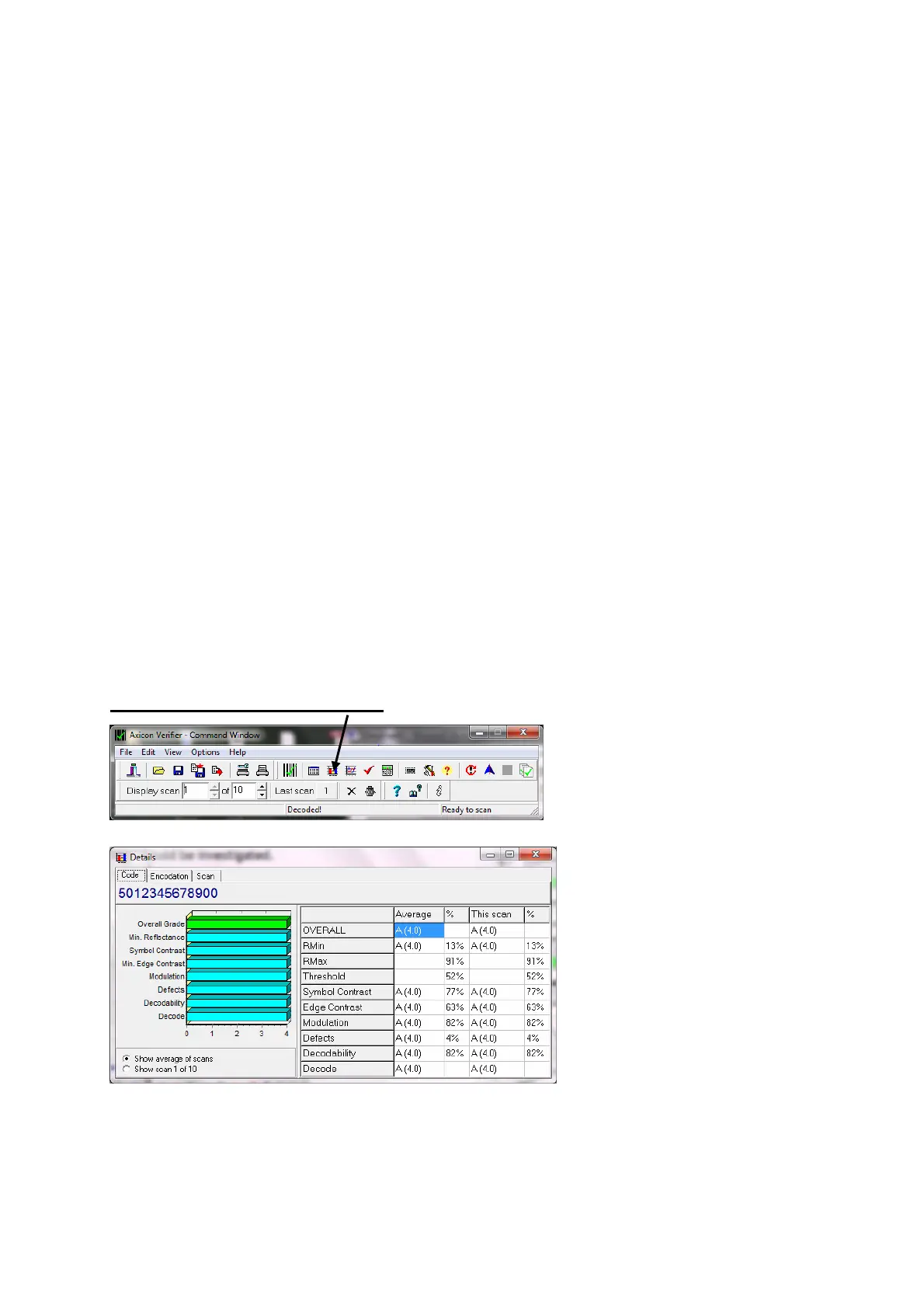
The Details Screen…. Press
to get:-
This screen shows each of
the ISO/ANSI parameters
that are measured and
individually graded (as
both grades and
percentages).
Seven parameters are
graded and the lowest single grade becomes the overall grade for that
scan. (Ideally you should take a number of scans at different points in
the height of the same barcode – the verifier will automatically average
these for you to produce an overall print quality grade)



 To Next Page