OSD Menu
Country: Select the country.
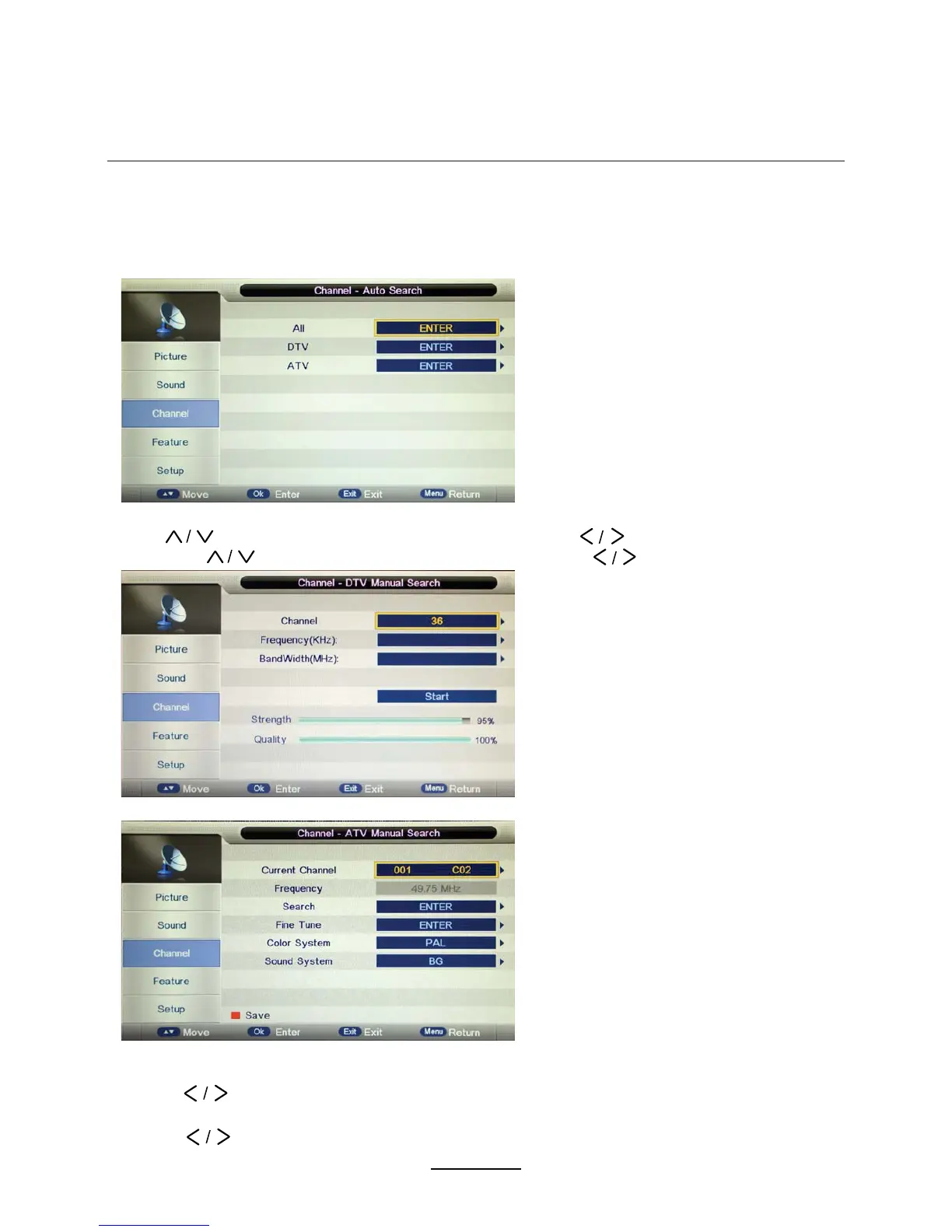
Auto Search: Press OK button to enter the Auto Search menu, select search mode, and press
DTV Manual Search: Enter the ',*,7$/7(/(9,6,21 Manual Search menu.
button to select the “Channel” item, and press
Press
7KHQpress
button to select the “Start” item, and press
button to select the channel
OK button to start auto search.
ATV Manual Search: Enter the A1$/2*7(/(9,6,21 Manual Search menu.
Fine Tune: Press OK button to enter the Fine 7une menu)ine tune the frequency
Current Channel: Select the current channel for manual search.
Search:Press OK button to enter the search menu0anualO\ search the frequency
Color/Sound System: Select the Color/Sound system for the program.
by button.
by button.
Note:
1. ALL: Auto search channels for DTV, ATV and
Radio.
DTV: Auto search channels for DTV and radio.
ATV: Auto search channels for ATV.
2.
When the TV is auto tuning, press MENU
button to stop auto tuning andreturn to
preview menu.
When the Child Lock is on, please enter the Password (Lock Password in Feature menu)
to start Auto and Manual Search.
7
585500
1
EXWWRQWRPDQXDOVHDUFK
127(
$QDORJXH79WUDQVPLVVLRQQRORQJHU
RSHUDWHVLQ$XVWUDOLD



 To Next Page