Press RED button to delete the file; Press GREEN button to sign or cancel all the files to playlist;
Press OK button to sign or cancel the selected file to playlist.
Basic Operation
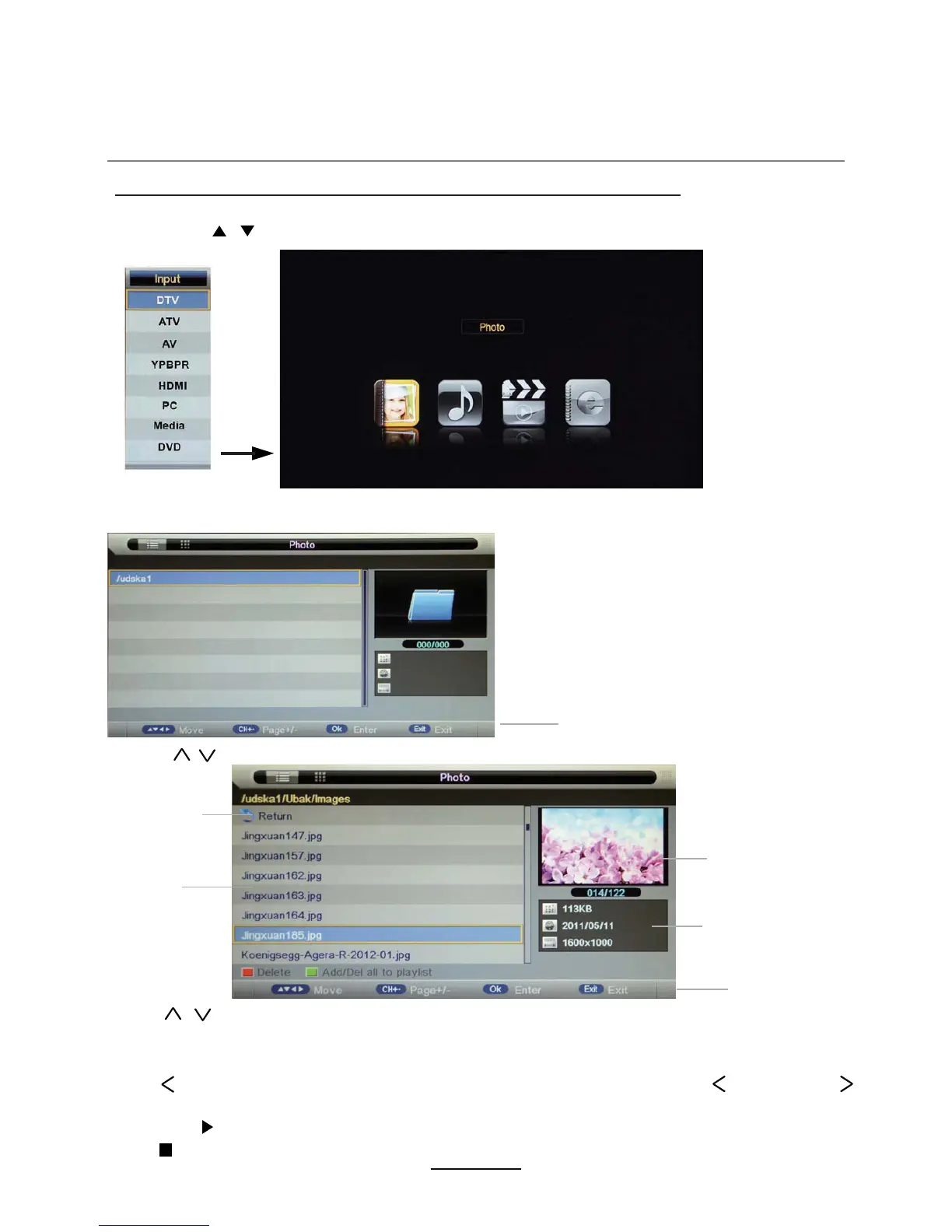
2). Insert USB device, and select the Media mode formPhoto, Music, Movie and eBook, then the
name of the device ZLOOEHdisplayHG on the screen asshown below.
3). Press / button to select the USB device and press OK button to enter the file list as shown below.
1). Press the INPUT button on the remote control to display the input source menu, select Media
source by the / buttons, and press OK button to enter the Multimedia menu as shown below.
Preview
Hints for operation
Return to
device list
File list
Informations
Hints
Press Exit again to Ueturn to the root MENU.
Then press button to program the files (be signed) selectHG.
Press button to stop and exit the full screen program3lease note the hintsVKRZQ
Multimedia Operation
Press / buttons to move (press OK button to select the file or unfold the folder);
Press button to previous menu, Press EXIT button to select the file view type: list( ) or thumbnails( ).
1


 To Next Page