PVR settings
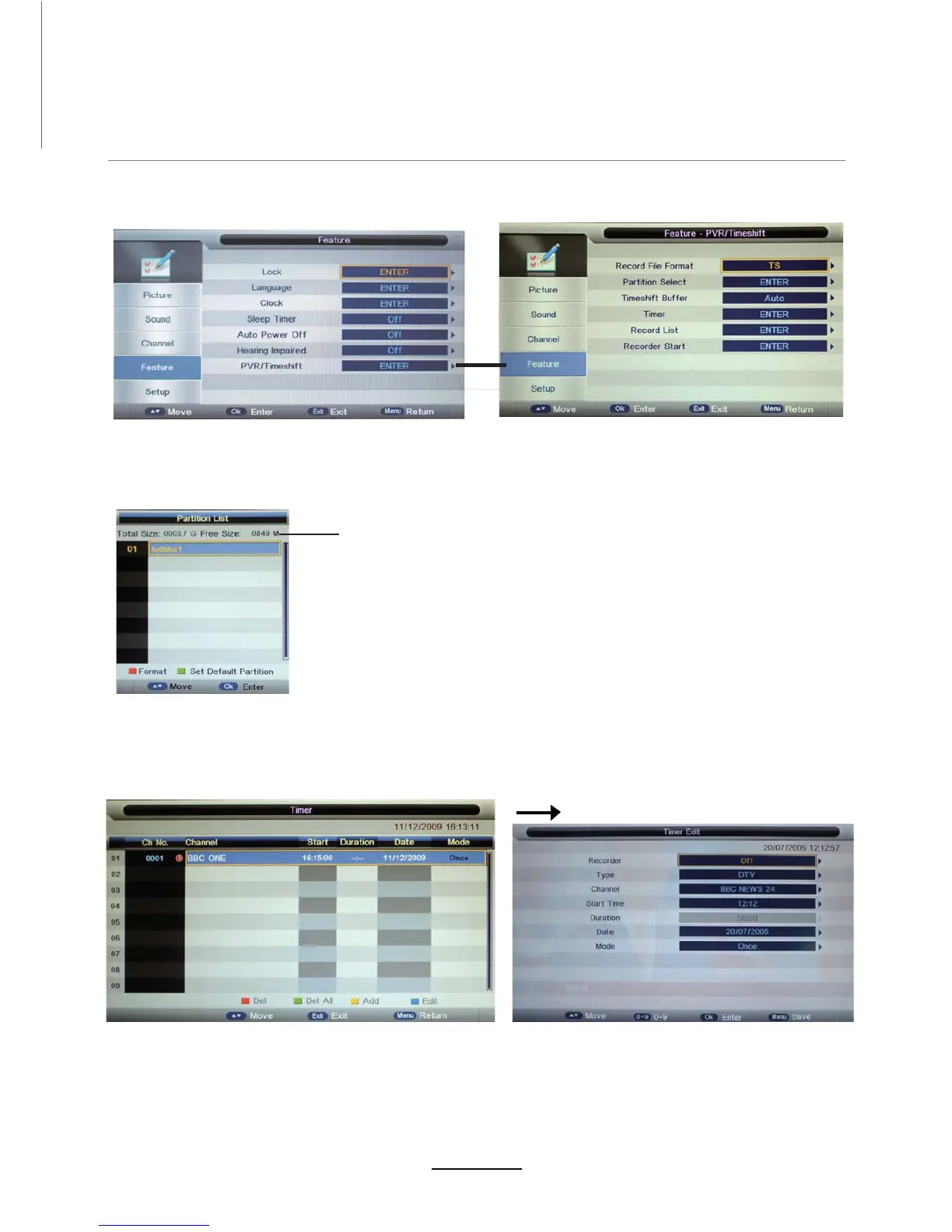
Press the MENU button 6elect Feature-PVR/Timeshift menu, press OK button to enter the menu as below.
USB device information
Format: Press RED button to format the selected USB device.
Set Default Partition: Press GREEN button to set the focus partition as the
default partition.The recorders are stored in the default partition. It need to
be reset if the default partition is full
1). Record File Format
Select Record File Format mode from TS and PS for storDJH in the USB device.
2). Partition Select
Recording Operation
Set Timeshift Buffer mode: auto, 30Mins, 1hr, 2hr.
3). Timeshift Buffer
4). Timer
Enter the Timer menu to setup the timer recording settings.
Press yellow button to add.
Recorder: Turn on/off the recorder function.
Type:Select the type of the program to record.
Channel:Select the channel to record.
Start Time: Set the start time for recording the program.
Duration:Set the duration time for recording.
Date: Select the date for recording.
Mode:Select the mode for recording.


 To Next Page