AXISP12NetworkCameraSeries
HowtoInstallAXISP1214-ESensorUnit
TheAXISP1214-EcanbemountedliketheAXISP1214/AXISP1224-EE,seepage21.
TheAXISP1214-Ecanalsobemountedinthesuppliedoutdoorhousing.Thecablescanberouted
throughthewalldirectlyintothehousing,orthroughoneofthepunch-outsinthecover.
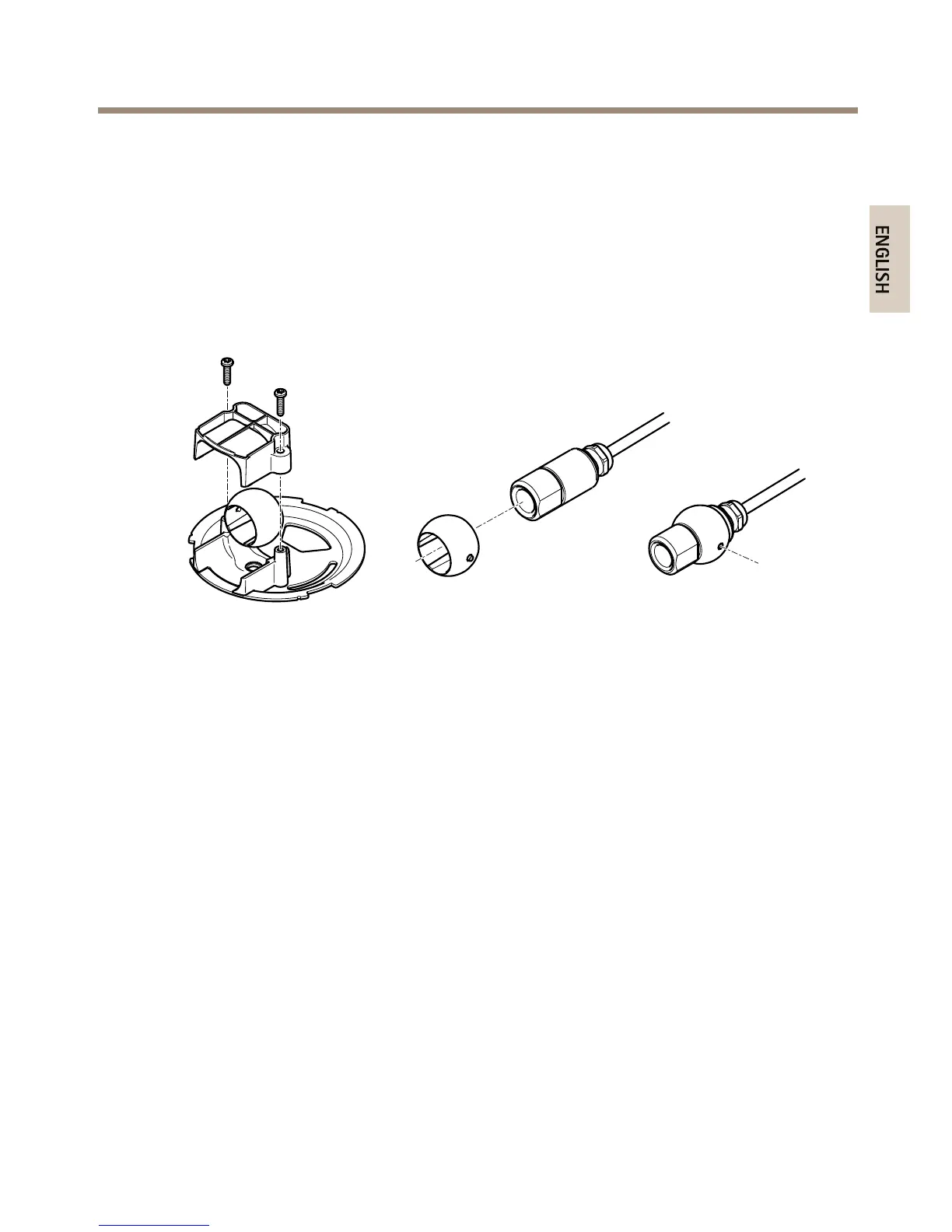
1.Removethetwoscrewsandthebracket.
2.Insertthecameraintotheballjointandfastenwiththestopscrew.
3.Drillaholethroughthewallorremoveoneofthepunch-outsinthecover.
4.Fastentheplatetothewallusingscrewsandplugsappropriateforthewallmaterial.
Ensurethatthecamerabracketispointingtowardstheareatobemonitored.Ifrouting
thecablethroughthewall,alignthecut-outintheplatewiththeholeinthewall.
5.Placetheballinthesocketandfastenthebracketwiththescrews.Aimthecamera
awayfromthewallbeforetighteningthescrews.Positionthecamerasothattheat
surfaceonthethreadisverticalorhorizontal.
6.Routethecablethroughthewall,orthroughthepunch-outinthecover.
7.Attachthecover.
8.ProceedtoConnectthecables,seeConnecttheCablesonpage24.
23



 To Next Page