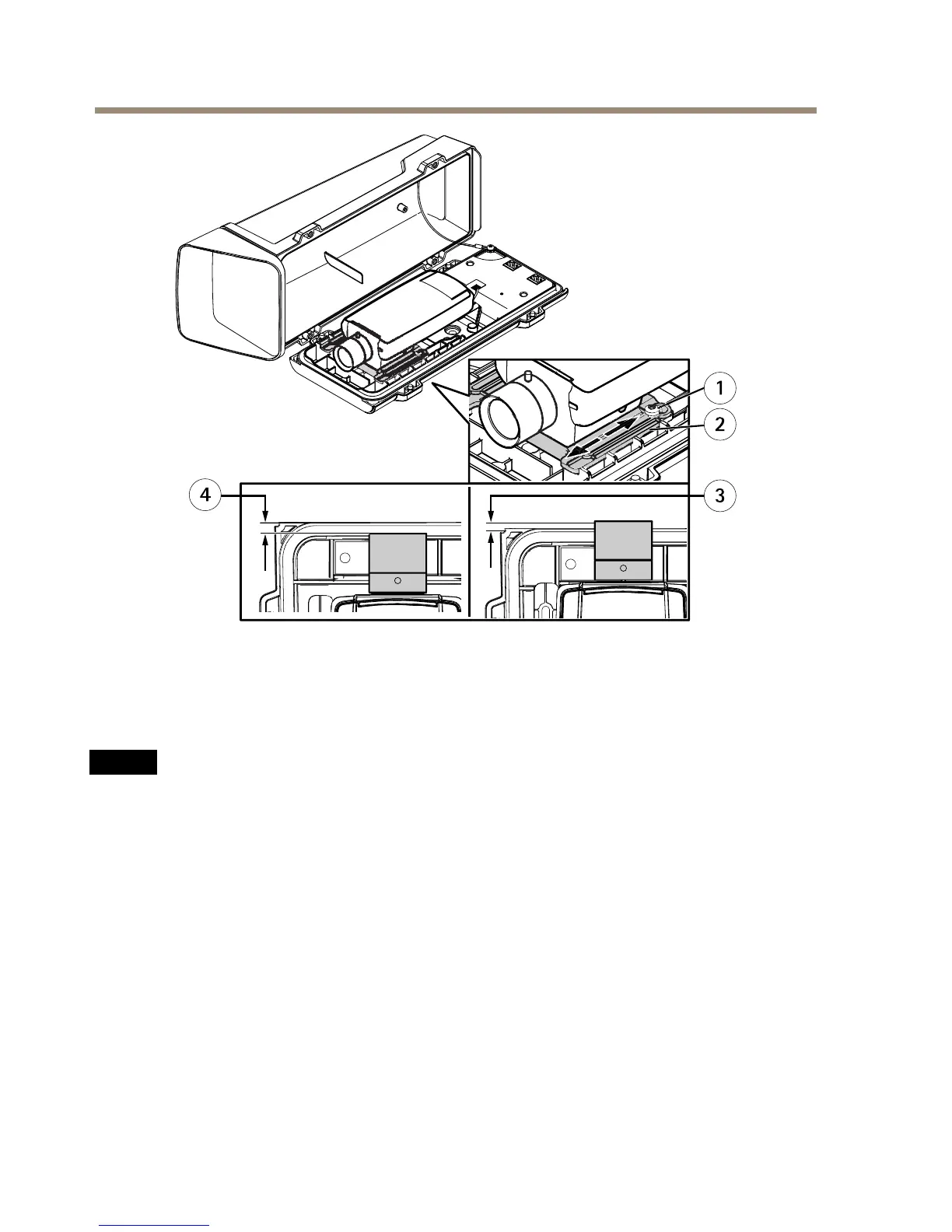
1
HolderscrewT20(2x)
2
Holder
3
PositionA(overlap):+3.7mm(+0.15in)
4
PositionB(gap):-6mmto-4mm(-0.24into-0.16in)
NO NO
NO
TICE TICE
TICE
•PositionA:Toavoidreectionsintheimage,adjusttheholder’spositionsothatthe
cameralensedgeoverlapsthebottomcoveredgeby+3.7mm(+0.15in).Notethat
thispositionvoidstheIK10rating.
•PositionB:TofulllltheIK10ratingrequirements,adjusttheholder’spositionso
thatthegapbetweenthecameralensandbottomcoveredgesisbetween-6mmand
-4mm(-0.24inand-0.16in).
5.Connecttheheatercabletotheheaterconnectorinthebottomcover.
6.IfusinganSDcardforlocalstorage,insertthecardintothecamera’sSDcardslot.
7.Connectthehousingtothenetwork(PoEIN)andthecameratothehousing(PoEOUT).
24



 To Next Page