AXISQ1798-LENetworkCamera
Additionalsettings
•Increasethelightlevelinthescene.
•Mountthecamerasothatobjectsmovetowarditorawayfromitratherthansideways.
Maximizethedetailsinanimage
Important
Ifyoumaximizethedetailsinanimage,thebitratewillprobablyincreaseandyoumightgetareducedframerate.
•Setthecompressionaslowaspossible.
•SelectMJPEGstreaming.
•TurnoffZipstreamfunctionality.
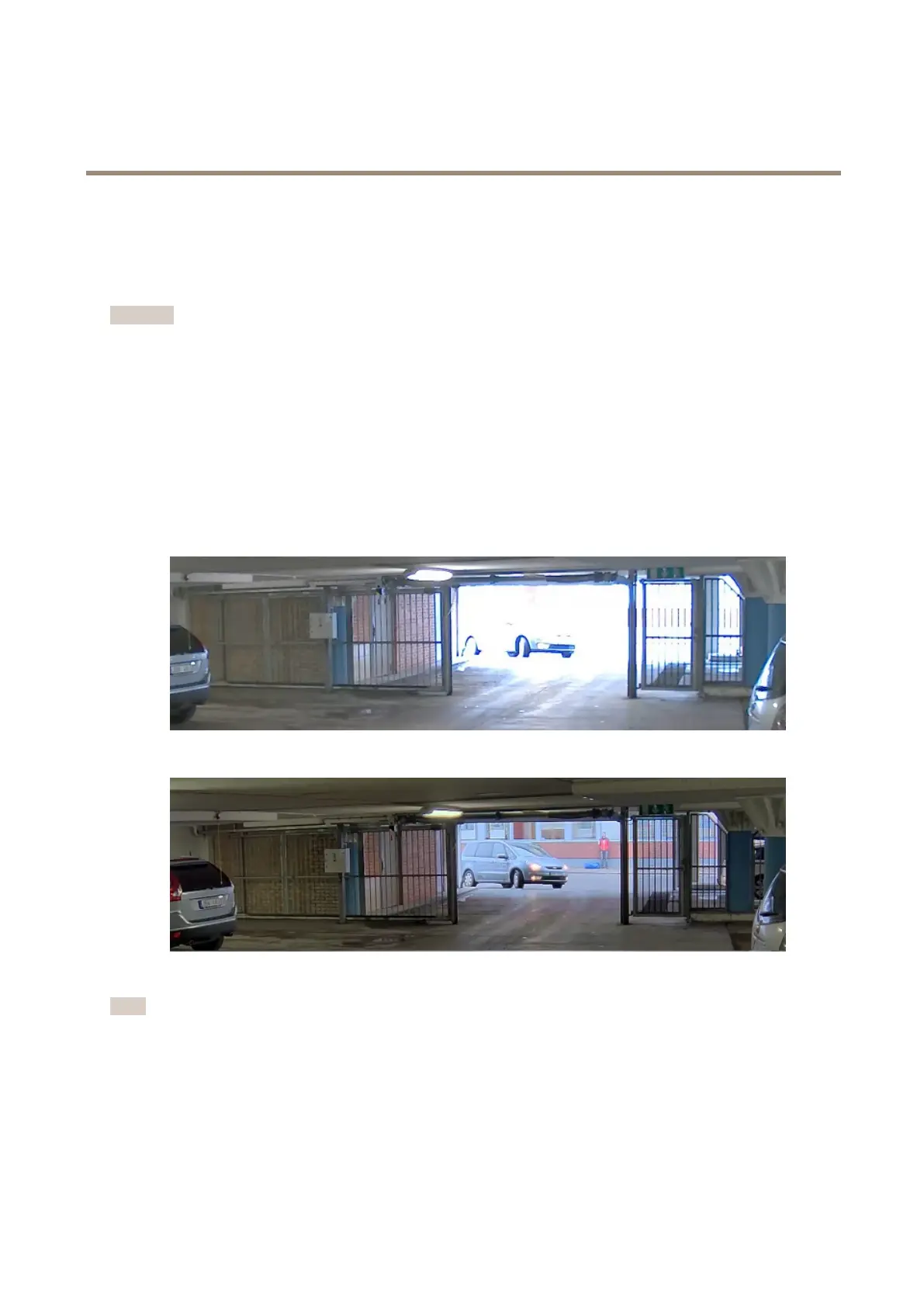
Handlesceneswithstrongbacklight
Dynamicrangeisthedifferenceinlightlevelsinanimage.Insomecasesthedifferencebetweenthedarkestandthebrightest
areascanbesignicant.Theresultisoftenanimagewhereeitherthedarkorthebrightareasarevisible.Widedynamicrange
(WDR)makesbothdarkandbrightareasoftheimagevisible.
ImagewithoutWDR.
ImagewithWDR.
Note
•WDRcancauseartifactsintheimage.
•WDRmaynotbeavailableforallcapturemodes.
1.GotoSettings>Image>Widedynamicrange.
2.TurnonWDR.
3.Ifyoustillhaveproblems,gotoExposureandadjusttheExposurezonetocovertheareaofinterest.
10



 To Next Page