AXISQ60Series
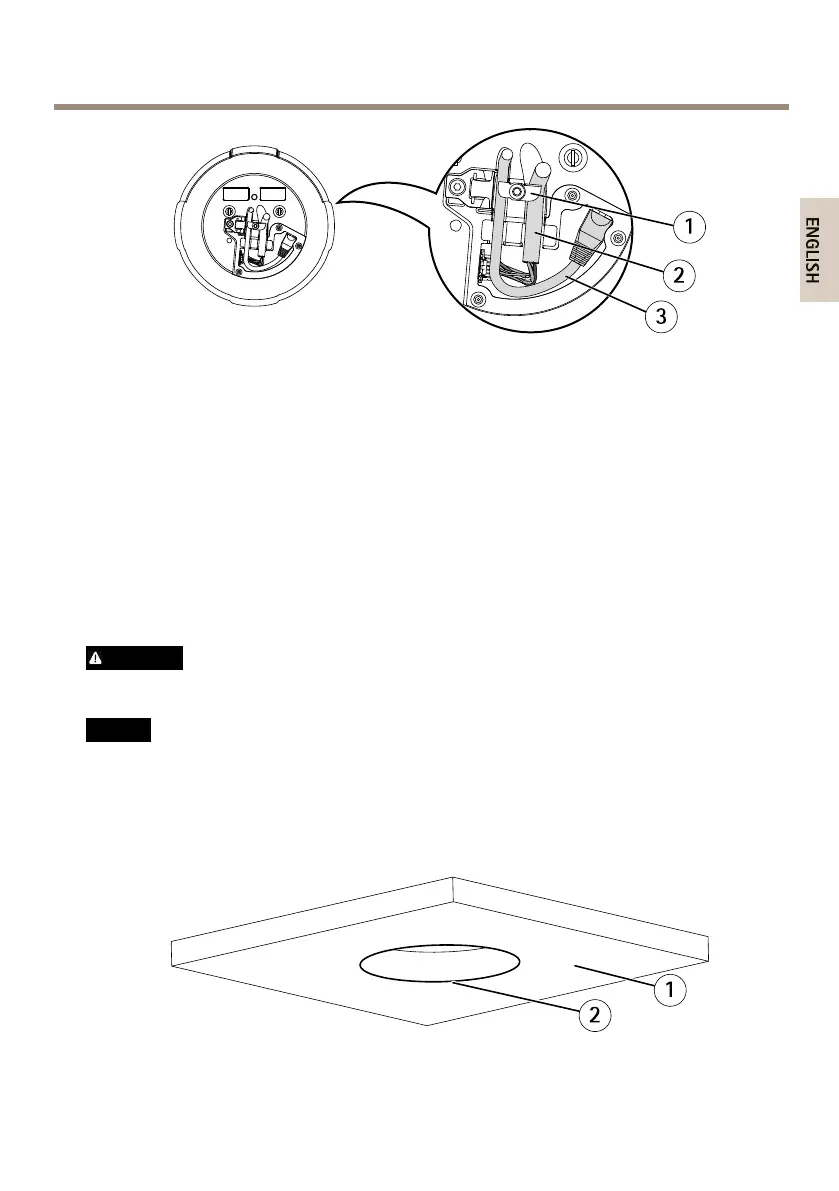
1
Cableholders
2
Multi-connectorcable
3
Networkcable
6.Turnthecableholderstokeepthecablesinplace.
7.Putthecamerabaselidbackinitsoriginalpositionandtightenthescrews(torque
1.5Nm).
8.Slidetheunitholdersonthenetworkcameraintotheslotsinthemountingplateand
rotatethecameraunit.
9.Installthesuppliedmidspan,seetheInstallationGuidedeliveredwiththemidspanor
nditonwww.axis.com
Installthecamerawithadropceilingmount
WARNING
Thecombinedweightofthecameraandceilingmountisapproximately3200g(7.1lb).
Makesurethattheceilingmaterialisstrongenoughtosupportthisweight.
NO NO
NO
TICE TICE
TICE
Theceilingtileshouldbe5–60mm(3/16–23/8in)thick.
1.Removetheceilingtileinwhichthedropceilingmountistobetted.
2.Cutaholeintheceilingtileforthedropceilingmount.Usethesuppliedtemplateto
markthepositionandcutaroundthetemplate.
1
Ceilingtile
15


 To Next Page
 Loading...








